Software by tag 'Wordpress'

11 Wordpress Plugins To Manage Your Ads Banners

March 17th, 2010 in Wordpress | 43 Comments

How to monetize your blog? The simplest way is to signup for Adsense, right? But there are actually a lot of Ad Networks that offer different types of banners for different niches. For a design blog, the most popular one is BuySellAds. However, they are some bloggers which prefer direct ads selling, which can save the middleman’s commission.

Direct ads selling is good, but you need to effectively manage your banners. For example, record down when the banner expire, the order of banner, track banner impressions, click through rate and much more. There could be very time consuming especially when you have a lot of banners.

So, why not installing some ads management plugins to your blog. They come with basic features such as randomly rotate the banners, banner expired date, insert ad code without modifying your template file and etc.

Today, we are going to look into 11 Powerful Wordpress Plugins To Manage your advertisements. You probably need only one of them, but you should go through each of the plugin before you make your decision.
(more…)

5 Tips To Optimize Your Wordpress.org Blog For Search Engines

March 10th, 2010 in SEO | 31 Comments

Any search engine optimization (SEO) expert or enthusiast will tell you WordPress.org (the self-hosted one) is the foundation for a blogger wants to get optimal traffic from Google. Its the only blog platform that offers complete control of your search engine optimization features.

“You don’t buy a BMW automobile and then let the manufacturer choose what your radio plays, or how fast you drive. Don’t let the same thing happen to your blog!”

WordPress.org is required for these 5 quick ways to blog search engine optimization.

Want a more complete list of SEO plugins for your self-hosted Wordpress blog? Read our Wordpress SEO plugins list.

All in One SEO Pack

All in One SEO Pack provides overwrite control for your blog site, page, post, and category titles, descriptions, and keywords. Perfect because you don’t have to depend on the SEO expertise of the theme developer who sometimes leave these critical elements out of the code, or give you little access to them. Screenshot from my plugin:

All in One SEO Pack Titles

(more…)

9 Useful Wordpress Poll And Rating Plugins

March 1st, 2010 in Wordpress | 28 Comments

Polls are very useful way to get in touch with your readers. Polls can be used to get your readers’ opinion and even new article idea.

There are various websites that let you setup your own polls. Once you insert the given code, you will be able to start using the polls immediately. PollDaddy is one of the great free online polls and serveys.

However, if you are a person who not really familiar with HTML, PHP, CSS or JavaScript, inserting these codes will probably takes the whole day. Furthermore, you probably don’t have all the features for a free account,or you probably just want a really simple rating feature.

If you are a Wordpress user, then you are lucky. There are a lot of useful Wordpress poll and rating plugins where you can download and use freely. Here, we share 9 useful Wordpress poll and rating plugins with our readers.

(more…)

18 Useful Wordpress Contact Form Plugins

January 27th, 2010 in Wordpress | 41 Comments

Contact Form is one of the most important page for all websites. If you are running an e-commerce website, you need a contact form so that your potential buyers can reach you to get more information. Even if you run a personal blog, you will also need a contact form so that bloggers from same niche or advertisers can contact you easily.

There are some great online form providers such as Wufoo and FormSpring. These services allow you to create contact forms, survey forms and registrations form easily without knowing much about web programming languages.

If you are using Wordpress, then you can use Wordpress plugins to build your contact form easily. However, there are a lot of Contact Form Plugins in Wordpress Plugin Repository. Some of the plugins are rather too old, not able to support the latest version of Wordpress or just having too little features.

So, we decided to gather 18 Best Wordpress Contact Form Plugins that will suit everyone needs. These plugins are tested by us and support Wordpress 2.9.1.

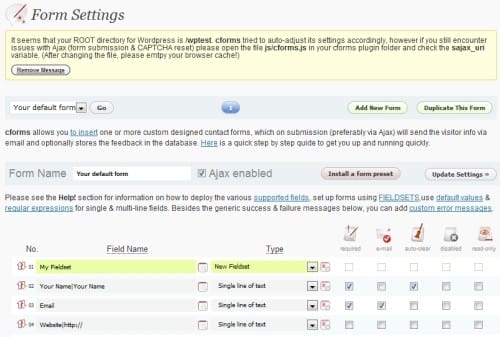
1. cformsII

cforms is a highly customizable Ajax driven contact form plugin. It lets you to create multi page forms or multiple forms on one page easily. They are few more cool features such as Role Manager support, Tell-A-Friend, Fully localization, Backup and Restore. Antispam is also supported by using CAPTCHA or Q&A.
cformsII

(more…)

WordPress Usability: Plugins That Make Your Blog More Visitor Friendly

January 7th, 2010 in Usability, Wordpress | 19 Comments

In a recent post, We touted the benefits of hacking WordPress over the installation of plugins. One of these benefits is that plugins can cause your blog to become bloated. Among other issues, a bloated blog takes longer to load. With the blogosphere being saturated with content on virtually any topic you can think of, making your blog as visitor friendly as possible should be one of your primary design goals.

While I certainly promote the use of hacks over plugins, I know that part of the beauty of the plugin is so that a blogger can create a fully-functional site without having to get their hands dirty with the code that drives their blogging software. Instead of looking at hacking the code, let’s take a look at a few plugins that can help build a more usable blog for your visitors.

Usability

The best definition of usability I have seen comes from the Base One Agency who states that “usability refers to how simple it is for customers to perform the desired actions on a website. Good usability can improve the conversion rate of a web site.” So in addition to how long it takes to load a WordPress blog, to achieve usability, you would need to look first at what the desired goals of your blog are. Is it to drive sales? Then your content needs to establish trust among your readers. For a more detailed look into the psychology behind usability, have a look at our previous post that covered Webpage Usability.

(more…)

Manage Your Blog’s Content with Two Simple WordPress Hacks

December 13th, 2009 in Tutorial, Wordpress | 6 Comments

It’s amazing that in my own non-scientific poll, half of those who work in some technology field still get the term hacker confused. A hacker is not someone who is leering in cyberspace ready to infiltrate their unsuspecting victim’s computer and pillage any information of use from its hard drive. A hacker is someone who looks for ways to manipulate things to make them work better. So when I speak of hacks for WordPress, I am looking at ways to change the code to make the application work better for us, not how to scrape content or steal log in information.

Hacks vs. Plug-ins

There are many different plug-ins available to help manage content on a WordPress blog so why would we want to mess with the code?

For starters, getting our hands dirty with the code of WordPress gives us a much better insight as to how the software works. As we become more comfortable with the source that powers our blog, we gain a better understanding of how to secure it from malicious attacks.

A second reason to avoid turning to a plug-in as a first resort is that an accumulation of plug-ins causes your blog to become bloated. Eventually, this bloat may begin to affect the way your blog loads and delivers to your audience.

Finally, if you pride yourself on going green or you just want to do what you can for the environment, you may be interested to know that code bloat can unnecessarily burden your server’s CPU. Making your server work harder uses more energy. Cooling a hard working CPU uses even more energy. Reducing code bloat saves energy.

Instead of relying on plug-ins, we are going to look at a few hacks that can help better manage a blog’s content. Each one of these hacks requires a bit of PHP knowledge and the ability to upload to your server.
(more…)

Wordpress XSS And What Can You Do About It

December 10th, 2009 in Wordpress | 7 Comments

Just recently, Wordpress released 2.8.6 with a critical security update that patches a cross-site scripting vulnerability found by Benjamin Flesch. That’s right, the same kid who discovered a way to patch your Wordpress blog by exploiting a similar XSS vulnerability has found another.

Cross-site scripting

When I started working more with web application security, I was amazed at the amount of web developers who are unaware of all the possible entry points the applications they develop have. Of these vulnerabilities, cross-site scripting (or XSS) still leads the pack according to WhiteHat Security.

A cross-site scripting vulnerability takes place when an attacker injects a client-side script into a web page. This attack can be used to bypass access controls, steal cookies, and hijack an active session to steal sensitive information.

(more…)

Wordpress Showcase: 40+ Beautiful And Well Designed Blogs Powered By Wordpress

August 26th, 2009 in Insipiration, Web Design, Wordpress | 121 Comments

In the previous post, we showcase 50 creative portfolios and soon there are readers who request us to share beautiful blog designs. A great portfolio will attract more clients to a designer while great blog design will bring you more visitors too.

Although content is king, but with a unique and awesome blog design, you can attract visitors and catch their attentions. So I would say beautiful blog design together with good content will definitely bring your blog stand out from the crowd.

Since most of us use Wordpress as our blogging platform, we decided to list out 40+ really awesome and beautiful blogs powered by Wordpress. We will see blogs from other platforms in the future.

1. Assault Blog

Assault Blog

2. BestBlogBox

BestBlogBox

(more…)

Ultimate Ecommerce Starter Kits for Wordpress Users

July 23rd, 2009 in Resources, Wordpress | 72 Comments

Buying and selling items online have become more and more important nowadays. Probably you want to create an ecommerce websites to sell your items worldwide.

There are a lot of popular ecommerce solutions, either commercial or open source. Magento is one of the most popular open source platform for ecommerce websites. We had covered various well-designed Magento themes before. But, if you are familiar with Wordpress, you may wish to use it as your ecommerce websites too.

Today, we are going to look into various themes, plugins and tutorials to build your own Wordpress Ecommerce website. Let’s look into this Wordpress Ecommerce solution starter kits.

Ecommerce Themes/Templates

Crafty Cart

Carfty Cart is a famous free Wordpress Ecommerce theme. It is being built by Billion Studio especially for King Cart’s readers. But everyone can download it for free. It requires WP e-Commerce plugin to function properly.
Wordpress Crafty Cart Theme

Shopping Cart Themes From ShopperPress

ShopperPress is a complete Wordpress Ecommerce solution. Users can download 6 different color themes for free (some of them required you to tweet them for the download link).
Shopping Cart Themes By ShopperPress

(more…)

Wordpress 2.8 And 10 Things That You Should Know Before/After You Upgrade

June 11th, 2009 in Wordpress | 109 Comments

Wordpress 2.8 had been released at 10th June 2009. There are a lot of add on features and improvements in this version. It is good for Wordpress users to upgrade to the latest version. Today, we are going to summarize some of the important features and also something that you should read/consider before you upgrade to the latest version.

Before you upgrade

There are two criteria that you need to consider before you upgrade your Wordpress to the latest version.

1. Plugins Compatibility

This is the most important thing that you need to consider before upgrade your Wordpress to 2.8 version. We use a lot of plugins for our Wordpress blog. At least some plugin to improve our SEO, right? If your plugins are not compatible with Wordpress 2.8, it may crash the whole blog! Wordpress 2.8 Codex does provide us a checklist that list out plugins that have been tested for compatibility with Wordpress 2.8.

Besides the Wordpress codex, BraveNewCode also provide us a Wordpress Plugin Compatibility Checker that has more details about the requirements for each plugin. Currently, the list contains around 5040 plugins. Below is the screenshot for the list.

wordpress-plugin-compatibility-checker-checklist

If your plugins are not listed in the list, you better contact the plugin author before upgrade your Wordpress.

(more…)

Page 1 of 212