

Many new Python programmers struggle to define array in python and work with collections of data effectively. Arrays serve as fundamental data structures that store multiple values in a single variable, making them essential for programming tasks.
This guide breaks down array creation using Python lists, the array module, and NumPy library with simple examples and clear explanations. Ready to master Python arrays?
Key Takeaways
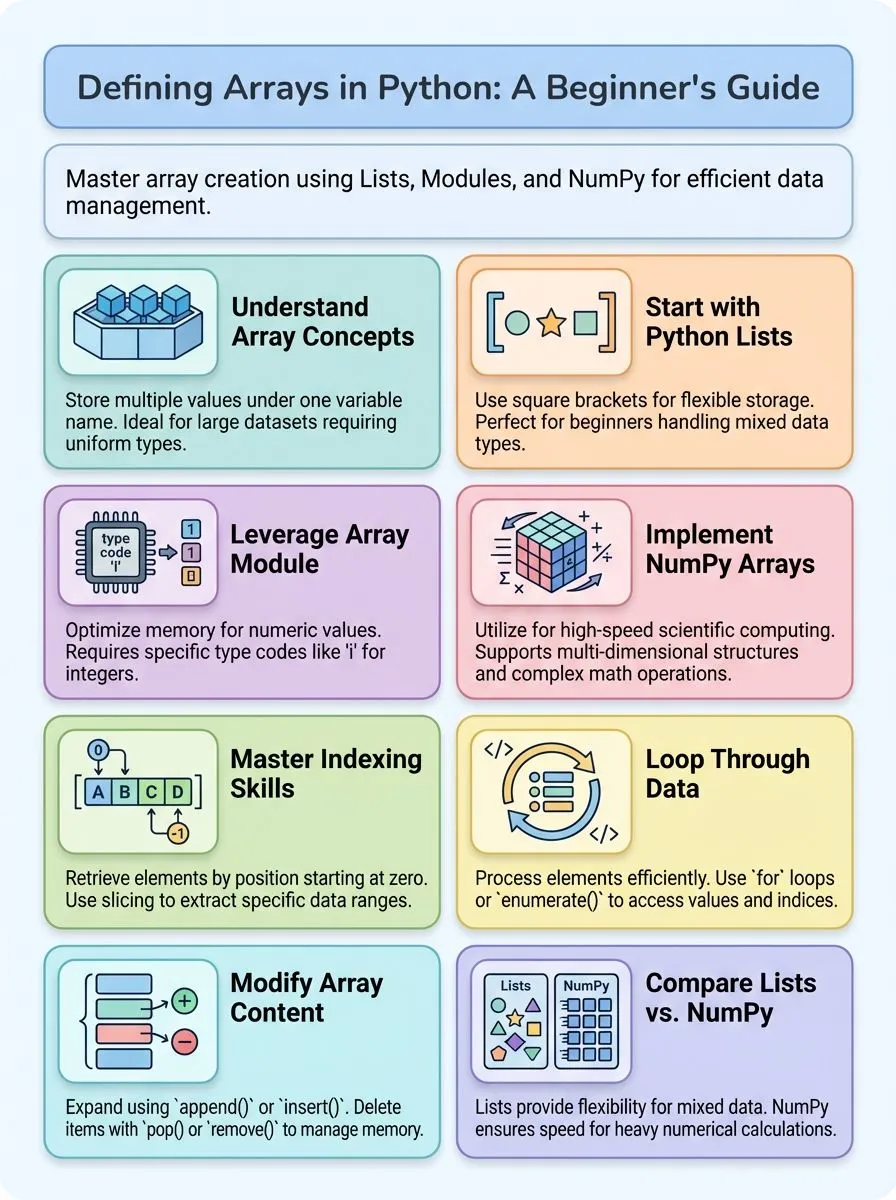
- Python offers three main array types: built-in lists, the array module for numeric data, and NumPy arrays for scientific computing.
- Lists store mixed data types and work for basic tasks, while arrays require same-type elements for better performance.
- Array elements start at index 0, support negative indexing, and allow slicing with bracket notation for data access.
- Methods like append(), extend(), pop(), and remove() enable dynamic addition and deletion of array elements during programming.
- NumPy arrays process mathematical operations faster than Python lists but need separate library installation and uniform data types.
What is an Array in Python?

An array is a special variable that holds more than one value at a time. Think of it as a container that stores multiple values under a single variable name. Arrays store multiple values in a neat, organized way.
This makes them much better than creating separate variables for each item. For example, instead of writing `car1 = “Ford”`, `car2 = “Volvo”`, `car3 = “BMW”`, you can create an array like `cars = [“Ford”, “Volvo”, “BMW”]`.
This simple approach saves time and keeps code clean.
Arrays work best for larger datasets where you need to store many items of the same data type. All elements in an array must be the same type, like all integers or all strings. Arrays are mutable sequences with type constraints, which means you can change their contents after creation.
The array size depends on machine architecture, and you can check this through array.itemsize. Alex Herrick from Web Design Booth often uses arrays when building WordPress themes that need to handle multiple design elements efficiently.
Arrays make data management simpler and help create more organized code structures.
How to Declare Arrays in Python
Python offers several ways to create arrays, each serving different purposes in programming projects. Developers can choose from built-in modules, standard lists, or powerful libraries like NumPy to handle their data needs effectively.
How to Use the `array` Module
The array module provides efficient storage for numeric values in Python programming language. This built-in module creates arrays that hold elements of the same data type, making them perfect for mathematical operations.
- Import the array module using a simple import statement. Type
import array as arrto access all array functions. This creates an alias that makes coding faster and cleaner. - Create a new array using the array.array() constructor with a type code. The syntax requires
arr.array('i', [10, 20, 30, 40, 50])where ‘i’ stands for integer type. Type codes define what kind of data the array can hold. - Choose the right type code for your numeric data needs. Use ‘b’ for signed char (1 byte), ‘h’ for signed short (2 bytes), or ‘f’ for float (4 bytes). Each type code corresponds to specific C types and Python types.
- Initialize arrays with different data types using appropriate type codes. Integer arrays use ‘i’, while floating point numbers need ‘f’. The array module supports various numeric types for scientific computing tasks.
- Access all available type codes through array.typecodes string. This built-in feature shows every supported type code in one place. Developers can check compatibility before creating arrays.
- Create empty arrays by omitting the initializer parameter. Use
arr.array('i')to make an array with zero elements. Empty arrays grow dynamically as elements get added later. - Store arrays in variables for repeated use in mathematical operations. Arrays work efficiently with large datasets compared to regular Python lists. The array data structure optimizes memory usage for numerical data.
- Understand that arrays hold only one type of objects unlike Python lists. This restriction enables faster computation and better memory management. Arrays excel at handling scientific computing tasks that need speed.
Can Python Lists Serve as Arrays?
While the `array` module offers specialized functionality, Python lists can absolutely work as arrays for most programming tasks. Lists provide flexibility and ease of use that makes them perfect for beginners learning array concepts.
Python lists store multiple elements in square brackets, just like arrays in other programming languages. A simple example shows this clearly: `a = [12, 34, 45, 32, 54]` creates a list that functions exactly like an array.
Lists allow access to elements through index numbers, support modification of values, and enable looping through all items. The co-founders at Web Design Booth frequently use Python lists in their web development projects because lists handle both simple data storage and complex operations with equal efficiency.
Lists work seamlessly for most array operations, making them an excellent starting point for creative professionals and tech enthusiasts who want to build programming skills without getting overwhelmed by specialized modules.
What Are NumPy Arrays and How to Use ThemNumPy arrays are powerful data structures that excel at handling numerical data for scientific computing and data analysis. Unlike regular Python lists, numpy arrays require all elements to be of the same type, which makes them faster and more memory-efficient for mathematical operations.
This third-party library must be installed separately but offers incredible capabilities for anyone working with data science, machine learning, or complex calculations.
Creating numpy arrays is straightforward once you import the numpy package. A 1D array looks like `a = np.array([10, 23, 34, 33, 45])` and outputs `[10 23 34 33 45]`. For more complex data, a 2D array uses `b = np.array([[1, 2, 3], [4, 5, 6]])` which produces `[[1 2 3] [4 5 6]]`.
Multi-dimensional arrays can go even further with 3D structures like `c = np.array([[[1, 2], [3, 4]], [[5, 6], [7, 8]]])` that output `[[[1 2] [3 4]] [[5 6] [7 8]]]`. These array objects make it simple to perform mathematical operations on large datasets.
NumPy arrays are the foundation of data analysis in Python, providing the speed and functionality that creative professionals need for their most demanding projects.
How to Access Array Elements
Python makes it easy to grab specific elements from your arrays, whether you use standard arrays, lists, or numpy arrays. You can access any element by its position, slice chunks of data, or loop through everything with simple commands that work across different array types.
These techniques work the same way for integers, strings, and floating-point numbers stored in your arrays. Want to master indexing, slicing, and iteration techniques that will make your Python code more powerful?
How Does Indexing and Slicing Work?
Indexing retrieves a single element by position, starting at 0. Slicing retrieves a range of elements from arrays and lists.
- Array indexing starts at zero – The first element sits at position 0, the second at position 1, and this pattern continues throughout the entire data structure.
- Access elements using square brackets – Place the index number inside brackets after the array name to grab specific array elements from your data set.
- Negative indices work backwards – Use negative numbers to access elements from the end of the array, where -1 represents the last item.
- Slicing creates new segments – Extract multiple elements using the colon syntax like
cars[1:3]to grab elements between positions 1 and 2. - Out-of-range indices trigger errors – IndexError appears when trying to access positions that don’t exist in your array or list structure.
- Array methods help locate values – The index(x[, start[, stop]]) function returns the position of element x, with optional start and stop parameters added in version 3.10.
- String representation shows structure – Arrays display as array(typecode, initializer) format, revealing both the data type and contained elements.
- Slicing syntax offers flexibility – Omit start or stop values to slice from beginning or end, creating powerful ways to manipulate your data collections.
How Can You Loop Through Arrays?
Looping through arrays gives programmers the power to access each element and perform operations on them. This technique forms the foundation of many data processing tasks in Python programming.
- Use the basic for-in loop – Write
for x in cars: print(x)to iterate through each element in the array and display its value on screen. - Combine loops with enumerate() function – This method returns both the index position and the actual value, making it perfect for tracking element positions during iteration.
- Apply list comprehension for efficient array creation – Create new arrays using
a = [x**2 for x in range(1, 11)]to generate squared values from 1 to 100. - Perform operations like summing during loops – Calculate totals, search for specific values, or modify existing elements while iterating through the array structure.
- Process large datasets with NumPy arrays – These specialized arrays offer vectorized operations that run much faster than standard Python lists for mathematical computations.
- Create new arrays through iteration – Transform existing data into fresh array structures using loop operations combined with mathematical functions or conditional statements.
- Access individual elements during loops – Extract specific values based on conditions or patterns found within the array elements during the iteration process.
- Modify array contents while looping – Change element values, apply filters, or update specific positions within the array using loop-based operations and assignments.
How to Modify Arrays
Arrays need constant updates during programming, and Python gives developers several ways to add or remove elements from their data structures. Read on to discover the simple methods that make array modification a breeze for your next coding project.
How to Add Elements to an Array
Adding elements to arrays gives programmers the power to build dynamic data structures. Python offers several methods to expand arrays with new data.
- Use
append()to add a single element to the end of the array. This method works with both Python lists and NumPy arrays. The new element gets placed at the final position. - Apply
extend(iterable)to add multiple elements from an iterable. This function takes any iterable like lists, tuples, or strings. All elements get added to the array’s end. - Call
insert(i, x)to place x before index i. This method lets you add elements at specific positions. The existing elements shift to make room. - Try
fromlist(list)to append items from a list. This array module method adds all list elements to your array. It works only with array objects from the array module. - Use
frombytes(buffer)to append data from bytes-like objects. Python 3.2 added this method to replace fromstring. It handles binary data efficiently. - Check array length with
len()after adding elements. Adding elements increases the length of the array automatically. This function returns the current number of elements. - Create lists with list comprehension for complex additions. This technique builds new arrays based on existing data. It offers a clean way to filter and transform elements.
- Apply NumPy arrays for mathematical operations on arrays. NumPy provides advanced functions for array manipulation. It handles multidimensional arrays better than standard Python lists.
How to Remove Elements from an Array
Removing elements from arrays gives developers control over data management and memory usage. Python offers several built-in methods that make this process simple and efficient.
- Use the pop() method to remove and return the last element – The pop() method removes the final item by default and gives it back to you, making it perfect for stack operations or when you need the removed value.
- Remove specific elements by index with pop(i) – Pass an index number to pop() to target exact positions in your array, such as pop(2) to remove the third element.
- Delete first occurrence of values using remove(x) – The remove() method finds and deletes the first matching value in your array, which works great for cleaning up duplicate data.
- Clear entire arrays instantly with clear() – Python 3.13 added the clear() method that wipes all elements of an array in one command, resetting it to empty state.
- Handle errors when removing non-existent values – Attempting to remove values that don’t exist raises a ValueError, so wrap remove() calls in try-except blocks for safer code.
- Track array length changes after removals – Each removal operation decreases the total length of your array, which affects loops and indexing operations that follow.
- Read and append data from files using fromfile(f, n) – This method reads n items from file f and adds them to your array, useful for batch data processing tasks.
- Match type codes when combining arrays – Arrays require identical type codes during merge operations, or Python raises a TypeError that stops your program execution.
How Can You Return Multiple Values from Functions Using Arrays?
Functions can return arrays to provide multiple values at once. This approach proves especially useful in data analysis and batch processing contexts where programmers need several results from a single operation.
Arrays offer efficient storage and access to multiple function results, making code cleaner and more organized. Mutable arrays can be modified after being returned from a function, giving developers flexibility in handling the data.
Functions may use numpy arrays for returning large, multidimensional datasets. Returned arrays can be processed or unpacked by the caller, allowing for streamlined data handling. Through years of WordPress development and digital marketing optimization, the co-founders discovered that returning arrays simplifies complex calculations.
Creating functions that return arrays eliminates the need for multiple function calls, improving performance and code readability across various programming projects.
What Are the Differences Between Python Lists and NumPy Arrays?
Functions can return multiple arrays, but understanding which array type to use makes all the difference in performance and functionality.
| Feature | Python Lists | NumPy Arrays |
|---|---|---|
| Data Type Storage | Store elements of different types mixed together | Require all elements to be the same type for consistency |
| Performance Speed | Slower for mathematical operations and large datasets | More efficient for numerical computations and large datasets |
| Import Requirements | Built-in Python feature, no imports needed | Require importing the NumPy library before use |
| Mathematical Operations | Need loops for element-wise calculations | Support vectorized operations, enabling faster data processing |
| Dimensional Capabilities | Limited to one-dimensional structures mainly | Offer advanced features like multidimensional arrays and broadcasting |
| Flexibility vs Performance | Provide more flexibility for mixed data, but less performance for numerical tasks | Optimized for speed but restricted to uniform data types |
| Use Cases | General programming, mixed data storage, simple operations | Essential for machine learning, scientific computing, and data analysis |
| Memory Usage | Higher memory overhead due to object storage | Lower memory footprint with efficient data packing |
Creative professionals working with video processing or data visualization will notice the performance gap immediately. YouTubers handling large datasets for analytics find NumPy arrays process information much faster than traditional lists. Tech enthusiasts building machine learning projects discover that NumPy arrays become essential tools for serious computational work.
Lists excel at storing mixed content like usernames, timestamps, and user preferences together. NumPy arrays shine with numerical data, image pixels, audio samples, or mathematical calculations. The choice depends on specific project needs and performance requirements.
For beginners, starting with Python lists makes sense due to their simplicity and built-in availability. Advanced users graduate to NumP
Conclusion
Python arrays open doors to exciting programming possibilities. Lists work great for simple tasks, while NumPy arrays shine for complex data work. Each method has its place in a programmer’s toolkit.
Creative professionals can use these tools to build amazing projects, from data analysis to machine learning applications. Start with basic lists, then explore NumPy when projects demand more power and speed.
FAQs
1. What is the difference between lists and arrays in Python?
Python lists can hold different data types like strings, integers, and floating-point numbers in one container. Arrays store elements of the same data type and offer better performance for mathematical operations. NumPy arrays provide advanced features for matrix operations and scientific computing.
2. How do you create an empty list or array of specific size in Python?
You can create an empty list using square brackets or the list() function. For arrays of specific size, use NumPy’s zeros() or ones() functions to make arrays with predetermined dimensions.
3. Can you use list comprehension to create arrays in Python?
List comprehension creates new lists quickly using a compact syntax. You can generate an array of random numbers or filter elements in the array using this method. NumPy also supports array creation through similar techniques.
4. How do you access an element in Python arrays and lists?
Use square brackets with the index number to access an element. Python uses zero-based indexing, so the first element has index 0.
5. What are the main advantages of using NumPy arrays over regular Python lists?
NumPy arrays handle mathematical operations like multiplication and standard deviation calculations much faster than regular lists. They use less memory and provide specialized functions for matrix operations. Whereas a list stores references to objects, arrays store actual data values directly.
6. How do you create a list of items or array using Python data structures?
Python dictionaries, lists, and arrays each serve different purposes for storing python data. You can create a new list using brackets, generate arrays with NumPy functions, or build dictionaries with key-value pairs for associative storage.
