
Learning how to make a loop in python can feel confusing for new coders who want to repeat tasks without writing the same code over and over. Python for loops help programmers run the same block of code multiple times, making programs shorter and more efficient.
This guide breaks down python loops into simple steps, showing readers exactly how to write loop syntax, use the range function, and control loop flow with clear examples. Ready to master python for loops?
Key Takeaways
- Python for loops execute code blocks repeatedly for each item in collections like lists, strings, and dictionaries.
- The range() function creates number sequences from 0 to N-1, perfect for controlling loop iterations precisely.
- Loop control statements break, continue, and pass manage loop flow by exiting early, skipping iterations, or creating placeholders.
- Common errors include indentation mistakes, infinite loops, and accessing elements beyond collection range limits that crash programs.
- For loops work with accumulator patterns to sum values, build strings, and process data efficiently in real applications.
What is a For Loop in Python?

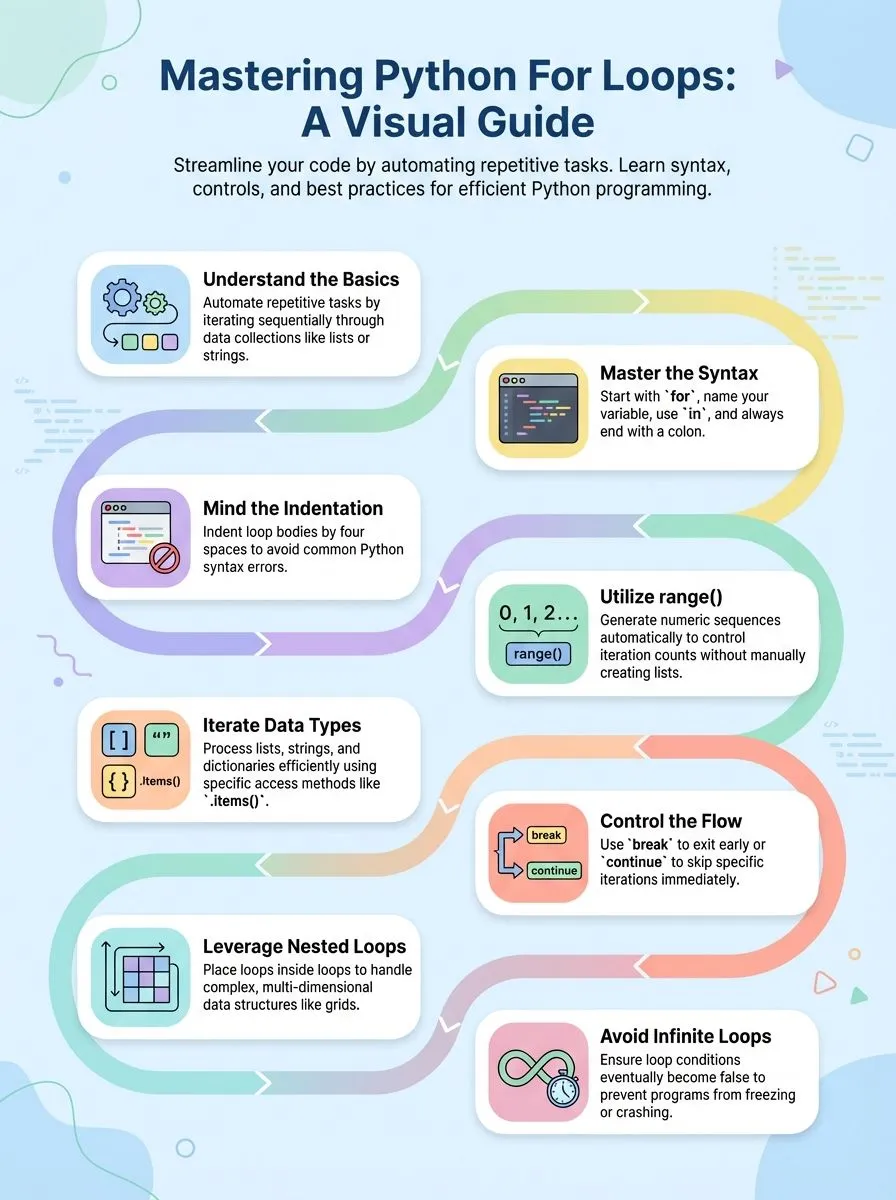
A for loop in Python serves as a control flow tool that executes commands sequentially for each value in a collection. This programming construct allows developers to iterate over a sequence such as a list, tuple, string, or range without writing repetitive code.
Python’s for loop structure makes it simple to access each item in a dataset and perform operations on every element. The loop variable automatically takes on each value from the sequence during each iteration, eliminating the need for manual counter management that other programming languages often require.
For loops excel at handling various data types and collections in Python 3. A typical for loop example demonstrates this concept clearly: `for number in [2, 3, 5]: print(number)` outputs 2, 3, 5 on separate lines.
The loop iterates through each element in the python list and prints the numbers sequentially. These loops are commonly used with the accumulator pattern to aggregate values, such as summing numbers or building new collections.
Code blocks within for loops must be indented properly to maintain Python’s syntax requirements, ensuring the interpreter can distinguish between loop content and regular program flow.
How Do You Write the Syntax of a For Loop in Python?
Python for loop syntax follows a simple pattern that makes coding accessible for beginners. The structure starts with the keyword “for,” followed by a loop variable, the keyword “in,” and the collection to iterate over.
The first line of a for loop must end with a colon, which signals Python that the loop body comes next. Alex Herrick has observed that many new developers struggle with this basic syntax, but mastering it opens doors to powerful programming techniques.
The body of a for loop must be indented, commonly 4 spaces, which creates the visual structure Python needs to execute code correctly. For loops consist of three components: the collection to iterate over, the loop variable (any name), and the loop body.
A basic example looks like this: `for item in my_list:` followed by indented code that runs for each item. The body can have multiple statements but should be concise to maintain readability and performance.
Clean code is not written by following a set of rules. Clean code is written by someone who cares enough to take the time to write it well.
Indentation errors include “IndentationError: expected an indented block” and “IndentationError: unexpected indent,” which commonly frustrate python developers starting their coding journey.
These errors occur when the spacing doesn’t match Python’s strict requirements for code structure. Understanding how the range() function works within this syntax framework helps create more dynamic and flexible loops for various programming tasks.
How Does the range() Function Work in For Loops?
The range() function creates a sequence of numbers that works perfectly with for loops. This built-in function produces numbers from 0 to N-1, making it essential for controlling loop iterations.
Joshua Correos often uses range() in his cybersecurity scripts to process data sets efficiently. The function takes parameters to define starting points, ending points, and step values.
For example, `for number in range(0, 3): print(number)` outputs 0, 1, 2. This simple syntax allows programmers to iterate through specific numeric sequences without manually creating lists.
Range() excels at creating loops that need precise control over iteration counts. The function generates numbers starting from 0 by default, which matches Python’s indexing system.
Creative professionals can use `for i in range(0, n): print(i)` with n=4 to output 0, 1, 2, 3. This approach proves valuable for accessing list elements by index or repeating actions a specific number of times.
Tech enthusiasts find range() particularly useful because it conserves memory by generating numbers on demand rather than storing entire sequences.
Iterating Through Different Data Types
For loops work with many different data types in Python, making them incredibly versatile for creative professionals and tech enthusiasts. These loops can iterate through lists, strings, dictionaries, and other iterable objects, giving programmers the power to process various types of information efficiently.
How to Loop Through a List in Python
Lists hold data that programmers need to access often. Python for loops make this task simple and fast.
- Create a basic list loop using the for statement – Write
for item in list_name:to start your loop. This syntax lets you access each element in the list one by one. - Use the list example
li = ["geeks", "for", "geeks"]to practice iteration – This code will output each string: geeks, for, geeks. The loop visits every item in order. - Access list items by their index position with range()() – Write
for index in range(len(li)): print(li[index])to get the same output. This method gives you control over position numbers. - Loop through lists of different data types easily – Python handles strings, numbers, and mixed lists the same way. Each item gets processed during its turn in the loop.
- Apply accumulator patterns to collect or sum values – Use loops to add numbers together or join strings. Create a variable before the loop to store your results.
- Print each list element with simple syntax – The statement
print(item)inside your loop displays each value. This basic pattern works for any iterable object. - Combine loops with conditional statements for filtering – Add if statements inside your loop to process only certain items. This technique helps you find specific data in large lists.
- Use the length of the list to control iteration – The
len()function tells you how many items exist. This information helps you avoid errors when accessing elements by index.
Dictionary loops work differently and require special syntax to access both keys and values.
How to Loop Through a String in Python
Strings in Python work like lists of letters. Each letter gets its own spot that you can visit one by one.
- Create a simple string loop using basic for loop syntax. Write
for letter in "hello":to start your loop. This code visits each letter in the word “hello” and stores it in the variable called letter. - Access each character directly without using index numbers. The loop gives you each letter right away. You don’t need to count positions or use brackets to get the letters.
- Print each character on a new line for clear output. Add
print(letter)inside your loop. This shows each letter separately: h, e, l, l, o on different lines. - Use string loops to reverse text like changing “tin” to “nit”. Start with an empty string, then add each letter to the front. This flips the order of all letters in your original word.
- Loop through longer strings the same way as short ones. Python handles big strings just like small ones. The loop visits every character no matter how long your text gets.
- Combine string loops with other operations for useful programs. Count vowels, find specific letters, or change text case. String loops let you check and modify each character as needed.
- Store results in lists or variables during string iteration. Create empty lists before your loop starts. Then add characters that meet your conditions to build new collections of letters.
How to Loop Through a Dictionary in Python
Dictionaries store key-value pairs that make data organization simple and efficient. Python developers can iterate through dictionaries using several methods to access both keys and values.
- Use the .keys() method to loop through dictionary keys only, which returns all keys as a collection for easy iteration.
- Apply the .values() method to access dictionary values directly without worrying about the corresponding keys during iteration.
- Implement the .items() method to get both keys and values together, returning tuples that contain paired data elements.
- Create a basic for loop structure like
for key in dictionary_name:to iterate through keys and access values using bracket notation. - Access dictionary values during key iteration by using
dictionary_name[key]syntax inside the loop body for complete data retrieval. - Handle missing keys safely by using the .get() method instead of direct bracket access to prevent KeyError exceptions.
- Convert dictionary items to lists using
list(dictionary.items())when you need indexed access or want to modify during iteration. - Example implementation shows
d = dict({'x': 123, 'y': 354})outputs x123, y354 when looping through key-value pairs properly. - Combine dictionary iteration with conditional statements to filter specific items or perform operations based on key or value criteria.
Control statements like break and continue work inside dictionary loops to manage iteration flow effectively.
Nested Loops in Python
Nested loops involve placing one loop inside another, creating a powerful tool for handling complex data structures. Programmers use a for loop within another for loop to process two-dimensional data like matrices, tables, or grids.
The outer loop controls the main iteration, while the inner loop runs completely for each cycle of the outer loop. This structure allows developers to access every element in multi-level data collections.
For example, `for i in range(1, 5): for j in range(i): print(i, end=”); print()` creates a simple pattern where the outer loop runs four times, and the inner loop runs a different number of times based on the current value of i.
The execution pattern of nested loops follows a specific order that beginners must understand. Each iteration of the loop follows this sequence: the outer loop starts, the inner loop completes all its cycles, then the outer loop moves to its next iteration.
This process repeats until the outer loop finishes completely. The example code produces distinct output: line one shows “1”, line two displays “22”, line three prints “333”, and line four outputs “4444”.
Each number appears based on how many times the inner loop executes. Creative professionals can use nested loops to generate patterns, process image data, or handle spreadsheet-like structures.
The loop inside another loop concept becomes essential when working with lists of lists, database records, or any multi-dimensional data structure.
How Do Loop Control Statements Work in Python?
Loop control statements give programmers powerful tools to manage how their for loops behave, allowing them to exit early, skip specific iterations, or create placeholder code that keeps programs running smoothly.
When and How to Use the break Statement
The break statement exits the loop prematurely when a condition is met. This powerful Python keyword gives programmers control over loop execution, allowing them to terminate loops before they finish naturally.
Creative coders often use the break statement to search through data and stop once they find what they need.
Here’s how it works in practice: In a loop over ‘geeksforgeeks’, break stops at the first ‘e’ or ‘s’. Output: Current Letter: e. The break statement proves especially useful when processing large lists or strings where continuing the loop becomes unnecessary.
Developers can save processing time and create more efficient programs by implementing strategic break points in their code.
When and How to Use the continue Statement
While the break statement exits a loop entirely, the continue statement takes a different approach. This powerful Python keyword skips the current iteration and returns to the beginning of the loop for the next cycle.
The continue statement proves most useful when programmers need to skip specific conditions without stopping the entire loop. Consider this practical example: when looping through the string ‘geeksforgeeks’, the continue statement can skip letters ‘e’ or ‘s’.
The output displays: g, k, f, o, r, g, k. This selective skipping allows developers to filter data efficiently while maintaining loop execution. Creative professionals often use this technique to process large datasets, skipping unwanted elements while keeping their programs running smoothly.
The continue statement works inside both for loops and while loops, making it a versatile tool for any Python programmer’s toolkit.
When and How to Use the pass Statement
Unlike the continue statement that skips iterations, the pass statement serves as a placeholder in Python code. Programmers use the pass statement when they need to create empty loops or functions that don’t perform any actions yet.
This keyword is used as a syntactic placeholder, allowing code to run without errors while developers build their programs step by step.
The pass statement proves useful during development phases when coders want to outline their program structure first. For example, `for letter in ‘geeksforgeeks’: pass` creates a loop that processes each character but performs no operations, and after the loop completes, the last letter processed would be “s”.
Joshua Correos often uses this approach when mapping out complex automation scripts, creating the basic loop structure before adding the actual functionality that will execute a block of code later.
What Are Best Practices for Writing Python For Loops?
Writing clean Python for loops makes code easier to read and debug. Following these practices helps programmers create efficient loops that work well in any project.
- Choose clear variable names that describe what you’re iterating over. Use descriptive names like
studentinstead ofswhen you loop through a student list. This makes your code self-documenting and easier for others to understand. - Keep loop bodies concise with minimal statements inside each iteration. Limit each loop to one main task or operation. Complex logic inside loops makes debugging harder and reduces code readability.
- Use consistent indentation throughout your loop structure to avoid syntax errors. Python requires proper spacing, so stick to four spaces or one tab consistently. Mixed indentation causes Python to throw errors.
- Apply the accumulator pattern when aggregating values like sums or concatenation. Initialize a variable before the loop, then update it inside each iteration. This pattern works well for totals, string building, or list creation.
- Choose appropriate data types for your loop variables and return values. Match your variable types to what you’re processing. Use integers for counting, strings for text processing, and lists for collecting items.
- Avoid modifying the collection you’re iterating over during the loop. Changing a list while looping through it can cause unexpected behavior or skip elements. Create a copy first if modifications are needed.
- Use enumerate() when you need both the index and value from a sequence. This built-in function provides cleaner code than manually tracking index numbers. It works with lists, strings, and other iterable objects.
- Break complex loops into smaller functions when the logic becomes too complicated. Single-purpose functions are easier to test and reuse. This approach follows good programming practices and improves code organization.
Loop control statements like break and continue can help manage flow, but they should be used carefully to maintain code clarity.
What Are Common For Loop Errors and How Can You Avoid Them?
Python programmers often make mistakes when they use for loops in their code. These errors can stop programs from running or cause unexpected results.
- IndentationError prevents programs from starting – This syntax error happens when code inside the loop lacks proper spacing. Always indent loop statements with four spaces or one tab consistently.
- Variable name errors cause runtime failures – Case sensitivity issues break loops when programmers mix uppercase and lowercase letters. Check that variable names match exactly throughout the code.
- Item errors occur when accessing elements beyond collection range – Trying to access
seasons[4]instead ofseasons[3]crashes the program. Always verify list length before accessing items by index. - Infinite loops freeze programs completely – Loops without proper exit conditions run forever and consume system resources. Include clear break statements or ensure loop conditions eventually become false.
- Mixing data types creates unexpected behavior – Combining strings and numbers in loop operations produces errors. Convert variables to matching types before performing arithmetic or concatenate operations.
- Forgetting to increment counters leads to endless execution – Manual counter variables need updates inside loop bodies. Always modify counter values to prevent infinite loop situations.
- Using wrong loop type for specific tasks – Choosing while loops instead of for loops complicates simple iteration tasks. Select for loops when iterating over lists, strings, or known ranges.
- Trace execution with tables showing line numbers and variable values – Debug loops by tracking how variables change during each iteration. Create simple tables that display variable states at different execution points.
What Are Infinite Loops and How to Prevent Them in Python?
Infinite while loops may cause the program to never terminate, creating a serious problem for any coder. These loops happen when the condition stays true forever, like the example `while(True): print(“Hello Geek”)` which runs without end.
Creative pros and tech enthusiasts often face this issue when learning python basics. The loop keeps running because the condition never becomes false. This can crash programs or make computers freeze up.
Infinite loops can be prevented by ensuring loop conditions eventually become false through careful planning. Smart coders always check their loop logic before running code. They make sure variables change inside the loop.
They also add break statements when needed. Testing small pieces of code helps catch these problems early. Good programmers use specific condition checks instead of always-true statements.
This keeps programs safe and working well. Next, let’s explore some practical examples that show these concepts in action.
What Are Some Practical Examples of Python For Loops?
After mastering infinite loop prevention, developers can explore real-world applications that showcase the power of for loops. These practical examples demonstrate how loops are used to solve common programming challenges.
- Calculate total scores using the accumulator pattern – Set total = 0, then use the for loop to iterate through a list of scores and add each value to the total variable for final results.
- Create word length lists from text data – Transform [“red”, “green”, “blue”] into [3, 5, 4] by counting characters in each string element during iteration.
- Concatenate multiple strings into single output – Combine [“red”, “green”, “blue”] to produce “redgreenblue” using string concatenation within the loop structure.
- Generate acronyms from word collections – Extract first letters from [“red”, “green”, “blue”] to create “RGB” through systematic character access and string building.
- Build cumulative sum sequences – Process number lists to create running totals like [1, 3, 5, 10] where each position shows the sum up to that point.
- Reverse text strings character by character – Loop through string indices backward to flip text order, creating mirror versions of original input data.
- Process data files line by line – Read large text files efficiently by iterating through each line instead of loading entire contents into memory at once.
- Validate user input collections – Check each item in form data or user submissions against specific criteria using conditional statements within loop structures.
- Generate multiplication tables automatically – Create mathematical reference charts by nesting loops to calculate products across different number ranges systematically.
Conclusion
Python for loops open doors to endless coding possibilities. These powerful tools help programmers repeat tasks without writing the same code over and over. Creative professionals can use loops to process large datasets, automate repetitive tasks, and build dynamic applications that scale with their needs.
Mastering for loops gives developers the foundation they need to tackle complex projects with confidence. Start practicing these concepts today, and watch your Python skills grow stronger with each iteration.
FAQs
1. What are the main types of loops in Python programming?
Python offers two primary types of loops: for loops and while loops. For loops are used to iterate over a list, string, or tuple, while while loops continue as long as the condition remains true. These loops allow you to repeat code blocks efficiently, making them essential control flow tools for any computer program.
2. How do Python for loops differ from loops in Java or JavaScript?
Python for loops use simpler syntax compared to Java or JavaScript loops. Python lets you iterate over a list or string directly without declaring iterator variables or using complex conditional statements. This makes Python code more readable and easier to learn for beginners.
3. Can you exit a loop early or skip an iteration in Python?
Yes, Python provides keywords to control loop execution. The break statement is used to exit a loop early when a specific condition is met. The continue statement helps you skip an iteration and move to the next loop cycle.
4. How do you access items when you iterate over a list in Python?
Python for loops make it simple to access items from any sequence. You can iterate over a list of items directly, and each element becomes available through your loop variable. This approach works with strings, tuples, and other iterable objects too.
5. What role do variables and parameters play in Python loop functions?
Variables in Python loops store current values during iteration, while parameters in loop-related functions define how the loop behaves. Global variables can be accessed within loops, but local loop variables have limited scope within the loop block. Understanding variable scope helps prevent common programming errors.
6. How do Python loops integrate with libraries like NumPy and Pandas?
Python loops work seamlessly with data science libraries like NumPy and Pandas for processing large datasets. These libraries provide optimized methods that often eliminate the need for explicit loops. However, understanding basic loop concepts remains crucial for custom data manipulation tasks.
