

Many new coders struggle with making their Python programs make smart choices and respond to different situations. Python’s if statement in python serves as the foundation for decision-making in code, allowing programs to execute different actions based on specific conditions.
This guide breaks down conditional statements, syntax rules, and practical examples that transform confusing concepts into clear, actionable coding skills. Master Python’s most essential control flow tool today.
Key Takeaways
- Python’s if statement uses basic syntax: “if condition:” followed by indented code blocks to control program execution.
- Logical operators AND, OR, and NOT combine multiple conditions into powerful decision-making tools for complex programming scenarios.
- If-elif-else statements check multiple exclusive conditions sequentially, with only the first true condition executing its code block.
- One-line conditional expressions follow the pattern “value_if_true if condition else value_if_false” for concise code writing.
- Common mistakes include mixing indentation styles, using single equals instead of double equals, and creating overly nested statements.
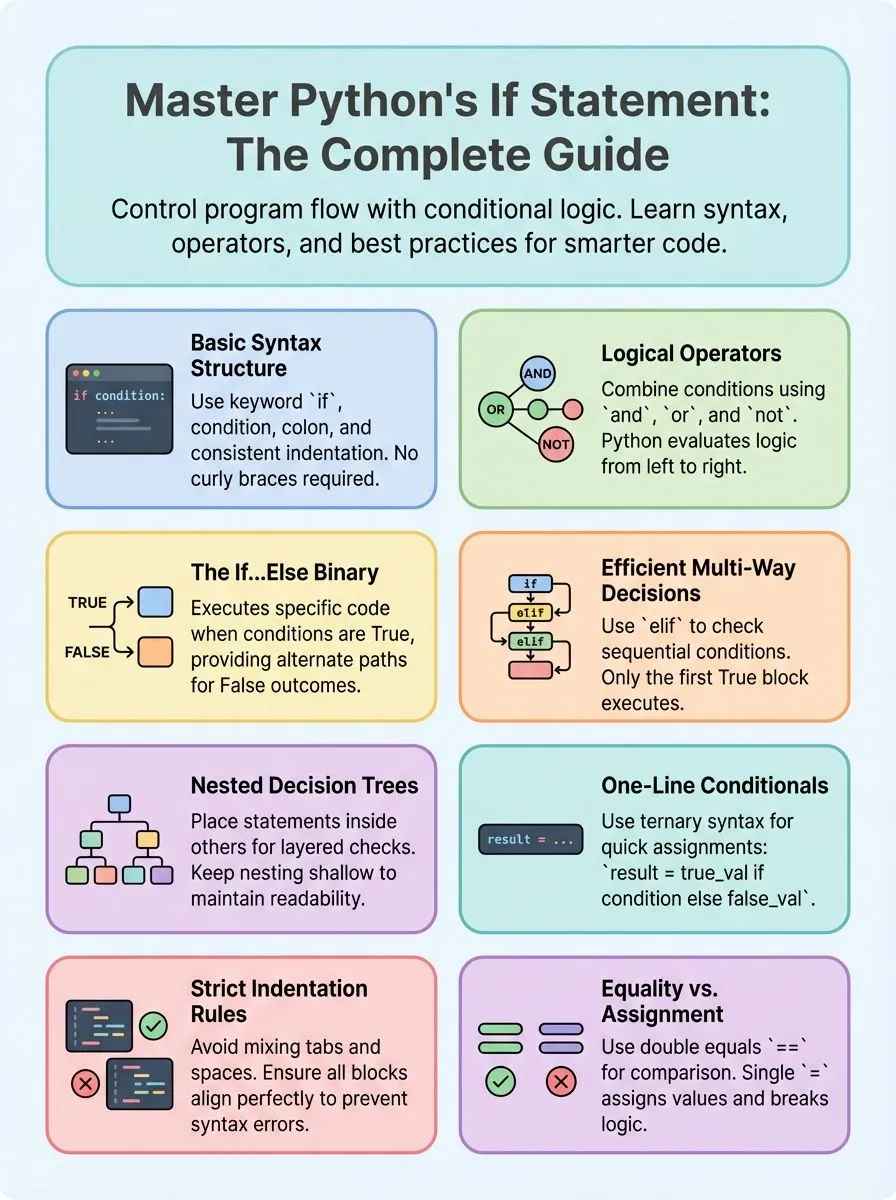
Understanding the Syntax of Python’s if Statements

Python’s if statement forms the backbone of conditional programming, allowing developers to control code execution based on specific conditions. The basic structure requires a keyword, condition, colon, and properly indented code block to function correctly.
What is the basic syntax of an if statement in Python?
Python’s if statement starts with the keyword “if” followed by a condition and a colon. The basic syntax looks simple: `if condition:` followed by an indented block of code. Every python developer must understand that indentation defines which statements belong inside the if statement.
Python uses indentation instead of curly braces like other programming languages such as Java or JavaScript.
Consider this practical example that Alex Herrick often uses when teaching new developers: `a = 33` and `b = 200`, then `if b > a: print(“b is greater than a”)`. This code executes because the condition evaluates to True.
The boolean expression `b > a` returns either True or False, determining whether the code block runs. Missing proper indentation after the colon raises an indentation error, making correct spacing crucial for every python program to function properly.
Logical operators enhance the power of conditional statements by combining multiple conditions into complex expressions.
How do logical operators work in if statement conditions?
Logical operators transform simple if statements into powerful decision-making tools. Python supports three main logical operators: AND, OR, and NOT. These operators let programmers combine multiple conditions in a single if statement.
The AND operator requires all conditions to be true for the code to execute. For example, using `age = 25` and `exp = 10`, the statement `if age > 23 and exp > 8: print(“Eligible”)` outputs “Eligible” because both conditions are met.
The OR operator executes code when at least one condition is true. The NOT operator reverses a condition’s truth value.
Python evaluates logical conditions from left to right, stopping early when the result becomes clear. This process, called short-circuit evaluation, makes code run faster. Programmers can group conditions with parentheses to control evaluation order.
Boolean variables work directly in if conditions without comparison operators. Values like 0, empty strings, None, and empty collections evaluate as False. Non-empty strings and non-zero numbers evaluate as True.
These same logical principles apply to loops and other control structures throughout Python programming.
Understanding nested if statements opens up even more possibilities for complex decision-making in code.
Variations of Python’s if Statements
Python’s if statement comes in several powerful forms that help developers control program flow with precision. These variations—including if…else combinations, elif chains, and nested structures—give programmers flexible tools to handle complex decision-making scenarios in their code.
How does the if…else statement work?
The if…else statement creates a basic decision point in Python code. This structure lets programs choose between two different paths based on whether a condition is true or false.
- The if…else statement executes one block when the condition is True, otherwise it runs the else block. This means only one section of code will run, never both at the same time.
- Python checks the condition after the if keyword first. The program evaluates whether the statement is true or false before deciding which block to execute.
- Indentation defines the scope of both if and else blocks in Python. All code under the if statement must be indented the same amount, and the same rule applies to the else block.
- The else clause provides alternate behavior when the if condition returns False. Without an else statement, nothing happens when the condition fails, but else gives you control over that scenario.
- Example code shows the pattern:
i = 20; if i > 0: print("i is positive") else: print("i is 0 or Negative"). This demonstrates how the statement chooses between two print messages based on the variable’s value. - The boolean value of the condition determines which statements within each block get executed. True conditions trigger the if block, while False conditions activate the else clause.
- This construct serves as a fundamental decision-making tool in Python programming. Alex Herrick uses if…else statements daily when building custom WordPress themes that adapt to different screen sizes and user preferences.
- Code indented under each clause must follow proper whitespace rules for readability. Python requires consistent indentation, making the code structure clear and easy to follow for other developers.
When and how to use if…elif…else statements?
While if…else statements handle two conditions well, real-world programming often requires checking multiple possibilities. The if…elif…else statement provides multi-way decision making, checking multiple sequential conditions for more complex scenarios.
- Use elif when checking multiple exclusive conditions – The elif keyword stands for “else if” and creates a chain of conditions that Python checks in order. Only one block executes, making code more efficient than separate if statements.
- Structure your conditions from most specific to most general – Place the most restrictive conditions first, then broader ones. This prevents general conditions from catching cases meant for specific ones.
- Apply if…elif…else for user input validation – Check if input equals specific values like numbers or strings. Example:
if i == 10: print("i is 10") elif i == 15: print("i is 15") else: print("i is not present"). - Reduce indentation complexity with elif instead of nested if statements – Multiple elif statements create cleaner, more readable code than deeply nested if blocks. This follows PEP 8 style guidelines for Python programming.
- Only the first True condition executes – Once Python finds a True condition, it runs that block and skips all remaining elif and else statements. This sequential checking saves processing time.
- End with an else statement for default cases – The final else block catches any values that don’t match previous conditions. This ensures your program handles unexpected input gracefully.
- Use elif for grade calculations and scoring systems – Perfect for converting numerical scores to letter grades or categorizing data into different ranges based on values.
- Test conditions in logical order for better performance – Arrange elif statements so the most likely conditions appear first. This reduces the average number of checks Python performs.
What are nested if statements and how to use them?
Nested if statements place one if statement inside another if statement block. This creates layers of conditions that check multiple things step by step.
- Place if statements inside other if blocks – Put an if statement inside another if statement to check conditions in stages. This lets you test multiple things one after another.
- Use proper indentation for each level – Each nested block needs correct spacing. The inner if statement must be indented more than the outer one.
- Check the example with i = 10 – This code shows how nested statements work:
if i == 10: if i < 15: print("i is smaller than 15"). - Build decision trees with nested logic – Create branching paths where each condition leads to more specific checks. This helps organize complex decision making.
- Keep nesting shallow for readability – Deep nesting makes code hard to read and fix. Limit how many levels you nest to maintain clear code.
- Follow the same indentation rules – Each nested if statement must follow Python’s spacing rules. Consistent indentation prevents errors and confusion.
- Test multiple conditions in stages – Use nested if statements when you need to check several things in order. Each level can test different aspects of your data.
- Apply nested statements to real problems – Use this pattern for user input validation, data filtering, or complex business logic that needs multiple checks.
Moving forward, learning one-line if statements will help you write more concise conditional code.
How can I write concise one-line if statements in Python?
Python supports one-line if statements that pack powerful logic into compact expressions. These ternary conditionals help developers write cleaner code while maintaining readability.
Alex Herrick from Web Design Booth often uses this technique to create elegant solutions for client projects. The basic syntax follows this pattern: `result = value_if_true if condition else value_if_false`.
This structure allows programmers to assign values based on conditions without writing multiple lines of code.
Consider this practical example: `a = -2; res = “Positive” if a >= 0 else “Negative”; print(res)` outputs “Negative”. The one-liner evaluates the condition `a >= 0` and assigns the appropriate string to the variable `res`.
Parentheses remain optional but improve readability in complex cases. This syntax works best for simple conditional assignments rather than multiple statements. Creative professionals find these expressions particularly useful for data processing tasks and quick variable assignments.
The next section explores real-world scenarios where if statements solve common programming challenges.
What are practical examples of using if statements in Python?
Python if statements help developers solve real coding problems every day. These examples show how programmers use conditional logic to build smart applications.
- User Input Validation: Check if a number is negative, set it to 0 and print a message, otherwise use elif and else to handle other conditions like positive values or zero.
- Age-Based Access Control: Set age = 20, then if age >= 18, print three statements: “You are an adult”, “You can vote”, and “You have full legal rights” to control access.
- Login Status Checking: Use boolean variables like is_logged_in = True, then if is_logged_in, print “Welcome back!” to greet returning users.
- Employee Qualification Filter: Combine logical operators where if age > 23 and exp > 8, print “Eligible” to screen job candidates based on multiple criteria.
- Number Classification System: Determine if a number is positive, negative, or zero using if…elif…else statements to handle all possible value types.
- Nested Condition Checking: Check if a variable equals 10, then if it’s less than 15 using nested if statements to create complex decision trees.
- One Line Conditional Assignment: Use ternary conditional expressions to assign “Positive” or “Negative” based on variable values for concise code.
- Multiple Choice Handling: Use if, elif, and else to check different possible values for a variable, handling multiple exclusive cases efficiently.
- Grade Calculator Logic: Check test scores with if statements to assign letter grades, using ranges like 90-100 for A, 80-89 for B grades.
- Shopping Cart Discount System: Apply different discount rates based on purchase amounts using conditional statements to calculate final prices automatically.
- Password Strength Validator: Check password length, special characters, and numbers using multiple if conditions to ensure security requirements are met.
What common mistakes should I avoid with if statements?
Understanding how if statements work in practice helps developers spot potential issues before they cause problems. Joshua Correos has seen countless programmers struggle with these common pitfalls during his years optimizing code for digital marketing applications.
- Mixing spaces and tabs for indentation creates syntax errors that break your entire program. Use only spaces or only tabs throughout your Python code to maintain consistency.
- Forgetting to indent code blocks after if statements triggers indentation errors immediately. Every statement inside an if block must be indented exactly four spaces from the if line.
- Using single equals (=) instead of double equals (==) in conditions assigns values rather than comparing them. The assignment operator changes variables while the equality operator checks if values match.
- Assuming only numbers evaluate as True or False overlooks how Python handles empty collections and strings. Empty lists, dictionaries, strings, and None all evaluate to False in conditional statements.
- Creating too many nested if statements makes code difficult to read and maintain over time. Limit nesting levels and consider using elif statements or separate functions for complex logic.
- Placing multiple statements in if blocks without consistent indentation results in unexpected behavior. Each line inside the conditional block requires the same indentation level to execute properly.
- Failing to cover all possible conditions with if-elif-else chains leads to unexpected program behavior. Include an else statement to handle cases you might not have considered initially.
- Writing multi-line conditions without proper parentheses or line breaks confuses Python’s parser. Break long conditions into multiple lines using parentheses for better readability and fewer errors.
Conclusion
Python’s if statement forms the backbone of smart programming decisions. Developers who master these conditional structures can build programs that respond to different situations with ease.
From simple if…else blocks to complex nested conditions, these tools help control program flow effectively. Creative professionals and tech enthusiasts will find these skills essential for automating tasks and building interactive applications.
Practice with real examples makes these concepts stick, turning beginners into confident Python programmers who can tackle any coding challenge.
For more insights on enhancing your coding skills, check out our guide on how to make loops in Python.
FAQs
1. What makes Python’s if statement different from other programming languages like Java or C Sharp?
Python’s if statement uses simple English words and clean indentation style instead of curly braces. Unlike Java or C Sharp programming language syntax, Python reads more like natural language. The if…elif…else statement structure makes code blocks easier to understand for beginners.
2. How do conditional statements control the flow of a Python program?
Conditional statements let your computer program make decisions based on different conditions. The statement is executed only when the condition is true, which helps control the flow through blocks of code depending on specific requirements.
3. Can you use Python’s if statement with built-in data types like tuple and dictionary?
Yes, Python’s if statement works perfectly with built-in data types including tuple, dictionary, and string objects. You can check multiple values in a sequence or test if a key exists in an associative array structure.
4. What is the purpose of the pass statement in Python conditionals?
The pass statement acts as a placeholder when you need syntactically correct code but want no action to occur. This reserved word helps during development when you plan to add functionality later.
5. How do Python’s conditionals compare to switch statements in other languages?
Python doesn’t have a traditional case statement like some programming languages, but the if…elif…else structure serves the same purpose. Pattern matching was added in newer Python versions as an alternative to multiple conditional checks.
6. What role does indentation play in Python’s conditional programming?
Indentation style is crucial in Python because it defines code blocks instead of brackets. Proper spacing tells the computer which statements belong together in your conditional logic, making Python unique among programming languages.
