

Python programmers often face the challenge of creating loops that run forever, whether by accident or on purpose. An infinite loop in Python executes code blocks repeatedly without stopping, making it a powerful tool for specific programming tasks.
This guide breaks down how to control these loops, prevent unwanted ones, and use them effectively in real projects. Master these techniques to write better code.
Key Takeaways
- Python offers two types of infinite loops: intentional loops for servers and applications, and unintentional loops from programming mistakes.
- Break statements provide emergency exits from loops, while continue statements skip specific iterations without stopping the entire loop.
- Loop counters prevent runaway code by tracking executions and forcing exits after reaching limits like MAX_ATTEMPTS = 3.
- Infinite loops power real-world applications including GUI frameworks, servers, games, and real-time data processing systems that run continuously.
- Proper control techniques using break statements, continue commands, and loop counters help developers create efficient, responsive Python applications.
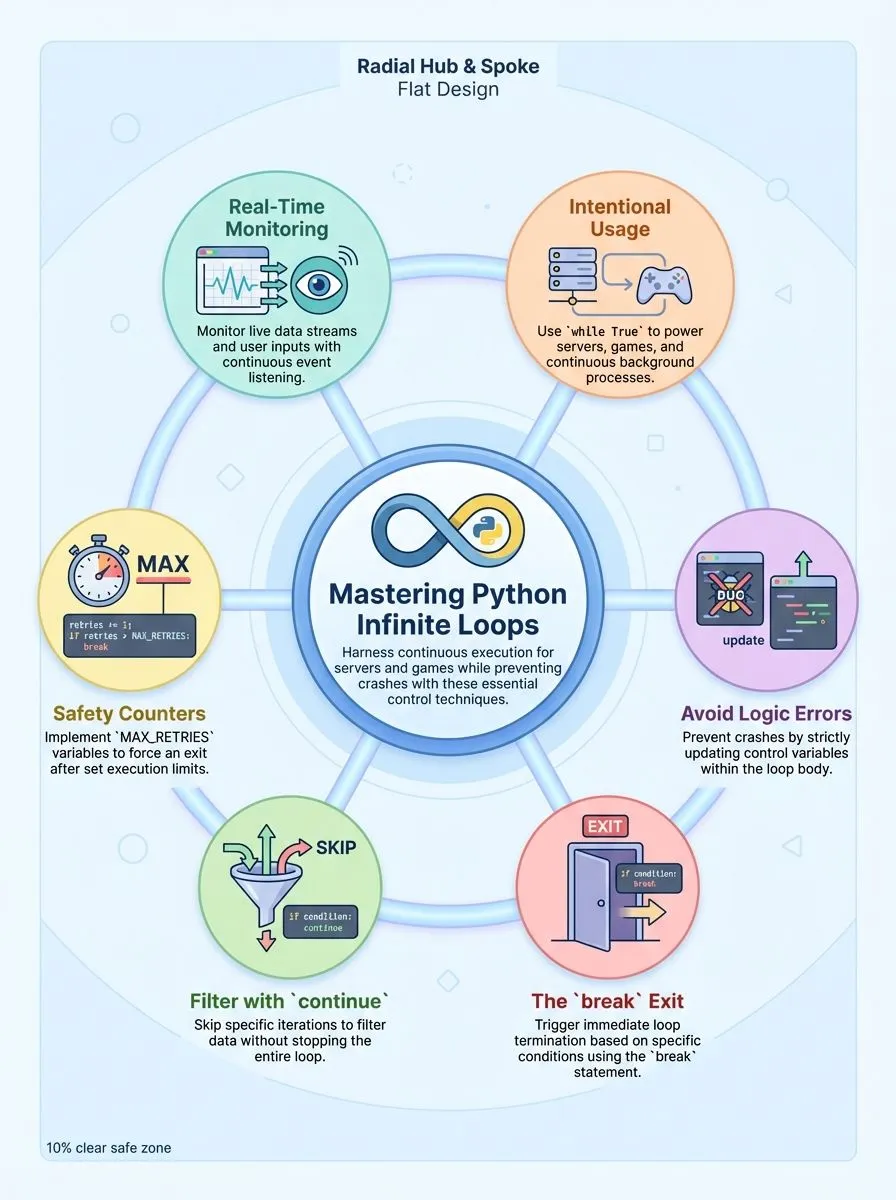
Understanding Different Types of Infinite Loops in Python

Python programmers encounter two distinct categories of infinite loops that serve completely different purposes in their code. These loop types range from carefully planned structures that power servers and applications to accidental programming mistakes that can crash entire programs.
What Are Intentional Infinite Loops and When Are They Used?Intentional infinite loops serve as the backbone for continuous processes that must run without stopping. Developers create these loops on purpose using “while True” statements to keep programs active until specific conditions trigger a break.
GUI frameworks, games, async applications, and server processes rely heavily on these never-ending cycles to maintain constant operation.
Service loops demonstrate perfect examples of intentional infinite loops in action. A password entry system might use MAX_ATTEMPTS set to 3, creating a loop that continues until users enter correct credentials or exhaust their tries.
Real-time systems and servers depend on these loops to listen for events or connections continuously. REST APIs and database polling applications use event loops to stay responsive, ensuring they can handle requests at any moment.
Properly managed intentional infinite loops prevent resource waste and ensure smooth operation.
Web Design Booth’s development team frequently implements these patterns when building responsive web applications that need constant monitoring capabilities.
How Do Unintentional Infinite Loops Occur?
Unintentional infinite loops happen when programmers make logic errors in their code. These loops occur most often when developers forget to update the loop’s control variable inside the loop body.
For example, a while loop might check if a number is greater than zero, but the code never decreases that number. The condition always evaluates to True, and the loop runs forever.
Logic mistakes like these cause programs to become unresponsive and consume excessive resources.
Missing break statements create another common problem that leads to infinite loops. Programmers sometimes write loops without proper exit conditions or forget to include statements that change the controlling variable.
A while loop that never exits unless someone manually stops it signals incorrect termination conditions. These issues force users to interrupt execution with Ctrl+C or similar commands.
Performance problems arise quickly when loops consume too much memory and processing power. Adding break statements as failsafes helps prevent infinite looping due to unforeseen circumstances, and ensuring the loop’s condition eventually becomes false stops these costly mistakes.
Learning key techniques for controlling infinite loops helps developers avoid these common pitfalls.
Key Techniques for Controlling Infinite Loops
Programmers need smart ways to control infinite loops, or their code will run forever and crash their programs. Python offers several powerful loop control statements that help developers manage when loops should stop, skip iterations, or continue running based on specific conditions.
How Does the `break` Statement Stop a Loop?
The break statement acts like an emergency exit for any loop in Python. This control flow statement terminates a loop immediately, regardless of the original loop condition. Programmers can place break statements inside while loops, for loops, or nested loops to stop execution when specific conditions are met.
The break statement provides programmers with precise control over loop termination, making it an essential tool for creating efficient and responsive code.
Consider this practical example where a variable starts at number = 6 and the loop decrements it. The break triggers when the number reaches 2. The output shows numbers 5, 4, and 3 printed to the console, followed by “Loop ended,” but 2 and 1 never appear.
Multiple break statements can handle different exit scenarios within the same loop, giving developers flexibility in their code logic. Service loop examples often use while True with a break inside to control loop termination, especially in password entry systems where break exits after MAX_ATTEMPTS (set to 3) or successful password verification.
When Should You Use the `continue` Statement in Loops?
The continue statement works best for filtering data and skipping unwanted values during iteration. Python developers find this control flow statement useful for avoiding deeply nested conditionals inside loop bodies.
For example, a countdown loop that skips the number 2 prints 5, 4, 3, 1, 0, and “Loop ended,” completely omitting the specified value from the sequence.
String processing tasks benefit greatly from the continue statement’s selective iteration capabilities. Programmers can skip specific characters like ‘e’ or ‘s’ in “geeksforgeeks” without terminating the entire loop.
This approach maintains readable code while processing user input or handling invalid data efficiently. Both for-loop and while-loop structures support continue statements, making them versatile tools for controlling program flow based on conditions that need selective processing rather than complete loop termination.
How Can a Loop Counter Prevent Infinite Loops?Loop counters act as safety nets that prevent code from running forever. These simple variables track how many times a loop has executed and force an exit after reaching a set limit.
A password entry system demonstrates this perfectly: the program starts with attempts at 0 and sets MAX_ATTEMPTS = 3. Each failed login increases the counter by one. The loop terminates when attempts reach the maximum, protecting the system from endless password guessing.
Developers use counters as secondary exit conditions that work alongside the main loop logic. Connection retry systems often employ MAX_RETRIES = 5 to limit network attempts. The counter increments within the loop body, tracking progress toward the cutoff point.
This approach ensures the program exits gracefully even when the primary condition never becomes false. User input prompts and network requests benefit greatly from this pattern, creating more stable applications that never get stuck in infinite execution cycles.
Practical Use Cases of Infinite Loops
Infinite loops power many real-world applications that developers use every day. These loops keep programs running continuously, handling tasks like server requests, user input, and live data streams without stopping.
How Are Infinite Loops Used in Event Handling and Servers?
Event loops in GUI frameworks, games, async applications, and server processes rely on infinite while loops to keep programs running. These loops create a continuous cycle that waits for user clicks, keyboard input, or network requests.
The program stays active and ready to respond instantly. Service loops in servers maintain active listening by running while True until a break statement stops the process. This approach lets servers handle multiple users at once without missing any requests.
Server processes depend on infinite loops to manage persistent connections and handle incoming requests as they occur. Polling a database or REST API for updates uses infinite loops to check status in real time.
The loop runs forever, checking for new data every few seconds. Event loops can use multiple break statements to handle different types of exit conditions like shutdown signals or error messages.
This pattern keeps web servers, chat applications, and online games running smoothly for hours or days without stopping.
Why Use Infinite Loops for Real-Time Data Processing?
Real-time data processing demands continuous monitoring and immediate response to incoming information. Infinite loops excel in this environment because they allow programs to constantly check for new data without stopping.
Temperature monitoring applications demonstrate this perfectly, using infinite loops to track readings until a threshold like 28°C is reached. These loops create an always-active system that processes information the moment it becomes available.
Real-time systems such as sensors or live data feeds depend on this continuous operation for ongoing data acquisition.
Data processing pipelines utilize infinite loops to keep checking for and handling new input streams. The loop using a while statement can monitor multiple data sources simultaneously, executing a block of code repeatedly as fresh information arrives.
Infinite loops can be paired with break conditions to exit when a specific data event occurs, preventing unnecessary resource consumption. Sleep intervals often regulate these continuous processes to manage CPU usage effectively.
Proper exit conditions become necessary to prevent infinite loops from consuming excessive memory in data-intensive applications. Understanding control flow statements helps developers create efficient real-time processing systems that respond instantly to changing conditions.
Conclusion
Infinite loops become powerful tools when programmers understand their purpose and control. Python developers can create robust applications using break statements, continue commands, and proper loop counters.
These techniques help build servers, process real-time data, and handle user events effectively.
Smart coding practices prevent unintentional infinite loops while maximizing their benefits. Developers who master these concepts write cleaner, more efficient code. Python’s flexibility with while loops opens doors to creative programming solutions that keep applications running smoothly.
FAQs
1. What is an infinite loop in Python and how do you create an infinite loop?
An infinite loop is a type of loop that never ends because the given condition always stays true. You can create an infinite loop using while (true) or by setting up a condition that never becomes false, which means the loop breaks will never happen naturally.
2. What are the main types of loop patterns available in the Python programming language?
Python offers several loop patterns including while loops, for loops with iterables, and do-while loop alternatives. Each type serves different purposes, from iterating over lists to executing a block of code a specific number of times.
3. How do break and continue statements work within the body of the loop?
Break statements help you exit the loop immediately when a specified condition is met. Continue statements skip the current iteration and move directly to the next iteration, allowing more control over loop execution.
4. What happens when you encounter a TypeError or indentation error in loop code?
Python will show a traceback with “recent call last” information pointing to the problem. These errors often occur due to incorrect Python syntax, wrong variable assignment, or improper scope handling within functions.
5. How can iterators and the itertools import help with advanced loop programming?
Iterators let you iterate through data efficiently without loading everything into memory at once. The itertools import provides powerful tools for creating complex iteration patterns, including generators that can replace the list approach for better performance.
6. What role do boolean values and logical expressions play in loop control?
Boolean values determine whether loops continue or stop based on true or false conditions. Logical expressions evaluate these conditions, and when the condition becomes false, the loop naturally terminates, preventing infinite execution that could crash your computer program.
