

**Mastering int in Python: A Guide to Python’s Built-in Function for Integers**
Converting text to numbers trips up many Python programmers, especially when working with user input or data from files. The Python int() function serves as a built-in tool that transforms strings, floats, and other data types into whole numbers with simple syntax.
This guide walks through practical examples of using int in python, from basic string conversion to handling different number bases and catching common errors. Master this essential function and write cleaner code today.
Key Takeaways
- Python’s int() function converts strings, floats, and other data types into whole numbers using simple syntax.
- The function supports different numeric bases from 2 to 36, including binary, octal, and hexadecimal conversions.
- ValueError occurs with invalid strings while TypeError happens when using non-strings with explicit base parameters.
- Python 3.8 added fallback support where int() tries index() method if int() doesn’t exist.
- Unlike float(), int() truncates decimal values completely, so int(9.9) returns 9 without rounding.
How do you use the int() function?

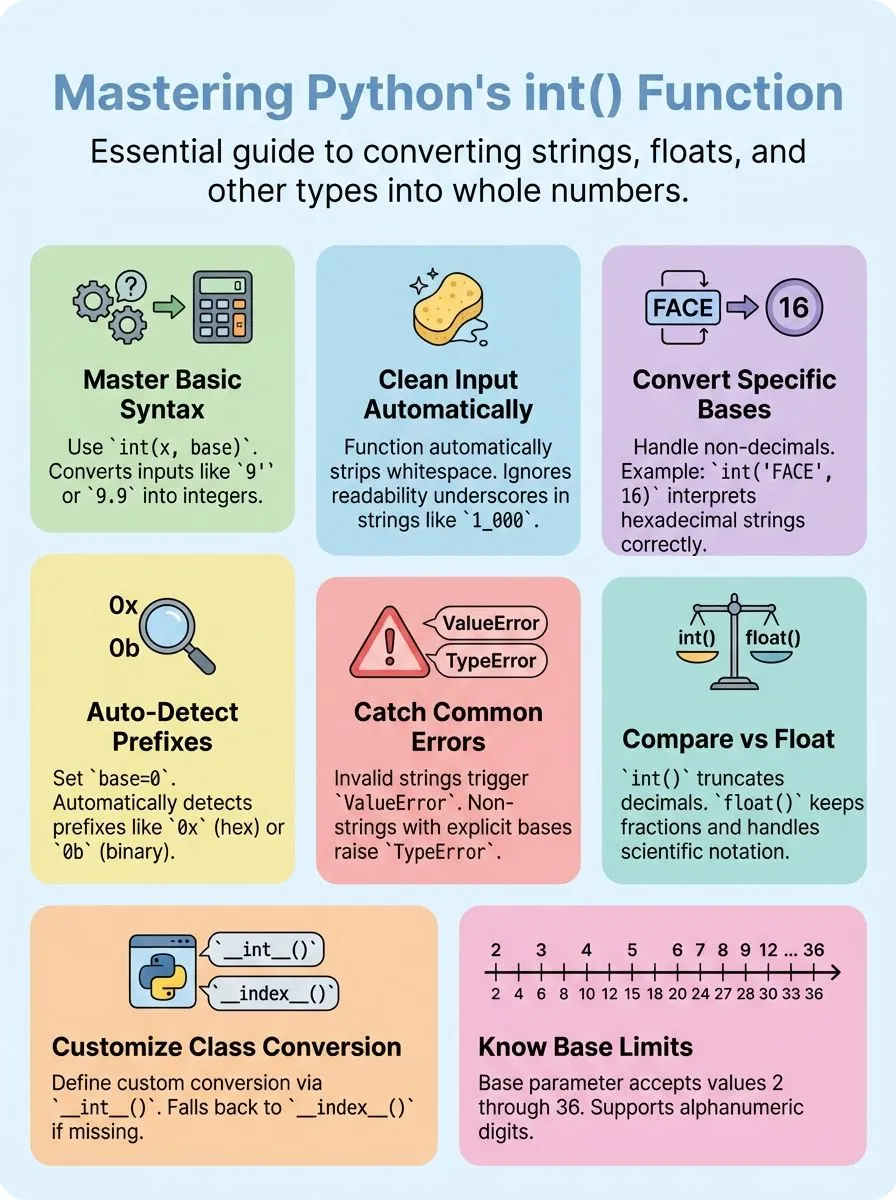
The int() function works with simple syntax that makes converting values to integers easy. The basic format follows `int(x, base)` where x represents the value to convert and base serves as an optional parameter.
Users can call int() with just one argument, two arguments, or even no arguments at all.
Most Python programmers start with basic conversions like `int(‘9’)` which returns 9, or `int(9.9)` which returns 9 by removing the decimal portion. The function returns 0 if no arguments are provided, making it useful for initializing integer variables.
The base parameter accepts different numeric systems like binary, octal, or hexadecimal, allowing developers to convert string representations from various number systems into decimal integers.
Common ways to use int() in Python
The int() function serves as Python’s primary tool for converting various data types into integer values. Python developers rely on this built-in function daily to handle numeric conversions, parse user input, and work with different number systems across their projects.
How do you convert strings to integers with int()?
Python’s int() function transforms string representations into integer objects with simple syntax. This conversion process handles various numeric formats and bases for flexible data processing.
- Basic string conversion – Use
int('123')to convert the string ‘123’ into the integer 123. This method works with any valid numeric string containing digits. - Handle negative numbers – Convert negative values by passing strings like ‘-456’ to int(). The function recognizes the minus sign and creates the appropriate negative integer.
- Process strings with whitespace – The int() function automatically strips leading and trailing whitespace from input strings. Example:
int('-12_345n')interprets the string as integer -12345. - Work with underscores for readability – Since Python 3.6, int() allows underscores in numeric strings for improved readability. These underscores get ignored during conversion.
- Convert hexadecimal strings – Use
int('FACE', 16)to interpret hexadecimal string ‘FACE’ as integer 64206. The second parameter specifies the base system. - Auto-detect base with prefix – Set base to 0 for automatic detection:
int('0xface', 0)detects the ‘0x’ prefix and returns 64206. This works with binary and octal prefixes too. - Handle binary string conversion – Convert binary representations using
int('01110011', base=2)to transform binary string ‘01110011’ into integer 115. The base parameter must equal 2. - Validate string format – Only valid numeric strings matching the specified base can convert successfully. Invalid formats raise a ValueError exception during processing.
How does int() handle different numeric bases?
Python’s int() function works with many number systems beyond regular decimal numbers. This built-in function can convert strings from binary, octal, hexadecimal, and other bases into standard integers.
- Base parameter supports values from 2 to 36 – The int() function accepts a base argument that tells Python which numeric system to use for conversion, with 36 being the maximum because it uses all digits plus letters A-Z.
- Auto-detection works with base 0 – Setting the base parameter to 0 makes int() automatically detect hexadecimal (0x), octal (0o), or binary (0b) prefixes in the input string.
- Binary conversion uses base 2 – Converting binary strings like ‘0b110’ to decimal 6 requires setting the base parameter to 2, making int(‘0b110’, 2) return the correct integer value.
- Octal strings convert with base 8 – The function int(‘0o12’, 8) converts the octal string ‘0o12’ to decimal 10, showing how different numeric bases produce different results.
- Hexadecimal needs base 16 – Converting hex strings like ‘0x1A’ to decimal 26 works with int(‘0x1A’, 16), where the base parameter tells Python to interpret the string as hexadecimal.
- Unicode digits work for bases 10-35 – Python accepts letters a-z and A-Z as valid digits for higher bases, allowing creative numeric representations beyond standard decimal format.
- Non-string objects cause TypeError with explicit base – Passing anything other than a string along with a base parameter triggers a TypeError, protecting against invalid conversion attempts.
- Python 3.4 handles non-integer base arguments – Modern Python versions can process floating-point base values, making the function more flexible for advanced mathematical operations.
How to handle errors with int()?
Python’s int() function throws specific errors when it can’t convert data properly. These errors happen often when working with user input or parsing string data from files, and knowing how to catch them saves developers hours of debugging time.
What causes ValueError and TypeError when using int()?
Python’s int() function can fail in several ways that create errors. These errors happen when the function gets bad input or wrong settings.
- Invalid string literals trigger ValueError – The int() function raises ValueError when it gets a string that cannot convert to a number, like int(‘geeks’) which fails because ‘geeks’ contains no valid numeric digits.
- Non-string objects with explicit base cause TypeError – Passing a non-string object to int() along with an explicit base raises TypeError, such as int(0b101, 2) which triggers the error message about converting non-string with explicit base.
- Missing conversion methods create TypeError – Objects without int() or index() methods make int() raise TypeError because the function cannot find a way to convert the object to an integer.
- Base parameter outside valid range produces ValueError – The base argument must stay between 2 and 36 or equal 0, and any value outside this range causes ValueError to stop the conversion process.
- Excessively long strings can raise errors – Since Python 3.11, very long strings passed to int() can trigger errors due to string length limits that protect system memory and performance.
- Empty strings with custom base fail – Providing an empty string with a base parameter other than 10 creates ValueError because the function cannot parse nothing into a numeric value.
- Whitespace-only strings cause conversion errors – Strings containing only spaces or tabs without actual digits make int() raise ValueError since whitespace alone cannot represent any integer value.
How does int() compare to Python’s float()?
The int() function creates integers while float() creates floating-point numbers with decimal places. These numeric types serve different purposes in Python programming. The int() function truncates decimal values, so int(9.9) returns 9, removing the fractional part completely.
Meanwhile, float(9) converts the integer to 9.0, adding a decimal point. This fundamental difference affects how arithmetic operations work in Python code.
Both functions convert strings to numbers, but they handle the conversion process differently. The float() function accepts scientific notation like float(‘1e-003’) which returns 0.001, and float(‘+1E6’) returns 1000000.0.
It also processes special values such as float(‘-Infinity’) returning -inf. Since Python 3.8, the float() function falls back to __index__() for conversion if __float__() is missing from an object.
The int() function focuses strictly on whole numbers and raises exceptions for invalid inputs, while float() can handle a broader range of numeric representations including exponential formats.
Advanced uses of int()
Python’s int() function offers sophisticated features that extend beyond basic string conversion. These advanced capabilities include custom object integration through special methods and enhanced control over data type handling in complex programming scenarios.
How do __int__() and __index__() methods work with int()?
Python classes can define special methods that tell the int() function how to convert custom objects into integers. These dunder methods create powerful ways to make any object work with Python’s built-in integer conversion.
- The int() method acts as the primary way for custom objects to define their integer value. Classes that implement this method can return any integer when someone calls int() on their instances.
- Python 3.8 introduced a fallback system where int() tries index() if int() doesn’t exist. This change makes integer conversion more flexible for custom python classes that already define indexing behavior.
- Both methods must return actual integer values, not strings or other data types. The python variables returned from these methods become the final result of the int() conversion process.
- Custom objects without either method will raise a TypeError when passed to int(). This error protection ensures that only objects with clear integer representations can undergo conversion.
- The index() method originally served for sequence indexing and slicing operations. Objects with this method can work as array indices and now also convert to integers through int().
- Creating classes with int() gives full control over integer conversion behavior. Developers can implement complex logic to determine what integer value their object should represent.
- The index() method must return exact integers without any rounding or truncation. This strict requirement makes it perfect for objects that represent precise numeric positions or counts.
- Python’s numeric conversion protocols use these methods to create seamless interoperability between custom and built-in types. This design lets custom objects participate fully in Python’s type system and arithmetic operators.
Conclusion
Python’s int() function serves as a powerful tool for converting data types and handling numeric operations. Creative professionals and tech enthusiasts can leverage this built-in function to process user input, parse configuration files, and manipulate data across different numeric bases.
The function handles string conversions, manages floating-point truncation, and supports binary operations with remarkable efficiency.
Understanding error handling with ValueError and TypeError exceptions helps developers write robust code that gracefully manages unexpected input. Advanced users can implement custom __int__() and __index__() methods to extend functionality for specialized objects and classes.
For a deeper understanding of how Python handles floating-point numbers, don’t miss our comprehensive guide on the float() function in Python.
FAQs
1. What does the int function do in Python programming language?
The int function creates an integer from different data types like strings, floating-point numbers, or other numeric values. Python supports this built-in function to convert various inputs into whole numbers. This function helps software developers work with integer data in their programs.
2. How do you create an int from a string in Python?
You pass the string as a parameter to the int function, like int(“123”). The string must contain only valid digits, or Python will raise an exception. Leading zeros in the string get removed automatically during conversion.
3. Can the int function work with different number bases like binary numbers?
Yes, the int function accepts a second parameter for the base value. You can convert binary, hexadecimal, or any base up to 36 into decimal integers. For example, int(“1010”, 2) converts the binary string to decimal 10.
4. What happens when you use int with floating-point arithmetic values?
The int function removes the decimal part and keeps only the whole number portion. This process truncates toward zero, so int(3.9) becomes 3 and int(-2.7) becomes -2.
5. How does Python handle hash values for integer objects?
Python creates hash values for integers using a hash function that works with the hash table system. Integer objects are immutable, so their hash value stays the same throughout the program. This makes integers work well as dictionary keys or in sets.
6. What are the limits and special features of Python integers?
Python integers have no fixed size limit, unlike other programming languages like Java or JavaScript. They can grow as large as your computer’s memory allows. Python 3.14.3 documentation shows that integers support all bitwise operations and mathematical functions like exponentiation and multiplication.
