

Many Python developers struggle with converting lists into dictionaries when working with data. Python lists and dictionaries serve different purposes, with lists storing ordered items and dictionaries storing key-value pairs for faster lookups.
This guide shows multiple ways to convert list to dictionary python using simple methods like enumerate(), zip(), and dictionary comprehension. Master these techniques today.
Key Takeaways
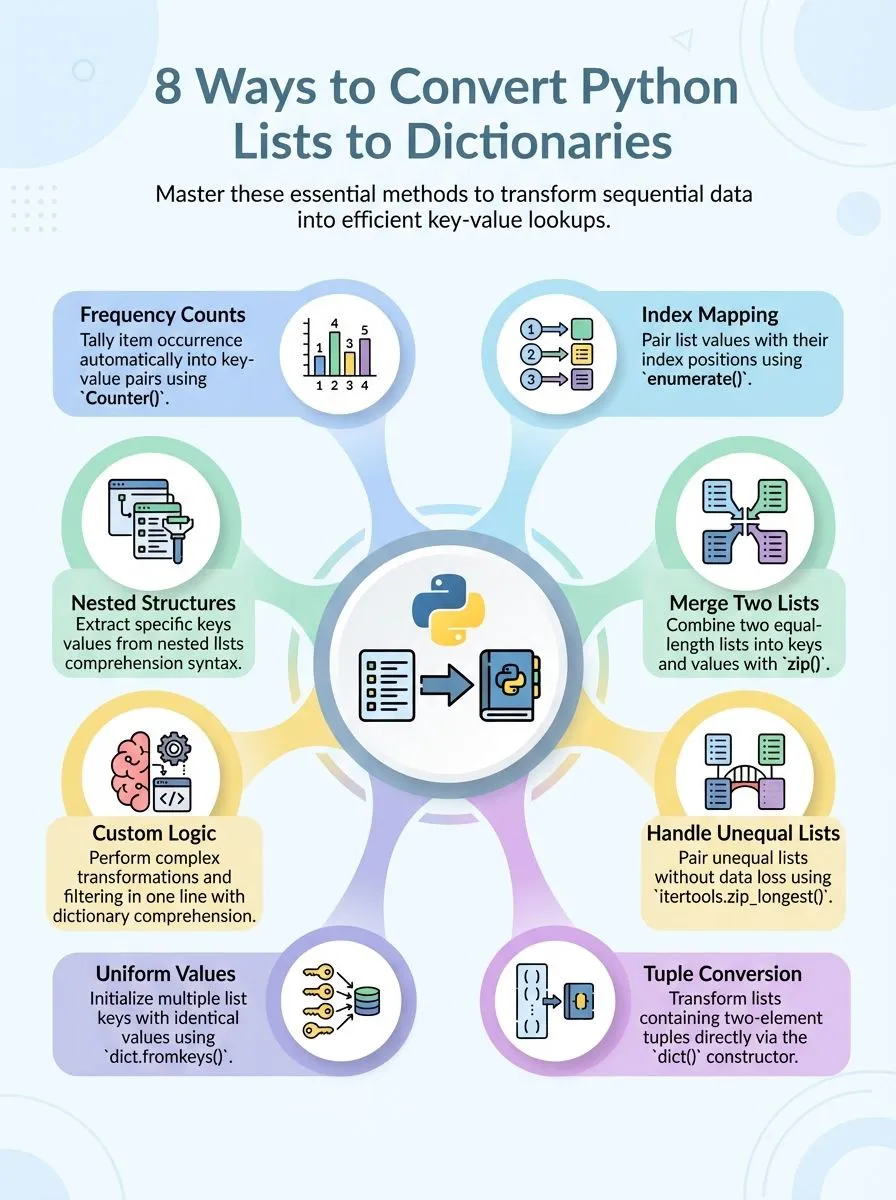
- Use enumerate() to convert lists to dictionaries with index positions as keys and list elements as values.
- Apply zip() function to combine two equal-length lists into dictionaries with paired key-value relationships.
- Convert list of tuples directly using dict() function where each tuple contains exactly two elements.
- Use zip_longest() from itertools module to handle unequal-length lists without losing data during conversion.
- Dictionary comprehension creates advanced conversions with filtering and transformations in single code lines.
How do you convert a list to a dictionary using enumerate()?

The enumerate() function turns any list into a dictionary by pairing each value with its position. This built-in function creates index-value pairs that convert directly into key-value relationships.
- Use enumerate() to create index-based keys – Apply enumerate() to a list like
[10, 20, 30]to get pairs (0, 10), (1, 20), (2, 30) that become dictionary entries. - Convert enumerate output with dict() constructor – Wrap enumerate() inside dict() to transform the pairs into a proper dictionary object with indices as keys.
- Access original list values through numeric keys – The resulting dictionary maps position numbers to list elements, making data retrieval simple through bracket notation.
- Handle empty lists gracefully – Enumerate() creates an empty dictionary when applied to empty lists, preventing errors in data processing workflows.
- Preserve original list order – Dictionary maintains the same sequence as the source list since Python 3.7 guarantees insertion order preservation.
- Apply enumerate with custom start values – Set a different starting index using enumerate(list, start=1) to create keys beginning from any number instead of zero.
- Combine with other data types – Lists containing strings, numbers, or tuples convert equally well using enumerate() for consistent dictionary creation.
- Use for quick data structure conversion – This method provides the simplest way to transform sequential data into key-value mappings for dictionary operations.
How can you create a dictionary from two lists of equal length using zip()?
The zip() function pairs two lists together to create a dictionary with keys and values. Alex Herrick from Web Design Booth often uses this method when building custom WordPress themes that need data mapping.
- Create two separate lists of equal length – First list contains keys, second list holds corresponding values that will map together perfectly.
- Apply zip() function to both lists – The zip(l1, l2) command pairs first element from each list, then second elements, continuing until complete.
- Convert zipped pairs into dictionary format – Use dict() function around the zip result to transform paired data into a python dictionary structure.
- Example with numbers and letters works perfectly – l1 = [1, 2, 3, 4] and l2 = [‘a’, ‘b’, ‘c’, ‘d’] creates {1: ‘a’, 2: ‘b’, 3: ‘c’, 4: ‘d’}.
- Check list lengths match before zipping – Unequal lengths cause zip() to stop at shortest list, potentially losing important data from longer list.
- Store result in new variable immediately – Dictionary creation happens instantly, but storing output prevents data loss and enables future use.
- Use built-in functions for clean syntax – This method requires no loops or complex logic, making code readable and efficient for data structures.
- Apply technique to any data types – String keys, number values, or mixed types all work with this conversion method for flexible programming.
Handling two lists of unequal length with zip_longest()
**When Lists Don’t Match: zip_longest() Saves the Day**
Python developers often face a common challenge when they need to convert two lists into a dictionary, but the lists contain different numbers of elements. The zip_longest() function from the itertools module provides an elegant solution for handling this scenario, allowing programmers to pair elements from unequal lists while filling missing values with a default placeholder…
and there’s much more to explore about this powerful technique.
What issues arise when zipping lists of different lengths?
Python’s zip() function creates a sneaky trap for developers working with lists of different lengths. The function stops at the shortest list, ignoring extra elements completely. This behavior causes silent data loss that can break programs without warning.
Alex Herrick discovered this issue during a client project where user data got truncated because one list contained 7 elements while another had only 4. The zip() function simply dropped the last 3 elements from the longer list, creating incomplete records.
The problem becomes worse when developers expect all data to transfer into the new dictionary. Missing information leads to bugs that are hard to track down. Joshua Correos often sees this mistake in cybersecurity scripts where incomplete data creates security gaps.
Python offers zip_longest() from the itertools module as a solution. This function fills missing values with None or a custom fillvalue like ‘x’. The zip_longest() method ensures no data gets lost during the conversion process, making it the safer choice for lists of unequal length.
How do you convert a list of tuples into a dictionary?
Python makes it easy to turn a list of tuples into a dictionary. The dict() function works perfectly for this task.
- Use the dict() function to convert a list of tuples directly into a dictionary, where each tuple contains a key-value pair.
- Create your list with tuples like color = [(‘red’, 1), (‘blue’, 2), (‘green’, 3)] to prepare for conversion.
- Apply d = dict(color) to transform the list of tuples into {‘red’: 1, ‘blue’: 2, ‘green’: 3}.
- Ensure each tuple contains exactly two elements, or Python will throw an error during conversion.
- Handle duplicate keys by knowing that later tuples will overwrite earlier ones with the same key.
- Convert nested data structures by first flattening complex tuples into simple key-value pairs.
- Use this method for any iterable containing two-element sequences, not just lists of tuples.
- Verify your tuple containing pairs are properly formatted before attempting the conversion process.
How does dict. fromkeys() assign the same value to all keys?
Moving from tuple conversion methods, Python offers another powerful approach for specific scenarios. The dict.fromkeys() method creates a single dictionary where all keys receive identical values.
This method proves especially useful for developers who need to initialize multiple keys with the same default value.
Alex Herrick frequently uses this technique during responsive design projects at Web Design Booth. The method takes a list as the first parameter and assigns the second parameter as the value for every key.
For example, using `l1 = [1, 2, 3, 4]` with `dict.fromkeys(l1, “a”)` produces `{1: ‘a’, 2: ‘a’, 3: ‘a’, 4: ‘a’}`. Dictionary comprehension offers an alternative approach, though dict.fromkeys() remains more efficient for this specific task.
How can dictionary comprehension be used for advanced list-to-dictionary conversions?
Dictionary comprehension transforms complex list-to-dictionary operations into elegant one-liners. This method is efficient and creates clean code that handles multiple scenarios. Developers can group elements into key-value pairs by pairing consecutive elements from a single list.
For example, converting `a = [“a”, 1, “b”, 2, “c”, 3]` becomes simple with `result = {a[i]: a[i + 1] for i in range(0, len(a), 2)}`, producing `{‘a’: 1, ‘b’: 2, ‘c’: 3}`.
Creative professionals find dictionary comprehension perfect for filtering and transforming data simultaneously. The syntax allows conditional logic that creates targeted conversions.
Programmers can convert the list while applying functions to keys or values, making it superior to traditional loop methods. This approach handles nested structures and complex transformations that would require multiple steps using other techniques.
How do you convert a nested list into a dictionary?
Dictionary comprehension offers powerful tools for complex conversions, but nested lists present unique challenges. Converting nested structures requires careful handling of inner elements to create meaningful key-value pairs.
- Create a nested list with pairs – Define your nested list where each inner list contains exactly two elements, like
l1 = [[1, 2], [3, 4], [5, [6, 7]]]for proper dictionary conversion. - Apply dictionary comprehension syntax – Use the pattern
d1 = {x[0]: x[1] for x in l1}to extract the first element as the key and second element as the value from each nested list. - Handle mixed data types in values – The conversion works with various data types, allowing integers, strings, or even lists as values, such as creating
{1: 2, 3: 4, 5: [6, 7]}. - Verify equal-length inner lists – Ensure each nested list contains exactly two elements to avoid index errors during the conversion process using dictionary comprehension.
- Test the resulting dictionary structure – Check that keys are properly mapped to their corresponding values and the dictionary maintains the expected format after conversion.
- Use enumerate for index-based keys – Alternative approach involves
enumerate()function to create dictionaries where list indices serve as keys for nested list values. - Apply zip for parallel nested lists – Convert two separate nested lists into one dictionary by pairing corresponding elements from each list using the zip function.
- Implement error handling for irregular structures – Add try-except blocks to manage nested lists with varying lengths or unexpected data types during the conversion process.
How can Counter() be used to convert a list to a dictionary?
After working with nested lists, many developers discover that Counter() offers a different approach to convert a python list into a dictionary. This method works best when you need to count how many times each item appears in your list.
Counter() creates a dictionary where each unique value becomes a key, and the number of times it appears becomes the value.
The collections.Counter function makes this process simple and direct. For example, Counter([‘c’, ‘b’, ‘a’, ‘b’, ‘c’, ‘a’, ‘b’]) produces {‘c’: 2, ‘b’: 3, ‘a’: 2} This approach proves useful when analyzing data or tracking frequency patterns in your lists.
The Counter method automatically handles duplicate values and creates an organized dictionary that shows exactly how often each element appears in your original list.
How do you combine multiple dictionaries from a list using ChainMap?
Counter helps track items, but ChainMap takes a different approach to merge data. This tool from Python’s collections module links multiple dictionaries together without creating a new one.
ChainMap creates a single view that searches through each dictionary in order.
The process works like a chain of connected links. Each dictionary stays separate, but ChainMap lets users access all keys as one unit. This method proves useful for configuration settings or layered data structures.
ChainMap maintains the original dictionaries while providing unified access to all stored values.
What are Python collections, and how do they relate from sets to lists?
Python collections serve as powerful data structures that organize and store information in different ways. Sets eliminate duplicate values and maintain unique elements, while lists preserve order and allow repeated items, making each collection type perfect for specific programming tasks.
What happens when lists of different lengths are zipped?
The zip() function stops at the shortest list when working with lists of different lengths. Extra elements from longer lists get ignored completely. This behavior can cause data loss if developers don’t expect it.
For example, zipping a list with five items and another with three items creates only three pairs. The remaining two elements from the longer list disappear.
Python’s itertools module offers zip_longest()() as a solution for this problem. This function includes all elements from both lists, even when they have different sizes. Missing values get filled with a specified fillvalue, which defaults to None.
This approach ensures no data gets lost during the conversion process. The zip_longest() function proves essential when converting lists of unequal length into dictionaries where every element matters.
The next section explores how to convert a list of tuples into a dictionary using simple methods.
Conclusion
Converting lists to dictionaries opens up powerful data manipulation possibilities for creative professionals and tech enthusiasts. These simple methods transform how developers organize and access information in their projects.
Python list comprehension, enumerate functions, and zip operations provide flexible solutions for any coding challenge. Creative pros can now build more efficient applications, while YouTubers can process data faster for their content creation workflows.
Master these techniques to level up your programming skills and create amazing digital experiences.
For more insights into how Python treats different collections, especially when working with sets and lists, check out our detailed guide Understanding Python: From Sets to Lists.
FAQs
1. What is the easiest way to convert a Python list to a dictionary?
The simplest method uses dict.fromkeys to create a dictionary where list items become keys. This approach works best when you want all keys mapped to the same value, like None or an empty string.
2. How can I handle converting a list of dictionaries into a single dictionary?
You can iterate through each dictionary in your list and merge them using the update method. This mutable approach lets you combine multiple dictionaries while keeping control over duplicate keys.
3. What happens when I use list methods like append or slice with dictionary conversion?
List methods like append and slice help you prepare your data before conversion. You can slice specific portions of your list or append new items, then convert the modified list to create your dictionary structure.
4. Can I use list comprehension to convert lists to dictionaries more efficiently?
Yes, list comprehension offers a powerful way to create dictionaries from lists in one line. This method gives you control flow options and works well with iterators from itertools import statements.
5. How do defaultdict and setdefault help with list to dictionary conversion?
The defaultdict creates a dictionary that automatically assigns default values to new keys. The setdefault method lets you retrieve existing values or set new ones, making it perfect for handling missing keys during conversion.
6. What should I know about mutable versus immutable objects when converting lists?
Lists are mutable, meaning you can delete, sort, or modify them before conversion. Dictionaries are also mutable, but their keys must be immutable objects like strings or numbers, not other lists or dictionaries.
