

Many Python developers struggle with python dictionary syntax when they start working with key-value pairs and data structures. Python dictionaries serve as one of the most powerful built-in data types, storing information in an organized, accessible format that programmers use daily.
This comprehensive guide breaks down dictionary creation, data access methods, modification techniques, and advanced operations through clear examples and practical code snippets. Master these essential skills today.
Key Takeaways
- Python dictionaries store data in key-value pairs using curly braces {} or the dict() constructor method for flexible data organization.
- Access dictionary values safely using square brackets or the get() method, which prevents KeyError exceptions when keys don’t exist.
- Dictionary comprehensions create new dictionaries efficiently with syntax {key: value for item in iterable} for compact data processing.
- Essential dictionary methods include keys(), values(), and items() which return dynamic views for iterating through dictionary contents effectively.
- Dictionaries are mutable data structures allowing programmers to add, update, and remove key-value pairs using assignment operations and built-in methods.
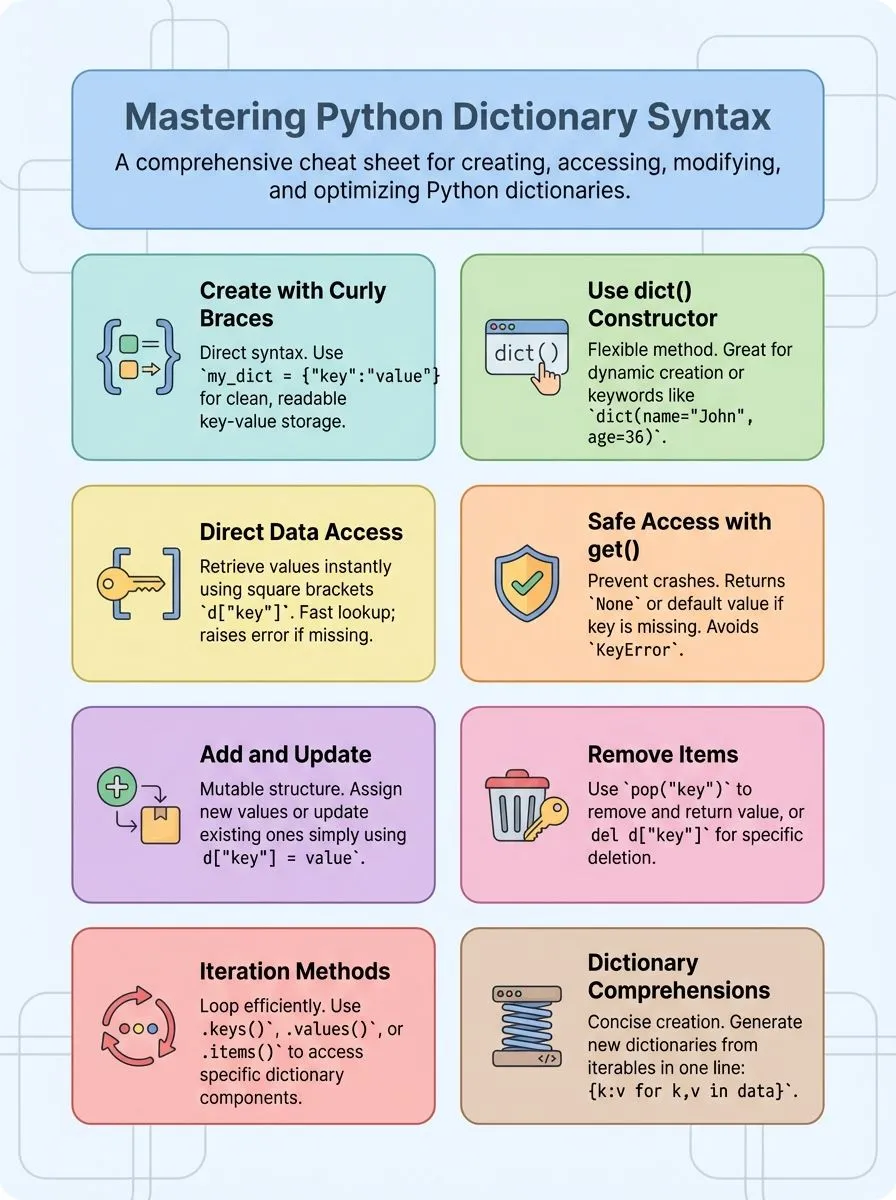
How to create Python dictionaries

Python dictionaries offer multiple creation methods that make data storage simple and flexible. These powerful data structures let programmers organize information using key-value pairs, making data retrieval fast and efficient.
How do I create a dictionary using curly braces ({})?
Creating a dictionary with curly braces offers the most direct way to build these useful data structures. This method lets developers store key-value pairs in a clean, readable format.
- Start with empty curly braces to create an empty dictionary, like
my_dict = {}, which gives you a blank container ready for data. - Add key-value pairs inside the braces using colons to separate keys from values, such as
student = {"name": "Alice", "age": 30}. - Use strings, integers, or other immutable objects as dictionary keys since these data types work best for hash table operations.
- Separate multiple key-value pairs with commas to keep your dictionary syntax clean and organized.
- Place each key-value pair on separate lines for better readability when working with larger dictionaries containing many items.
- Ensure each dictionary key stays unique within the same dictionary to avoid data conflicts and maintain proper functionality.
- Mix different data types as values while keeping keys immutable, allowing flexible storage of strings, numbers, lists, or nested dictionaries.
- Create dictionaries directly during assignment without needing extra steps or built-in functions like the dict() constructor method.
How do I create a dictionary with the dict() constructor?
The dict() constructor offers a flexible way to create dictionaries in Python programming. This method proves especially useful for dynamic dictionary creation from various data sources.
- Create empty dictionaries using dict() without any parameters. This basic approach establishes a blank dictionary ready for data insertion.
- Build dictionaries using keyword arguments like dict(name=”John”, age=36, country=”Norway”). Each parameter becomes a key-value pair in the resulting dictionary structure.
- Pass a list of tuples to dict() for efficient dictionary creation. Each tuple contains two elements that become key-value pairs in the final dictionary.
- Verify dictionary creation using print(type(thisdict)) which returns . This type checking confirms successful dictionary instantiation through the constructor method.
- Create dictionaries from iterable data sources for dynamic programming solutions. The constructor accepts various iterable formats and converts them into proper dictionary structures.
- Ensure keys remain immutable types when using the dict() constructor. Strings, numbers, and tuples work as keys, while lists and other mutable objects cause errors.
- Take advantage of ordered dictionaries since Python 3.7 maintains insertion order. Modern Python versions preserve the sequence of key-value pairs during dictionary creation.
- Combine the dict() constructor with other python functions for advanced data processing. This approach enables complex dictionary manipulation and data transformation workflows.
Understanding dictionary access methods becomes the next crucial step in mastering Python dictionary operations.
How can I access data in a Python dictionary?
Accessing data in Python dictionaries forms the foundation of effective programming with these powerful data structures. Developers need reliable methods to retrieve values from their dictionary collections, whether they’re building web applications, analyzing datasets, or creating interactive software solutions.
How do I retrieve values by keys in a dictionary?
Getting values from Python dictionaries is simple and direct. Dictionary access lets you find data quickly using keys as your guide.
- Use square brackets to access dictionary values directly – Type the dictionary name followed by the key in square brackets like thisdict[“brand”] to get the value right away.
- Access fails with KeyError if the key does not exist in the dictionary – Python throws an error when you try to access a key that isn’t there, so check your keys first.
- Mixed keys work perfectly for dictionary access – Example with mixed keys: {“Name”: “John”, 1: [2, 4, 3]} allows access via both string and integer keys like d[“Name”] or d[1].
- Direct key retrieval gives instant results – Example: d[“name”] retrieves the value for the key “name” without any extra steps or methods needed.
- Print statements show dictionary values clearly – Use print(thisdict[“brand”]) to display the value on screen and see what your dictionary contains.
- Keys must match exactly for successful access – Spelling, case, and data type matter when you access dictionary items through square brackets.
- Dictionary values can be any Python data type – Access strings, numbers, lists, or even other dictionaries using the same square bracket method.
- Fast lookup makes dictionaries perfect for data storage – Python dictionaries give you instant access to values without searching through the whole collection like lists do.
What is the get() method and how do I use it?
The get() method retrieves a value by key and returns None if the key is missing. This python dictionary method prevents KeyError exceptions that crash programs when accessing nonexistent keys.
- Basic get() syntax uses dictionary_name.get(“key_name”) to safely access values without risking errors. This method works with any dictionary created using curly braces or the dict() constructor.
- The get() method returns None automatically when a key doesn’t exist in the dictionary. This behavior makes it safer than using square brackets for dictionary access in uncertain situations.
- Specify custom default values using dictionary_name.get(“key”, “default_value”) for missing keys. This technique lets programmers control what happens when keys aren’t found in the data structure.
- The get() method never modifies the original dictionary, even when keys are absent. This immutable behavior keeps data integrity intact while checking for values safely.
- Use get() when working with user input or external data sources where key existence is uncertain. This approach prevents program crashes and creates more robust applications for real-world scenarios.
- The method works perfectly with nested dictionaries and complex data structures from JSON files. Developers can chain get() calls to access deep dictionary values without breaking their code.
- Combine get() with conditional statements to handle missing data gracefully in loops and functions. This pattern creates cleaner code that handles edge cases without extensive error checking.
- The get() method integrates seamlessly with list comprehension and dictionary operations for data processing tasks. This functionality makes it valuable for data science projects and machine learning applications.
How can I modify Python dictionaries?
Python dictionaries are mutable, which means programmers can change their contents after creation. This flexibility makes dictionaries powerful tools for storing and manipulating data in Python programs.
How do I add or update key-value pairs in a dictionary?
Python dictionaries are mutable data structures that allow developers to add items and modify existing values with ease. The process uses simple assignment operations and built-in methods to manage key-value pairs effectively.
- Direct assignment creates new entries or updates existing ones – Use the syntax d[“age”] = 22 to add a new key-value pair or update an existing key’s value in the dictionary.
- Numeric keys work just like string keys for assignments – The example d[1] = “Pythondict” shows how to change the value for key 1, demonstrating that dictionary keys must be immutable types.
- The update() method handles multiple key-value pairs simultaneously – This python dictionary method allows adding or updating several entries at once using another dictionary or keyword arguments.
- Updating existing keys replaces their current values completely – The dictionary keeps only the latest value when the same key receives a new assignment, maintaining unique keys throughout the data structure.
- New key-value pairs increase the dictionary length automatically – Each addition expands the collection of key-value pairs, making dictionaries dynamic containers for storing related data.
- Multiple data types can serve as values in dictionary assignments – Numeric, string, boolean, or even list values can be assigned to dictionary keys, providing flexibility for various programming needs.
- Dictionaries are mutable collections that support dynamic modifications – This characteristic allows developers to add items, remove entries, and update values throughout the program’s execution without creating new objects.
- Keys must remain immutable while values can be any data type – String, numeric, and boolean types work as keys, but lists cannot be used as keys due to their mutable nature.
How do I remove items using pop() and del?
Python dictionaries offer several effective methods to remove unwanted items from your data structures. These removal techniques help developers manage dictionary content and maintain clean, organized code.
- Use del statement to remove specific key-value pairs – Type
del d["age"]to remove the item with key “age” from the dictionary, making this method perfect for quick deletions. - Apply pop() method to remove items and capture their values – The pop() method removes an item by key and returns its value, allowing developers to store the removed data for later use.
- Implement popitem() for removing the most recent additions – The popitem() method removes and returns the last inserted key-value pair as of Python 3.7, useful for stack-like operations.
- Execute clear() method to empty entire dictionaries – The clear() method removes all items from the dictionary, making it empty and resetting the data structure completely.
- Handle KeyError exceptions when removing non-existent keys – Attempting to pop() or del a non-existent key raises a KeyError, so developers should check if the key exists first.
- Monitor dictionary length changes after item removal – Removing items decreases the dictionary’s length as checked by len(), helping track data structure size during operations.
- Understand return value differences between removal methods – The del statement does not return the removed value, unlike pop(), which makes pop() more versatile for data recovery.
- The clear() method provides no return feedback – The clear() method does not return any value, simply emptying the dictionary without confirmation of the operation’s success.
Advanced dictionary operations and structures
Advanced dictionary operations and structures take Python programming to the next level, offering powerful tools that make code more efficient and elegant. These techniques allow developers to create complex data structures and manipulate information with just a few lines of code, transforming how they work with key-value pairs in their applications.
How do dictionary comprehensions work?
Dictionary comprehensions offer a concise way to create new dictionaries using compact python syntax. This powerful feature transforms data into key-value pairs with minimal code.
- Dictionary comprehensions use curly braces with a colon to separate keys and values, similar to regular dictionaries but with loop logic inside.
- The basic syntax follows this pattern: {key_expression: value_expression for item in iterable}, creating a new dictionary from existing data.
- You can filter data while building dictionaries by adding conditional statements after the for loop using if conditions.
- The example {x: x**2 for x in (2, 4, 6)} creates a dictionary mapping numbers to their squares, resulting in {2: 4, 4: 16, 6: 36}.
- Dictionary comprehensions work faster than traditional for loops when creating dictionaries, making them ideal for data processing tasks.
- You can iterate through python lists, strings, or other dictionaries to build new associative arrays with transformed data.
- Multiple conditions and expressions allow complex data transformations, letting you process and filter information in a single line of code.
- These comprehensions return a new dictionary object without modifying the original data source, maintaining data integrity during operations.
Understanding nested dictionaries becomes the next essential skill for managing complex data structures in Python applications.
What are nested dictionaries and how do I use them?
Nested dictionaries store dictionaries inside other dictionaries, creating multiple layers of data organization. Think of them as boxes within boxes, where each container holds its own set of key-value pairs.
The example d = {1: ‘Geeks’, 2: ‘For’, 3: {‘A’: ‘Welcome’, ‘B’: ‘To’, ‘C’: ‘Geeks’}} shows a dictionary containing another dictionary at key 3. This structure proves useful for organizing complex data like user profiles, inventory systems, or database records.
Accessing nested dictionary values requires chaining square brackets or using multiple get() methods. For instance, d[3][‘A’] returns ‘Welcome’ from the nested structure. Programmers can also create nested dictionaries step by step, adding inner dictionaries as needed.
This approach works well for building hierarchical data structures, managing stock information, or storing related data sets in organized groups.
Useful Python dictionary methods and techniques
Python dictionary methods unlock powerful ways to manipulate and extract data from your key-value collections. These essential techniques help developers work more efficiently with dictionaries, making code cleaner and more readable.
How do keys(), values(), and items() methods work?
Python dictionaries offer three powerful methods that make working with key-value pairs simple and efficient. Alex Herrick from Web Design Booth uses these methods daily when building custom WordPress themes that require data manipulation.
- The keys() method returns a view of all keys in the dictionary, allowing developers to see every key without accessing their values. This view reflects changes if the dictionary gets modified later.
- The values() method returns a view of all values in the dictionary, perfect for checking what data exists without worrying about the keys. Developers can iterate through values directly using this method.
- The items() method returns a view of all key-value pairs as tuples, making it ideal for loops that need both pieces of information. Example: for k, v in knights.items(): print(k, v) iterates through key-value pairs efficiently.
- These methods support iteration and membership testing, giving programmers flexible ways to work with dictionary contents. Each method creates a dynamic view that updates automatically when the original dictionary changes.
- Converting views to lists becomes easy with simple syntax like list(d.keys()), which transforms the key view into a standard Python list. This conversion helps when you need list-specific operations on dictionary data.
- All three methods allow for efficient looping and manipulation of dictionary contents without creating unnecessary copies. The views use minimal memory while providing full access to dictionary information.
- Membership testing works directly with these views, letting you check if specific keys or values exist using the ‘in’ operator. This feature makes data validation quick and straightforward.
- The views returned by these methods reflect changes if the dictionary is modified, ensuring your code always works with current data. This dynamic behavior prevents common bugs in data processing applications.
How can I sort and filter dictionaries?
After learning how to extract keys, values, and items from dictionaries, many developers want to organize and filter their data. Sorting and filtering dictionaries helps programmers work with large datasets more efficiently.
- Use the sorted() function on dictionary keys to create ordered lists. The sorted() function can be used to sort dictionary keys, values, or items. This method returns a list of sorted keys that programmers can loop through.
- Apply sorted() to dictionary.items() for complete key-value pair sorting. This approach sorts the entire dictionary by keys or values. Developers can specify reverse=True for descending order sorting.
- Create filtered dictionaries using dictionary comprehensions with conditions. Dictionary comprehensions allow filtering with syntax like {k: v for k, v in d.items() if v > 10}. This method creates a new dictionary containing only items that meet specific criteria.
- Sort dictionary values by converting them to lists first. The sorted() function works on dictionary values when combined with the values() method. This technique helps identify highest or lowest values in datasets.
- Filter dictionaries based on key patterns using string methods. Programmers can filter keys that start with specific letters or contain certain substrings. This approach works well for organizing data by categories or prefixes.
- Combine multiple filter conditions using logical operators in comprehensions. Complex filtering uses and, or operators within dictionary comprehensions. Multiple conditions help narrow down results to exact specifications.
- Sort nested dictionaries by accessing inner values with lambda functions. Lambda functions provide custom sorting logic for complex data structures. This method sorts dictionaries containing other dictionaries or lists as values.
- Use operator.itemgetter()() for efficient sorting of dictionary items. This function provides faster sorting performance for large dictionaries. The itemgetter approach works well with sorted() for both keys and values.
What is the comprehensive guide to Python dictionaries and syntax?
A comprehensive guide to Python dictionaries covers every aspect from basic creation to advanced operations. This guide includes detailed sections on syntax fundamentals, data manipulation techniques, and practical applications.
Python dictionaries store data in key-value pairs, making them essential for modern programming tasks. The tutorial provides structured learning paths that progress from simple dictionary creation using curly braces to complex nested structures.
Students learn to access values using keys, modify existing data, and implement dictionary comprehensions for efficient code writing.
Advanced sections explore dictionary methods like keys(), values(), and items() for data extraction. The guide demonstrates how dictionaries work with other Python data types, including lists and strings.
Real-world examples show dictionary applications in data science, web development, and automation projects. Control flow techniques help developers loop through dictionary contents effectively.
The comprehensive curriculum includes certification programs that validate dictionary mastery alongside broader Python skills. Machine learning applications showcase how dictionaries handle data distributions and model parameters.
Database integration tutorials connect dictionary concepts to MySQL and MongoDB operations, creating a complete learning experience for creative professionals and tech enthusiasts.
Conclusion
Python dictionaries open doors to powerful programming possibilities. These versatile data structures help developers store and organize information with ease. Creative professionals can build amazing projects using dictionary methods like keys(), values(), and items().
Tech enthusiasts will find dictionary comprehensions and nested structures perfect for complex applications. Start practicing with basic python syntax today and watch coding skills grow stronger each day.
For a deeper dive into mastering Python dictionaries, visit our comprehensive guide here.
FAQs
1. What makes Python dictionaries different from other data structures like lists?
Python dictionaries store data as name-value pairs, where keys map to values. Lists use numbers to find items, but dictionaries use unique keys. This makes dictionaries faster for finding specific data when you know the key name.
2. How do you create a new dictionary and add data into a dict?
You can create a new dictionary using curly braces with colon punctuation separating keys and values. The basic Python syntax looks like this: my_dict = {“key”: “value”}. You can also start with an empty dictionary and add pairs later using assignment.
3. Can you use lists as keys in Python dictionaries?
Lists cannot be used as keys because dictionaries require keys that cannot change. Keys must be immutable objects like strings or numbers. Lists can change, so Python does not allow them as dictionary keys.
4. What happens when you try to get a value from a dictionary that does not exist?
Python will show an error if the key is not in the dict. You can check if a key exists first, or use special methods that return a default value. This prevents your program from stopping when working with dictionaries.
5. How do dictionary methods help remove a key-value pair from your data?
Dictionary methods like pop() can remove a key-value pair and return the value at the same time. You can also use del to remove pairs without getting the value back. These methods keep your dictionary clean and organized.
6. Why are dictionary keys unique and how does this affect data storage?
Each key in a dictionary must be different from all others. If you try to add the same key twice, the new value will replace the old one. This rule helps dictionaries work fast and prevents confusion about which value belongs to each key.
