

Many Python programmers struggle with making their code decide between different options. The python else if statement gives coders a powerful way to handle multiple conditions in their programs.
This guide breaks down conditional statements, syntax rules, and control flow to help readers write cleaner Python code. Master these skills today.
Key Takeaways
- Python’s if-elif-else statements check conditions from top to bottom, executing only the first true condition found.
- Proper indentation with exactly four spaces per level is required for nested conditional statements to work correctly.
- Single-line conditional expressions use the format “value_if_true if condition else value_if_false” for compact decision-making code.
- The else clause serves as a fallback option that executes when all preceding if-elif conditions evaluate to false.
- Common mistakes include missing colons, improper indentation, wrong condition order, and forgetting to handle user input data types.
What is the if-else Statement in Python?

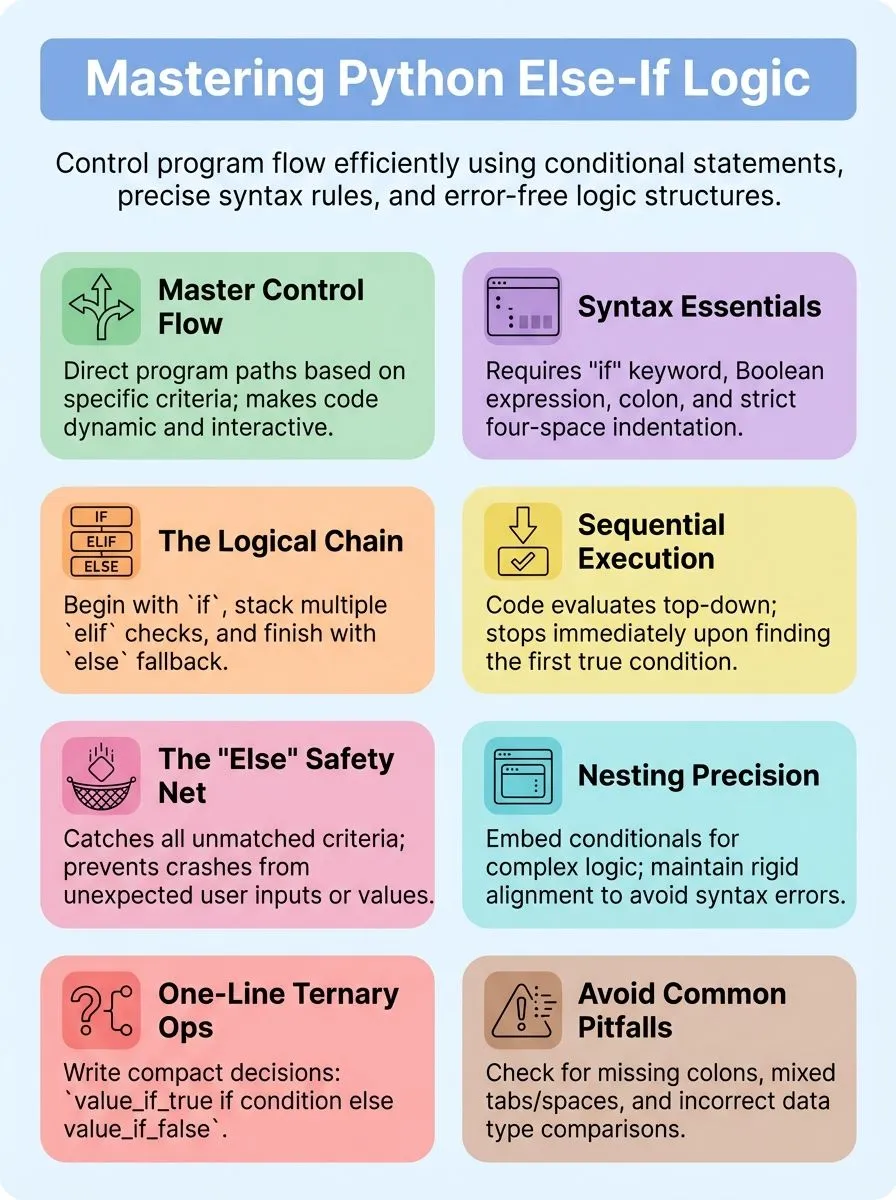
The if-else statement in Python acts as a decision-maker that tells your program which path to take based on specific conditions. This powerful control structure allows developers to create smart programs that respond differently when certain criteria are met or fail, making code more dynamic and interactive.
How does the if Statement work in Python?
Python’s if statement syntax starts with the “if” keyword, followed by a space and a Boolean expression, then ends with a colon (:). Code that belongs to the if statement gets indented on a new line.
This indentation tells Python which code block belongs to the if statement. Statements execute only when the expression evaluates to true.
Here’s how it works in practice: A user inputs their favorite programming language. If the input equals “Python”, the program prints a confirmation message. No output occurs if someone enters a different language.
This simple example shows how the if statement checks a specific condition and runs code only when that condition is met. The control flow moves to the next statement if the condition is false, making if statements perfect for creating programs that respond differently based on user input or data values.
What is the Syntax and Structure of if-elif-else Statements?
Python’s if-elif-else statements follow a clear pattern that makes code easy to read and understand. The structure starts with an initial if block, followed by one or more elif blocks, and ends with a final else block as fallback.
Each part serves a specific purpose: the if statement checks the first condition, elif statements handle additional conditions, and the else clause catches everything that doesn’t match.
Python evaluates conditions from top to bottom, executing only the first True condition it finds while ignoring all others.
The syntax requires specific formatting rules that programmers must follow. Each conditional statement begins with a keyword (if, elif, or else), followed by a condition and a colon.
The code block inside each statement must be indented properly, or Python throws an IndentationError that prevents execution. No code should appear between if and else statements, keeping the structure clean and logical.
This design allows developers to control the flow of their programs effectively, making decisions based on different scenarios while maintaining readable, organized code that handles multiple conditions with ease.
How do You Use Multiple Conditions with elif?
Building on the basic structure, elif statements allow programmers to check multiple conditions in sequence. Each elif statement provides a new condition to test if the previous conditions fail.
Python evaluates these conditions from top to bottom, stopping at the first condition that evaluates to true.
Consider this age verification example: if age < 18, the program prints a message to be over 18; if age < 21, it prints a message to be over 21; else, it prints approval. For input 14, the first condition triggers.
Input 19 activates the second elif condition. Input 45 reaches the final else block since none of the preceding conditions match. This control flow ensures only one block of code executes, making conditional statements more efficient and easier to read.
Nested if-else Statements Explained
Nested if-else statements let programmers place conditional statements inside other conditional statements, creating powerful decision trees that handle complex logic scenarios. Python programming allows developers to stack multiple layers of if-else blocks, where each inner statement executes only when its outer condition evaluates to true, making code more flexible and precise for handling intricate data processing tasks.
How do you use if-else inside another if-else?
Placing if-else statements inside other if-else statements creates nested conditional structures that check multiple layers of conditions. This technique allows developers to build complex decision trees that handle various scenarios with precision.
- Start with the outer if statement and indent all inner code blocks consistently – Python requires proper indentation for nested statements to work correctly, with each inner block moved four spaces to the right from its parent statement.
- Place the inner if-else statement inside the outer if block – The inner conditional statement executes only when the outer condition evaluates to true, creating a hierarchy of decision-making logic.
- Use consistent indentation levels for each nested layer – Each inner if-else must maintain the same indentation level within its parent block to prevent syntax errors and ensure proper code execution.
- Test multiple criteria by combining outer and inner conditions – The outer if statement checks the first condition, while the inner if-else examines additional criteria that depend on the first condition being met.
- Apply the same nesting principle to the outer else block – Inner if-else statements can also be placed within the outer else clause to handle alternative scenarios when the primary condition is false.
- Limit nesting depth to maintain code readability – Deep nesting with multiple layers makes code difficult to read and debug, so developers should consider alternative approaches for complex conditional logic.
- Ensure each nested block has proper closing structure – Every inner if-else statement must be completely contained within its parent block, with all statements properly aligned and indented according to Python syntax rules.
Why is proper indentation important in nested statements?
Proper indentation serves as Python’s backbone for nested statements because it tells the interpreter which code belongs to which block. Python requires exactly four spaces for each indentation level, and any deviation from this rule triggers SyntaxError or IndentationError messages.
Alex Herrick from Web Design Booth has seen countless developers struggle with nested if statements simply because they mixed tabs with spaces or used inconsistent spacing. The python if statement relies entirely on indentation to determine code structure, unlike other programming languages that use brackets or braces.
Nested if statement structures become unreadable and buggy without correct indentation patterns. IDLE’s automatic indentation feature can sometimes create confusion, especially when developers copy code from different sources with varying indentation styles.
Each inner else statement must align perfectly with its corresponding if statement, and the code will be executed only when Python can clearly identify which statements work together.
Indentation errors in nested structures can cause the wrong code blocks to execute, leading to unexpected results that are difficult to debug.
How Does Control Flow Work in if-elif-else Statements?
Control flow determines how Python executes your if-elif-else statements, moving through each condition until it finds one that evaluates to true. Python checks conditions from top to bottom, executing the first block where the condition is met and then skipping all remaining elif and else clauses.
How does the control flow operate in Python?
Python executes if-elif-else statements by checking each condition in order from top to bottom. The program stops checking as soon as it finds a condition that is true. This means Python never wastes time checking conditions that come after a true one.
The sequence of evaluation creates a clear path through the code.
Python’s control flow system makes decisions fast and smart. Each condition gets tested one by one until the program finds a match. Once a condition is true, Python runs that block of code and skips everything else in the chain.
If none of the conditions are true and no else clause exists, Python moves on without executing any code in that block. This logical flow keeps programs running smoothly and prevents errors from multiple conditions running at once.
What is the role of the else clause as a fallback?
The else clause serves as a fallback for when none of the preceding conditions are True. This statement acts like a safety net in conditional programming, catching all cases that don’t match specific requirements.
Think of it as the default option that runs when every other condition fails to meet the criteria.
Programmers use the else clause to handle unexpected inputs or provide default responses. For example, when checking user input, the else statement prints a default message when the input does not match any specific case.
This approach prevents programs from breaking or producing errors when users enter unexpected values. The else clause must be at the same indentation level as its corresponding if statement to work correctly.
How Can You Write Single-Line if-else Statements?
Single-line if-else statements offer a sleek way to write conditional code in Python 3. These compact expressions, also called ternary operators, let developers make quick decisions without multiple lines.
The syntax follows a simple pattern: `value_if_true if condition else value_if_false`. This structure puts the result first, then the condition, and finally the alternative. Python programmers find this format useful for simple checks that assign values or return results.
These conditional expressions can improve code readability for simple conditions, making programs cleaner and more efficient. For example, `status = “pass” if score >= 60 else “fail”` checks a test score and assigns the appropriate status in one line.
The statement is executed based on whether the specific condition is met. Developers can use comparison operators like greater than, equal to, or logical operators to create these compact decisions.
The true or false evaluation determines which value gets assigned to the variable.
What are Common Mistakes and Best Practices with if-elif-else?
Single-line if-else statements offer quick solutions, but complex conditional logic requires careful attention to detail. Python programmers often make simple errors that can break their code completely.
- Missing colons after conditional statements causes syntax errors. Python requires a colon after each if, elif, and else statement. The interpreter throws an error without this punctuation mark.
- Improper indentation breaks the code structure in Python. All statements within the same block need identical spacing. Mixed tabs and spaces create invisible errors that confuse beginners.
- Placing code between if and else statements violates Python syntax rules. The else clause must immediately follow the if block. Extra code in between creates parsing errors.
- Comparing input as integers instead of strings creates unexpected bugs. User input always returns string data type. Convert strings to integers using int() function for numeric comparisons.
- Using dictionaries to replace elif chains reduces code clarity for most developers. While technically possible, this approach makes debugging harder. Simple elif statements remain more readable for conditional logic.
- Forgetting to handle exception cases leads to program crashes. Use try-except blocks with else statements for error handling. The sys.exit() function terminates programs cleanly on critical conditions.
- Testing conditions in wrong order affects program flow control. Place specific conditions before general ones. Python evaluates conditions from top to bottom, stopping at the first true statement.
- Omitting the final else clause removes the fallback option. Include else statements to catch unexpected cases. This practice prevents silent failures in conditional logic.
What Are Examples of Advanced if-elif-else Usage?
Python developers often replace long elif chains with dictionary-based method dispatching. This approach proves especially useful in XML processing tasks, where John Machin’s techniques show how different blocks of code can handle various data streams efficiently.
The dictionary get method provides default values that eliminate the need for multiple conditional statements. This pattern allows programmers to map string keys directly to functions, creating cleaner and more maintainable code structures.
Machine learning applications showcase another powerful use case for advanced conditional logic. TensorFlow and PyTorch frameworks rely heavily on complex if-elif-else structures to manage model training workflows.
Web development projects using HTML, CSS, Angular, and Vue.js frameworks also benefit from sophisticated conditional patterns. Database management systems like MySQL, PostgreSQL, and MongoDB require intricate decision trees to handle different query types and data validation scenarios.
DevOps tools such as Docker and Kubernetes implement advanced conditional logic to manage container orchestration and deployment strategies across bioscience, data science, and technical services environments.
FAQs on Python if-elif-else Statements
Advanced usage examples demonstrate the power of conditional statements in real-world applications. Common questions arise when developers implement these control structures in their projects.
- What happens if you forget the colon after an if statement? Python throws a SyntaxError because the colon marks the start of a code block. Every conditional statement requires this punctuation mark to function properly.
- Can you use multiple elif statements in one conditional block? Python allows unlimited elif statements between the initial if and optional else. Each elif checks a different condition until one evaluates to true.
- Why does improper indentation cause errors in nested if-else statements? Python uses whitespace characters to define code blocks and scope. Incorrect spacing breaks the program structure and triggers indentation errors.
- What should you put in an empty else block? Use the pass statement when the else branch needs no action. This reserved word prevents syntax errors in empty code blocks.
- Do all if-elif-else chains need an else clause? The else clause remains optional in Python programming. Conditional statements work perfectly with just if and elif branches.
- Can you combine boolean data types with comparison operators in conditions? Python evaluates complex expressions using truth values and logical operators. Multiple conditions create more sophisticated decision-making logic.
- What executes when no conditions match in an if-elif chain without else? Python skips the entire conditional block and continues to the next statement. The program moves forward without executing any conditional code.
- How do single-line if-else statements differ from regular blocks? Ternary operators compress simple conditionals into one line using a different syntax structure. These work best for basic variable assignments.
Conclusion
Python’s if-elif-else statements give programmers complete control over their code’s behavior. These conditional statements form the backbone of every successful program, letting developers create smart applications that respond to different situations.
Mastering these tools opens doors to building everything from simple calculators to complex web applications. Tech enthusiasts who practice these concepts will find themselves writing cleaner, more efficient code that handles multiple scenarios with ease.
FAQs
1. What is the Python if else statement and how does it work?
The Python if else statement is a conditional statement used to check if a given condition is true or false. If the first statement is true, the code is executed; if the statement is false, Python will move on to the next block. This conditional programming allows your computer program to make decisions based on different conditions.
2. How do you write an if-else statement to check multiple conditions in Python 3 programming?
You can use another if statement called “elif” to check multiple conditions in your Python modules. The syntax requires a colon after each conditional statement, and the code block must be properly indented. This allows for more complex decision-making in your Python classes and functions.
3. When should you use conditional statements in Python programming language compared to other languages like JavaScript or Java?
Conditional statements allow programmers to control program flow in Python, just like in JavaScript, Java programming language, or C programming language. Python’s syntax is cleaner than languages like C Sharp or TypeScript because it uses simple keywords and colons instead of complex brackets. The statement will execute based on whether x is greater than 5 or x is equal to a specific value.
4. What happens when the first statement in a Python conditional is false?
The computer program skips the first code block and checks the next condition. If that statement is also false, Python continues down the chain until it finds a true condition or reaches the final else block. This process helps your program handle different scenarios effectively.
5. Can you use Python if else statements with data analysis tools like Pandas software and NumPy?
Yes, conditional statements work perfectly with Python reference libraries like Pandas and NumPy for data analysis. You can check conditions on data variables, filter information in associative arrays, or process data in Microsoft Excel-like operations. This makes Python ideal for complex data tasks compared to simpler tools like AngularJS.
6. How do Python conditional statements compare to similar features in Swift programming language or Kotlin?
Python’s conditional syntax is simpler than Swift programming language or Kotlin because it uses plain English keywords. While languages like Rust programming language or TypeScript require more complex syntax, Python lets you write “if x is greater than 5” in a very readable way. The statement is used across all programming languages, but Python makes it easiest to understand.
