

**Python Project Structure: Best Practices for Effective Layout and Organization**
Many developers struggle with messy Python projects that become hard to manage over time. A well-planned python project structure can make or break a project’s success, especially as complexity grows and teams expand.
Poor folder structure leads to import errors, confused team members, and code that breaks when moved between systems. Smart project layout saves hours of debugging and makes code easier to read, test, and share with others.
Alex Herrick brings over ten years of industry experience in designing clean, functional systems that work well for both small scripts and large applications. His expertise in creating organized, scalable solutions helps developers avoid common pitfalls that plague Python projects.
The right structure turns chaotic code into professional, production-ready software. Ready to transform your Python projects?
Key Takeaways
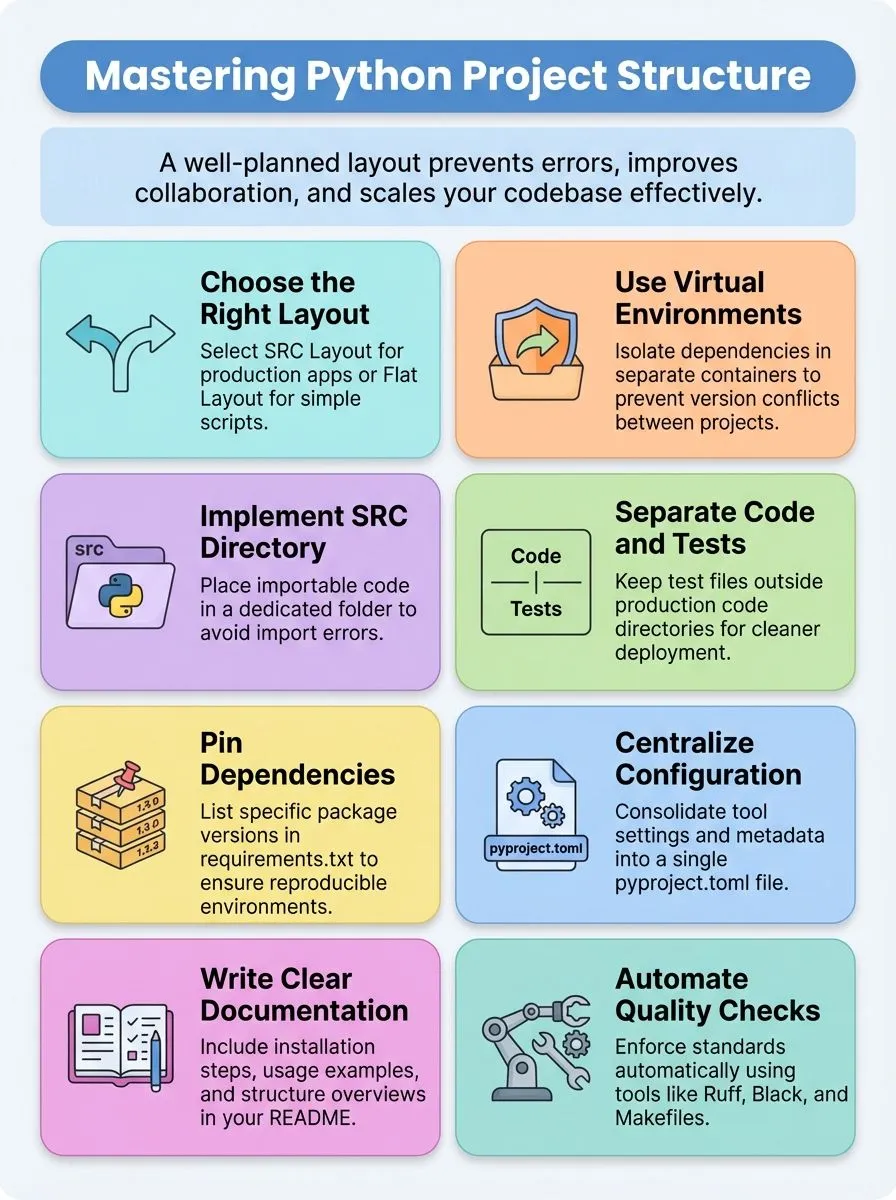
- Smart Python project structure prevents import errors, reduces debugging time, and makes code easier to read and share with team members.
- SRC layout places importable code in dedicated src/ directory, preventing packaging mistakes and enforcing better coding discipline for professional development.
- Virtual environments isolate project dependencies, preventing version conflicts between different projects and supporting clean automation workflows through make commands.
- Essential project components include setup.py or pyproject.toml for configuration, requirements.txt for dependencies, and separate tests/ directory for clean development.
- Tools like Ruff, Black, Pytest, and pre-commit hooks automatically maintain code quality and enforce consistent project structure across development teams.
Why is a well-organized Python project structure important?

A cluttered or confusing repository structure deters users and contributors at first glance. Joshua Correos from Web Design Booth has witnessed countless Python projects fail simply because developers couldn’t navigate the codebase effectively.
Project layout directly impacts collaboration and long-term usability for all team members, making it as crucial as the actual programming logic itself. Teams waste hours searching for files, debugging broken imports, and trying to understand where new features belong in a messy directory structure.
Repository structure stands equal to code style, API design, and automation in terms of project success. The codebase resembles a shared kitchen: walk-in friendly, no mystery, smooth hand-offs, easy debugging and testing, plus scalable growth.
A clear, repeatable folder structure prevents broken imports and chaos as the project grows larger. Data scientists and data engineering teams especially benefit from organized Python modules because their projects often involve complex pipelines, multiple configuration files, and various data sources that need systematic organization.
Common Python project layouts explained
Python developers face a critical choice when setting up their project directory. Two main approaches dominate modern python development, each serving different project needs and team preferences.
What is the “src” layout and why use it?
The SRC layout represents a modern python project structure that places all importable code inside a dedicated src/ directory. This approach creates a clear separation between source code and other project files like tests, documentation, and configuration files.
The typical SRC layout includes a project root directory containing src/, my_package/, __init__.py, and subdirectories like api/, data/, models/, and utils/. This structure prevents import hell and enforces package discipline by keeping all core code in a defined location rather than scattered throughout the project directory.
Clean code always looks like it was written by someone who cares. – Robert C. Martin
Four key benefits make the SRC layout essential for serious python development projects. First, it prevents import errors that plague flat layout structures. Second, it enforces coding discipline by requiring developers to properly organize their modules and packages.
Third, it enables cleaner installs and uninstalls, reducing the risk of residual files cluttering the system. Fourth, it scales exceptionally well, supporting easy addition of subpackages and modular components as projects grow.
The extra folder adds minor complexity, but organizational benefits far outweigh this small inconvenience. Production teams and long-term projects benefit most from this maintainable structure that keeps code bases clean and professional.
When should you choose a flat layout?
Flat layout suits small projects perfectly. Quick demos and scripts work well with this approach. All code stays at the top level, making rapid prototyping easy. Beginners can start coding right away without complex folder structures.
Single python file projects benefit from this simple setup. Command-line tools and basic scripts need minimal organization.
Temporary projects and learning exercises fit flat layout best. Students exploring the basics of python find this structure helpful. Single-use scripts don’t require elaborate organization.
Quick experiments and proof-of-concept work shine with flat layouts. The python interpreter can access files directly without complex import paths. This setup keeps things simple for short-term coding tasks and educational purposes.
Best practices for structuring Python projects
Smart Python developers know that good project structure makes coding faster and easier. These proven practices help teams build better software that works well and stays organized over time.
How do virtual environments improve project structure?
Virtual environments act like separate containers for each Python project. They keep dependencies isolated from each other and prevent version conflicts between different projects.
Conda and Mamba tools make this process simple by creating these isolated spaces automatically. Each project gets its own set of packages without interfering with others.
Virtual environments support multiple dependency versions across different projects.
These isolated spaces help prevent conflicts between global and project-specific packages. The ‘make install’ command sets up dependencies and creates virtual environments automatically.
Editable installs through pip ensure local changes show up right away in the environment. Running ‘make install’ after cloning a repository fixes import errors by putting dependencies in the right place.
This setup supports automation and continuous integration workflows perfectly.
Why create a dedicated `src` directory?
Creating a dedicated src directory transforms project organization from chaos to clarity. The src layout prevents accidental imports from the project root, avoiding “import hell” that plagues many Python developers.
This approach enforces packaging discipline and creates clear separation between code and project configuration files. Placing importable code in src/ ensures that only code inside src/ gets packaged and installed, reducing clutter and confusion during deployment.
The src directory structure helps prevent packaging mistakes, such as including unnecessary modules or missing critical files. This setup simplifies navigation and makes it easy to identify where core business logic resides.
Teams can quickly locate specific functionality within the sample src layout that includes src/my_package/ with subdirectories for api/, data/, models/, and utils/. Cleaner installs and uninstalls become possible when code stays isolated in a dedicated src directory.
The src directory structure scales well for larger projects and growing codebases, making it an essential practice for professional Python development.
How to separate code and tests effectively?
Tests should be placed in a dedicated ./tests/ directory, separate from src or core code. This approach prevents test code from being packaged or deployed with production code. Test files import the main module for isolated and controlled testing.
Joshua Correos has seen countless Python projects fail because developers mixed their test modules with production files and folders. The structure supports unit, integration, and end-to-end tests in clearly defined locations.
A context file (tests/context.py) can be used to manage imports and test environment setup. This file helps configure the working directory and handles dependency management across different test scenarios.
Test data and cache directories like .pytest_cache/ should be cleared regularly to avoid stale data issues. The template repo includes a sample tests/ directory for quick onboarding.
CI automation runs tests in the tests/ directory using make commands, which streamlines the entire testing workflow.
Configuration files play a crucial role in maintaining this separation.
What should be included in a `README` and documentation?
A solid README file serves as the front door to any Python project. Clear documentation helps new users and contributors understand the project quickly.
- Project title and brief description – State what the project does in simple terms. Include the main purpose and key features in one or two sentences.
- Installation instructions – Provide step-by-step setup commands. Include requirements.txt details and virtual environment setup for smooth installation.
- Usage examples – Show basic code snippets that demonstrate core functionality. Include sample input and expected output for clarity.
- Project structure overview – Explain the main directories and their purposes. Mention where to find source code, tests, and configuration files.
- Requirements and dependencies – List Python version compatibility and required packages. Reference the requirements.txt file for complete dependency management.
- Contributing guidelines – Outline how others can help improve the project. Include coding practices, style guide preferences, and pull request procedures.
- License information – Specify the project license type clearly. This helps users understand usage rights and restrictions.
- Contact details – Provide ways to reach the project maintainers. Include email addresses or links to issue trackers for support.
- Automation commands – Document common workflows like ‘make install’ and ‘make test’. These shortcuts help developers work more efficiently.
The docs/ directory structure plays an equally important role in comprehensive project documentation.
Key components of a Python project structure
Every Python project needs essential files and directories that work together like a well-oiled machine. These core components create a solid foundation that makes your code easy to manage, share, and deploy across different environments.
What roles do `setup.py` and configuration files play?
The setup.py file serves as the command center for package management and distribution settings. Located at ./setup.py, this file handles entry points, dependencies, and metadata that make packaging possible.
Joshua Correos has seen countless projects fail because developers skip this crucial step, leaving their code scattered and hard to install. The setup.py file defines how others can install and use your python package, making it essential for any serious development work.
Modern Python projects now embrace pyproject.toml as the new standard for configuration management. This single file consolidates settings for tools like Black, Ruff, and Pytest, eliminating the need for multiple configuration files cluttering your directory.
Projects using current Python packaging standards can skip setup.py entirely and rely on pyproject.toml instead. This approach creates cleaner builds and ensures consistent installs across different environments.
Configuration files support automation through Makefile tasks and CI/CD pipelines, making your development workflow smoother and more reliable.
How to use `requirements.txt` for managing dependencies?
Setup.py and configuration files handle project metadata and build settings, but dependency management needs a different approach. The requirements.txt file serves as the cornerstone for tracking all external packages your Python project needs to function properly.
Joshua Correos has seen countless projects fail because developers skip this crucial step in their workflow. This simple text file lives at the top-level directory of your project and lists every dependency with specific version numbers.
Teams can reproduce identical environments by running ‘pip install -r requirements.txt’, which eliminates the frustrating “it works on my machine” problem. The file supports pinning dependency versions for reproducibility, ensuring your data science projects run consistently across different computers.
CI/CD pipelines reference this file for automated testing and deployment, making it essential for professional development workflows. Projects can organize multiple requirement files in a dedicated requirements/ directory, separating base, dev, and prod dependencies for different deployment targets.
How to organize modules and packages properly?
Smart module organization makes Python projects easier to read and maintain. Joshua Correos has seen countless projects fail because developers stuff too much code into single files or create confusing directory structures.
A package is a directory containing an __init__.py file, which tells Python to treat that folder as a package. Module names should be short, lowercase, and avoid special symbols. Underscores are permitted but should be used sparingly.
Prefer submodules to underscores for clearer structure and organization.
Keep __init__.py files empty unless absolutely necessary. Too much code in __init__.py can slow imports as the project grows. Everything in Python is an object: functions, classes, strings, and types.
Python’s import system isolates modules, preventing unwanted overrides and promoting modularity. Use explicit imports like ‘from modu import func’ or ‘import modu’ for clarity and maintainability.
This approach prevents spaghetti code and creates clean interfaces between different parts of the codebase. Importing ‘pack.modu’ runs top-level code in the package’s __init__.py, so developers must be careful about what initialization code they include.
What tools can help maintain and enforce project structure?
Joshua Correos has seen countless Python projects fail due to poor organization and structure. Smart developers use specific tools to keep their code clean and their projects running smoothly.
- Ruff serves as a lightning-fast linting tool that catches code quality issues and enforces style guidelines across the entire project structure.
- Black automatically formats Python code to maintain consistent styling throughout all files in the directory system, eliminating debates about code appearance.
- Pytest runs comprehensive test suites from the tests/ directory, ensuring all modules and packages work correctly before deployment to PyPI.
- Pre-commit hooks activate with ‘pre-commit install’ command, enabling automatic formatting and type-checking on every version control commit.
- Makefile automation streamlines workflows with simple commands like ‘make install’, ‘make lint’, and ‘make test’ for efficient project management.
- GitHub Actions workflows integrate into .github/workflows/ directory, providing automated quality assurance through CI/CD processes for version-controlled projects.
- Sphinx documentation generator creates professional documentation from docstrings and Markdown files, making projects more accessible to other developers.
- Requirements.txt management tracks all project dependencies, ensuring consistent environments across different machines and deployment scenarios.
- Virtual environment tools isolate project dependencies from system-wide Python installations, preventing conflicts between different programming language versions.
These automation tools work together to create a solid foundation for any Python project structure and development workflow.
Conclusion
Smart Python project structure makes coding easier and more fun. Developers who follow these best practices create code that others can read and use. Clean organization saves time during debugging and helps teams work together better.
A well-planned directory layout with proper requirements.txt files and clear readme.md documentation attracts more contributors. Tools like virtual environments and structured modules keep projects running smoothly.
Teams that invest time in good project structure build software that lasts longer and grows faster.
For more information on getting your Python environment set up, check out our guide on how to install Python on Ubuntu.
FAQs
1. What is the best way to structure a Python project for beginners?
The best way to structure a Python project starts with creating a main.py file as your entry point. Create separate folders for your modules and include a readme.md file to explain your project. This approach makes your code easier to read and maintain.
2. How should I organize computer files and directories in my Python project?
Place related code in a package structure using the directory system. Keep various configuration files in a separate config folder, and store your main execution files at the root level. This file system approach helps with modular programming and keeps everything organized.
3. What role does main.py play in Python project execution?
The main.py file serves as the primary entry point for execution in your Python language project. It controls the program’s control flow and connects different modules together. Think of it as the starting point that ties all your code together.
4. How do package managers work with Python project structure?
Package managers need a clear directory structure to work properly with your Python programming language projects. They look for specific configuration files and understand how your modules connect through the interface system. A well-organized structure makes package management much simpler.
5. Why should I use modular programming in my Python projects?
Modular programming breaks your code into smaller, manageable pieces that work like building blocks. Each module handles specific functions, making your project related code easier to debug and update. This approach also helps with namespace management and keeps your dictionary of functions organized.
