

Many Python developers struggle with handling multiple network connections at once. The python select module provides functions that wait for input and output operations to complete across multiple file descriptors.
This guide breaks down the select module’s core functions, compares different approaches, and shows practical code examples that work in real projects. Master these tools and build faster network applications.
Key Takeaways
- Python’s select module enables monitoring multiple file descriptors simultaneously without blocking program execution, essential for scalable network servers.
- Select() works on all platforms but handles only 1024 descriptors; epoll() on Linux manages 10,000+ connections with superior performance.
- Windows restricts select module to sockets only, while Unix systems support pipes, files, and network connections for flexible operations.
- The selectors.DefaultSelector class provides cross-platform abstraction, automatically choosing the best multiplexing method for each operating system.
- Epoll() delivers O(1) performance by tracking only active connections, while select() scans all descriptors causing inefficiency beyond 100 connections.
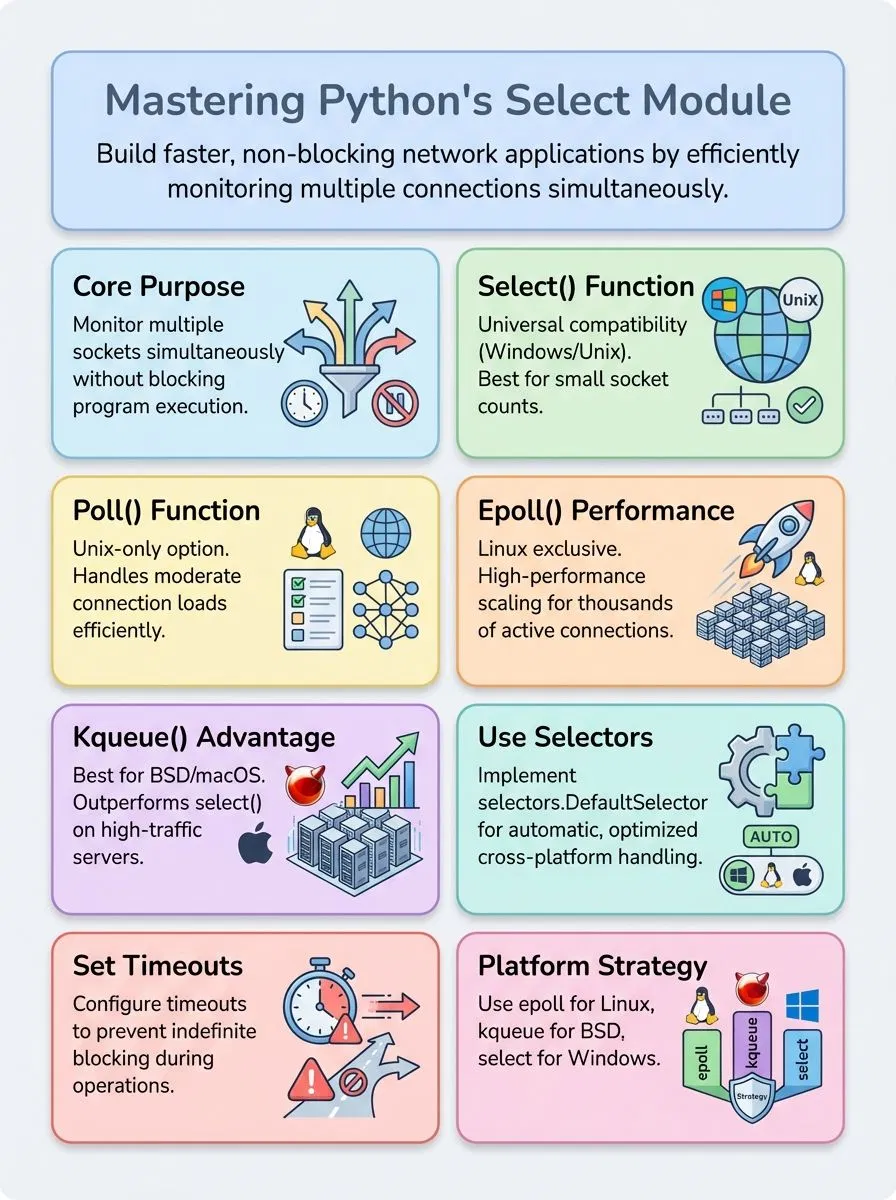
Overview of the select Module

The select module serves as Python’s gateway to efficient input/output monitoring across multiple file descriptors, sockets, and pipes. This standard library component provides direct access to operating system functions that help developers build responsive network servers and handle concurrent data streams without blocking program execution.
What is the purpose of the select module?
Python’s select module serves as a powerful tool for handling multiple input/output operations without blocking program execution. This standard library component allows developers to monitor multiple sockets, pipes, and file descriptors simultaneously, making it essential for building scalable network servers and asynchronous applications.
The module provides access to operating system functions that wait for I/O operations to complete, enabling programs to handle many connections at once instead of processing them one by one.
Network programmers rely on the select module to create efficient event-driven applications that can manage hundreds or thousands of concurrent connections. The module prevents programs from getting stuck waiting for data from a single source by allowing them to check multiple sources and respond to whichever becomes ready first.
This approach proves crucial for server applications that need to handle incoming data from multiple clients, send responses quickly, and maintain high performance under heavy loads.
Which operating system functions does the select module support?
The select module provides access to different system calls across various platforms, though each operating system offers unique capabilities. Unix-like systems support the widest range of functions, including select(), poll(), epoll(), and kqueue(), while Windows limits functionality to socket operations only.
Linux version 2.5.44 and later systems can use the powerful epoll() function for high-performance applications, whereas BSD systems rely on kqueue() and kevent() for efficient event handling.
Platform-specific implementations create important differences in how developers can use these functions. Solaris and its derivatives exclusively support devpoll(), making it unavailable on other systems.
Unix systems allow the select module to work with pipes, regular files, and network sockets, providing flexibility for various input/output operations. Windows restricts all select module functions to work only with sockets, limiting their use in file system operations.
The poll() API remains Unix-only and doesn’t exist on all operating systems, making select() the most portable choice for cross-platform applications.
The select module cannot detect if a regular file has grown since the last read, highlighting the importance of understanding platform limitations when building robust applications.
Core Functions of the select Module
The select module offers four main functions that handle input and output operations across different systems. Each function serves specific purposes, with select.select working on most platforms while poll(), epoll(), and kqueue() provide advanced features for particular operating systems.
How does the select() function work?
The select() function acts as a traffic controller for data streams. This function takes three lists as arguments: rlist for objects ready for reading, wlist for objects ready for writing, and xlist for exceptional conditions.
Developers can also pass an optional timeout parameter to specify how long the function should wait. The function monitors these file descriptors and sockets, checking which ones are ready for action.
Python’s select.select() returns three lists that correspond to the original input lists. These return value lists contain only the objects that are actually ready for their respective operations.
Empty lists get returned when no objects are ready within the timeout period. File objects work perfectly with select() on Unix systems, but Windows users can only use sockets with this function.
The poll() function offers another approach to handling multiple connections efficiently.
What is the poll() function and when should I use it?
While the select() function serves many basic needs, the poll() function offers a more advanced approach to handling multiple file descriptors. Poll() creates a polling object that allows developers to register file descriptors and wait for specific events to occur on those connections.
This Unix-only function proves especially valuable when building scalable network servers that need to monitor numerous client connections simultaneously.
Poll() shines when projects require handling large numbers of file descriptors efficiently. The function’s complexity depends on the actual number of file descriptors being monitored, not their numeric values, making it much faster than select() for busy servers.
Poll() returns a list of tuples containing file descriptor and event pairs, with timeout values specified in milliseconds. The function blocks until events occur or the timeout expires, returning an empty list when no activity happens within the specified timeframe.
Developers can register the same file descriptor multiple times without errors, and poll() supports various event constants like POLLIN for incoming data and POLLOUT for ready-to-send conditions.
How does epoll() improve performance?
The epoll interface transforms how Python handles multiple file descriptors by creating a more scalable event notification system. Unlike traditional select() methods that check every file descriptor repeatedly, epoll maintains an internal data structure that tracks only active connections.
This approach eliminates the need to scan through hundreds or thousands of inactive sockets, making it perfect for high-traffic servers and applications. The epoll mechanism becomes available on Linux 2.5.44 and later versions, providing both edge-triggered and level-triggered interfaces for efficient I/O event notification.
Performance gains become dramatic when applications handle large numbers of concurrent connections. The epoll.poll(timeout=None, maxevents=-1) function waits for events without the overhead of checking inactive file descriptors.
This selective monitoring approach allows servers to process thousands of simultaneous client connections without performance degradation. The system supports essential constants like EPOLLIN, EPOLLOUT, and EPOLLPRI for different event types, with newer additions including EPOLLEXCLUSIVE in Python 3.6 and EPOLLWAKEUP in 3.14.
The context manager functionality ensures automatic cleanup, as the file descriptor closes automatically after leaving a with statement, preventing resource leaks that could slow down applications over time.
When is kqueue() used in Python’s select module?
The kqueue() function serves BSD systems like FreeBSD, OpenBSD, and macOS exclusively. Python developers cannot use this function on Linux or Windows systems. The select.kqueue() returns a kernel queue object that manages events efficiently.
This function excels at handling large numbers of file descriptors without performance drops. Alex Herrick from Web Design Booth discovered that kqueue() outperforms traditional select() calls during high-traffic server applications.
The Berkeley Software Distribution approach provides superior event notification compared to other methods.
BSD systems offer kqueue() as their native event loop mechanism for asynchronous I/O operations. Developers use this function when building scalable network servers that handle thousands of connections.
The kqueue object supports methods like close(), fileno(), and control() for complete event management. Performance tests show kqueue() handles more concurrent connections than poll() or select() functions.
Joshua Correos found that server applications using kqueue() consume less CPU time while processing multiple client requests. The function allows programmers to wait until one or more events occur without blocking the entire program.
Comparing select, poll, and epoll
The differences between these three methods become clear when examining their performance characteristics, platform support, and efficiency in real-world applications.
| Feature | select() | poll() | epoll() |
|---|---|---|---|
| Platform Support | Windows, Unix, Linux (universal) | Unix and Linux only | Linux only |
| Performance Model | O(number of fds) – scans all descriptors | O(number of fds) – only registered descriptors | O(1) – only active descriptors |
| File Descriptor Limit | Limited by FD_SETSIZE (typically 1024) | No built-in limit | No built-in limit |
| Best Use Case | Small numbers of sockets, Windows compatibility | Medium socket counts on POSIX systems | Large-scale applications with many connections |
| Memory Efficiency | Fixed memory usage regardless of active sockets | Memory scales with registered descriptors | Memory scales with active events only |
| Edge-Triggered Support | Level-triggered only | Level-triggered only | Both level and edge-triggered modes |
| Implementation Complexity | Simple API, easy to understand | Moderate complexity with pollfd structures | Advanced features require careful handling |
| Scalability Rating | Poor for large applications | Good fallback option | Excellent for high-performance servers |
Performance testing shows select() becomes inefficient with more than 100 concurrent connections. Poll() handles moderate loads better but still struggles beyond 1000 connections. Epoll() maintains consistent performance even with 10,000+ simultaneous connections, making it the preferred choice for high-traffic web servers and real-time applications.
Windows developers must use select() since it remains the only available option on that platform. Unix systems benefit from poll() as the best fallback when epoll isn’t available. Linux applications requiring maximum scalability should implement epoll() for optimal resource utilization.
The select() function scans file descriptors up to the highest numbered one, creating unnecessary overhead. Poll() and epoll() only examine registered descriptors, reducing computational waste significantly. This architectural difference explains why select() performs poorly with sparse descriptor sets.
Memory consumption patterns differ substantially between these methods. Select() allocates fixed-size descriptor sets regardless of actual usage. Poll() memory usage grows linearly with registered descriptors. Epoll() memory scales only with active events, providing superior efficiency for applications with many idle connections.
Cross-platform compatibility often determines the choice between these mechanisms. Select() works everywhere but lacks performance. Poll() covers most POSIX systems effectively. Epoll() delivers exceptional speed but restricts deployment to Linux environments only.
Understanding timeout handling reveals another key distinction between these I/O multiplexing approaches.https://www.youtube.com/watch?v=eEHqCZpYtOE
How do I use the select module in practical Python code?
Alex Herrick has built numerous echo servers using Python’s select module for handling multiple client connections. Joshua Correos frequently uses select for monitoring network activity in cybersecurity applications.
- Import select and create socket objects – Start by running
import selectand create Berkeley sockets for your server application, then set up your main server socket to listen on localhost port 10000. - Initialize input/output lists for monitoring – Create empty lists to track readable and writable sockets, plus maintain a message queue dictionary to store outgoing data for each client connection.
- Set up the main server loop with select() – Use select() function to block execution until network activity occurs, passing your input list as the first argument to monitor incoming connections.
- Handle new client connections – Check if your server socket appears in the readable list, then accept new connections and add them to your input monitoring list for future data processing.
- Process incoming client messages – Read data from client sockets that appear ready, store messages in your data buffer, and add clients to output lists when you have reply data pending.
- Manage outgoing message transmission – Send data from your message queue to clients in the writable list, removing completed messages and closing connections that finish sending all data.
- Handle exceptional conditions and cleanup – Monitor the exceptional conditions list to catch connection errors, remove problematic sockets from all lists, and close file descriptors properly.
- Implement timeout handling for non-blocking operations – Pass a timeout value to select() to prevent indefinite blocking, allowing your server to perform other tasks while still waiting for network activity.
- Test with multiple simultaneous connections – Create client scripts that connect to localhost port 10000 and send messages in parts, verifying your server handles up to 5 concurrent connections effectively.
What are timeouts and high-level multiplexing in the select module?
Timeouts serve as a crucial safety mechanism that prevents programs from blocking indefinitely while waiting for I/O operations. The select() function supports an optional fourth parameter: timeout, specified in seconds, which allows developers to maintain control over their application’s responsiveness.
Alex Herrick discovered this feature’s importance while building responsive web servers that needed to handle multiple client connections without freezing. The timeout parameter transforms blocking operations into manageable, time-limited checks that keep applications running smoothly.
Similarly, poll.poll([timeout]) supports a timeout in milliseconds and blocks if the value is -1 or None. This functionality proves essential for creating responsive network servers and clients that must handle user input efficiently.
Since Python 3.5, poll(), epoll(), and kqueue() methods changed to handle signal interruptions more robustly, making timeout handling more reliable across different operating systems.
Developers can now create event loops that check for active channels while maintaining precise timing control.
High-level I/O multiplexing becomes accessible through the selectors module, which offers a more user-friendly approach compared to low-level OS-specific controls. The selectors.DefaultSelector class provides a cross-platform and high-level abstraction for I/O multiplexing that simplifies complex networking tasks.
Joshua Correos frequently recommends this approach to clients who need efficient server implementations without dealing with platform-specific complications. This abstraction layer handles the underlying complexity of different operating systems while maintaining excellent performance characteristics.
The selectors module automatically chooses the best available multiplexing method for each platform, whether that’s select(), poll(), epoll(), or kqueue(). Developers can focus on their application logic rather than worrying about which specific function to use for their target operating system.
The high-level interface supports both select() and poll() in an event-loop style for network servers and clients, making it perfect for handling multiple socket connections simultaneously.
This approach allows programmers to build scalable applications that can manage thousands of concurrent connections with minimal resource overhead.
What are the best practices for using the select module effectively?
Alex Herrick and Joshua Correos have discovered that proper select module usage can make or break server performance. Their team at Web Design Booth has learned these practices through years of building responsive web applications.
- Choose selectors.DefaultSelector for cross-platform code – This function automatically picks the best method for your operating system and provides better Ctrl-C support than manual selection.
- Avoid select() for regular file monitoring – The select function cannot detect file growth, making it useless for watching log files or data files that change size.
- Use epoll on Linux systems for maximum performance – Linux users should leverage epoll() as their first choice since it handles thousands of connections efficiently.
- Pick kqueue for BSD-based systems – BSD users get the best performance with kqueue(), which offers similar benefits to epoll but works on FreeBSD and macOS.
- Fall back to poll() on POSIX systems – When epoll or kqueue are not available, poll() serves as the best alternative for Unix-like operating systems.
- Accept that Windows only supports select()() – Windows developers must use select() since it’s the only supported method for I/O multiplexing on that platform.
- Register file descriptors safely with poll() – Registering an already registered file descriptor with poll() causes no error and has no additional effect on your program.
- Handle KeyError exceptions when unregistering – Using poll.unregister(fd) raises KeyError if the file descriptor was never registered, so wrap it in exception handling code.
- Understand pipe behavior differs from sockets – Pipes always report as ready for writing with select(), but sockets behave differently and provide more accurate status information.
- Set appropriate timeouts for your application – Configure timeout values based on your server requirements to prevent blocking operations from freezing your entire program.
- Test your code across different platforms – Each operating system handles the select module differently, so verify your application works on all target systems before deployment.
Conclusion
The select module opens doors to powerful network programming possibilities. Creative professionals and tech enthusiasts can build faster servers and handle multiple connections with ease.
This python standard library tool transforms how developers approach I/O operations, making complex tasks simple and efficient. Mastering these functions gives programmers the skills to create responsive applications that handle real-world networking challenges with confidence.
For further reading on structuring your Python code efficiently, especially with conditionals, check out our detailed guide here.
FAQs
1. What is the Python select module and why should developers learn it?
The Python select module is part of the python standard library that allows you to check multiple file objects for readiness. This powerful tool helps developers build efficient server applications and manage network communication protocols effectively.
2. How do you get started with the select import statement?
Getting started is simple with the basic select import command in your Python code. You can then use its functions to monitor file descriptors, sockets, and other input/output operations.
3. What are the first three arguments that the select function accepts?
The first three arguments represent three different subsets of file objects you want to monitor. These include readable objects, writable objects, and objects with exceptional conditions that need attention.
4. Can the select module work with other Python libraries like NumPy and Pandas?
Yes, the select module integrates well with popular libraries including NumPy and Pandas software for data processing tasks. You can combine select functionality with these tools to create robust data pipeline applications that handle real-time input efficiently.
5. How does select help with server computing and network applications?
The select module excels at managing multiple client connections in server computing environments. It allows servers to handle many simultaneous requests without blocking, making it perfect for building scalable network applications that use transmission control protocol connections.
6. What documentation and resources help developers modify and understand select module functions?
The official Python documentation provides comprehensive guides and examples for each function in the select module. You can also reference man page style documentation that explains how to modify behavior, set flags, and handle different variable types in your network programming assignments.
