
Many aspiring coders wonder what can Python be used for and feel overwhelmed by the endless possibilities this programming language offers. Python stands as one of the most popular programming languages worldwide, powering everything from Netflix recommendations to Instagram’s photo-sharing platform.
This guide breaks down Python’s practical applications into simple, digestible sections that help beginners understand where they can apply their coding skills in real-world projects.
Time to explore Python’s amazing potential.
Key Takeaways
- Python powers major platforms like Netflix and Instagram while offering versatile applications from web development to artificial intelligence.
- Django and Flask frameworks enable beginners to build websites quickly, with Django handling complex features and Flask offering lightweight control.
- Python excels at data analysis through Pandas and Matplotlib libraries, creating visual reports and charts from spreadsheets and databases.
- Machine learning becomes accessible with TensorFlow and Scikit-learn, allowing developers to build AI models and predictive analytics systems easily.
- Python automates repetitive tasks like file organization, email management, and data processing, saving hours of manual work daily.
Python for Web Development

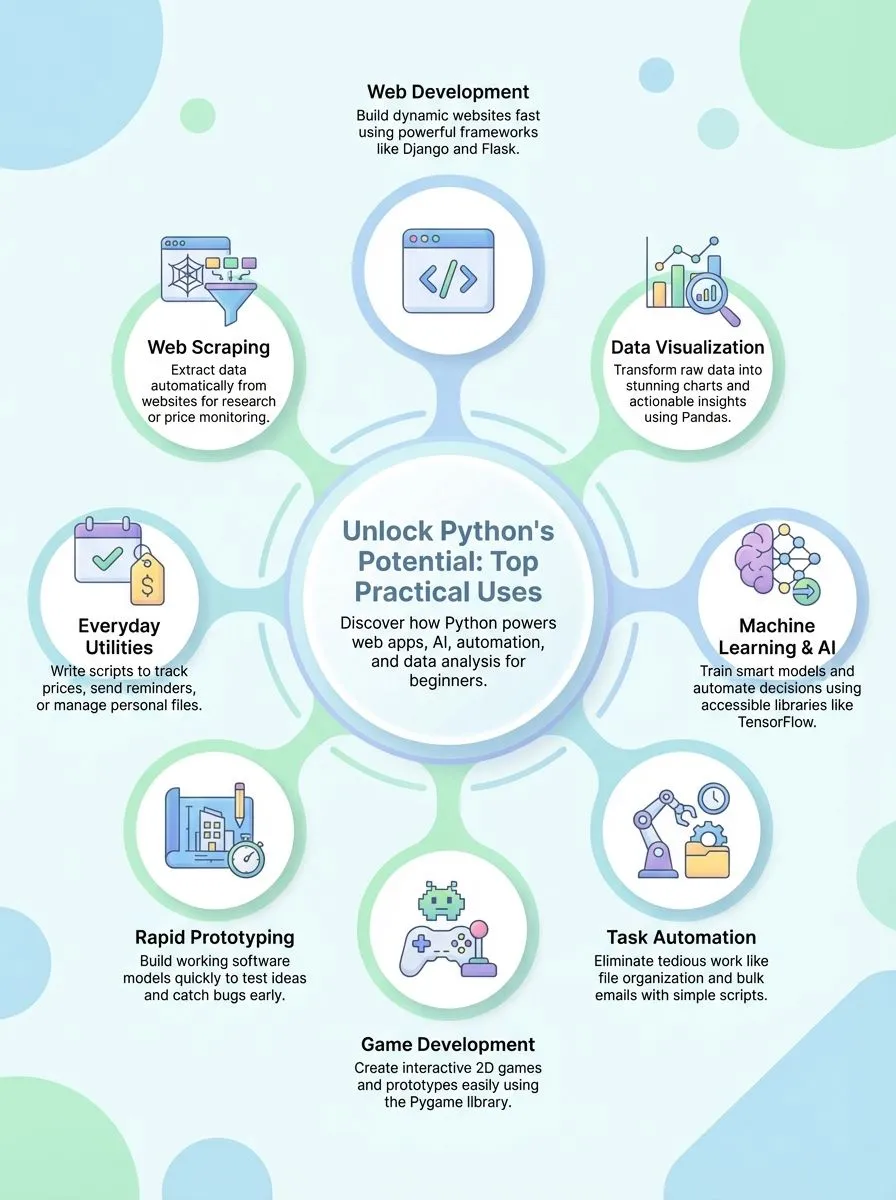
Python transforms how developers create websites and online applications. This versatile programming language offers powerful frameworks that make building web applications faster and simpler than traditional methods.
Django stands out as a comprehensive web framework that handles everything from user authentication to database management. Flask provides a lightweight alternative for developers who prefer more control over their project structure.
Both frameworks enable programmers to write clean, maintainable code that powers millions of websites across the internet. Python’s simple syntax makes web development accessible to beginners while offering advanced features that satisfy experienced developers.
How do you build websites using Django?
Django stands as one of the major web development frameworks in Python, making it perfect for creative professionals who want to build powerful websites. This framework helps developers create custom web applications quickly and efficiently.
Django handles the complex server-side tasks, so developers can focus on creating amazing user experiences. The framework supports everything from simple blogs to complex e-commerce sites.
Python developers use Django to handle server communication and data processing for web applications with ease. The framework’s modular structure allows for rapid development and efficient management of website components.
Django works great for full-stack engineers and back-end engineers because it includes features like URL routing and built-in security measures. Developers can build web applications that connect to databases, process user data, and deliver dynamic content to visitors across different devices.
What are the basics of creating web apps with Flask?
Flask stands out as a lightweight Python framework that gives developers complete control over their web applications. This flexible tool allows programmers to build custom solutions without the heavy structure of larger frameworks like Django.
Flask works perfectly for quick prototyping and simple web apps where developers want to choose their own components. The framework requires minimal setup, making it ideal for beginners who want to learn web development fundamentals.
Flask is commonly used in roles where quick prototyping or custom solutions are necessary.
Developers can create their first Flask app with just a few lines of code. The framework handles routing, which means it connects web addresses to specific functions in the code. Flask also manages templates, allowing developers to create dynamic web pages that change based on user input or data.
Python programmers appreciate Flask because it follows the “micro-framework” approach, starting small and adding features as needed. This makes Flask perfect for creative professionals who want to build custom web tools, APIs, or small business websites without learning complex systems.
Python for Data Analysis and Visualization
Python excels at turning messy spreadsheets and databases into clean insights that make sense. Creative professionals can build stunning charts, graphs, and interactive dashboards that tell compelling stories with their data using powerful Python libraries.
How can you create visual reports with Pandas?
Pandas transforms raw data into stunning visual reports through its powerful data manipulation features. This core library enables users to generate bar graphs, pie charts, and 3D plots directly from structured datasets.
Data scientists and analysts rely on Pandas to clean messy spreadsheets, filter important information, and prepare data for visualization. The library works seamlessly with popular plotting tools to create professional-looking charts that tell compelling stories.
Business professionals love how Pandas simplifies complex data analysis tasks into just a few lines of code. Users can create comprehensive reports by combining data from multiple sources, calculating summary statistics, and generating visual elements all within one workflow.
The integration with visualization libraries enhances report generation capabilities for both business presentations and research purposes. Teams often use these visual reports to make data-driven decisions, track performance metrics, and communicate findings to stakeholders who prefer charts over spreadsheets.
What are the steps to visualize data using Matplotlib?
Matplotlib makes data visualization simple for beginners who want to transform raw numbers into clear, professional charts. This foundational Python library helps users create detailed visualizations like line plots, bar charts, and scatter plots with just a few lines of code.
The process starts with importing matplotlib.pyplot as plt, then loading data using pandas or numpy arrays. Users can create basic plots by calling functions like plt.plot() for line graphs or plt.bar() for bar charts, followed by plt.show() to display the results.
The library supports decision-making across industries by providing clear graphical representations of data trends that make complex information easy to understand. Python programmers can customize their charts by adding titles, labels, colors, and legends using simple commands like plt.title() and plt.xlabel().
Matplotlib works seamlessly with other popular python libraries, making it a versatile tool for data science projects. The wide range of chart types includes histograms, pie charts, and heatmaps, giving users flexibility to choose the best visualization for their specific data analysis needs.
Python in Machine Learning and AI
Python transforms how machines learn and make smart decisions, opening doors to artificial intelligence that seemed impossible just years ago. This programming language powers everything from chatbots that understand natural language to computer vision systems that recognize faces, making AI development accessible to creators who want to build the future.
How do you train machine learning models with TensorFlow?
TensorFlow stands as a prominent Python library for machine learning that makes training models simple for beginners. This powerful tool enables developers to create predictive analytics and deep learning systems without complex coding.
The library accelerates data analysis and machine learning tasks, making it easier for programmers to implement advanced algorithms. Tech enthusiasts can start building their first model by installing TensorFlow and loading their data into the system.
Training a model involves feeding data to TensorFlow and letting it learn patterns. Users define their model structure, choose loss functions, and set optimization methods. The system processes thousands of data points to find connections and make predictions.
TensorFlow proves key in sectors such as healthcare and public services, aligning with modern AI technology integration. Creative professionals can use this versatile language to automate tasks and build AI solutions for their projects.
What is Scikit-learn and how is it used for AI?
Scikit-learn stands as one of the most popular Python libraries for machine learning projects. This beginner-friendly tool helps developers implement algorithms like classification, regression, and clustering without complex coding.
The library makes artificial intelligence accessible to newcomers who want to learn python programming fundamentals. Many educational institutions and companies use Scikit-learn because it simplifies the process of building AI models.
Python programmers love Scikit-learn for its rapid experimentation features and model evaluation tools. The library supports quick testing of different algorithms, making it perfect for prototyping AI solutions.
Developers can analyze data patterns, train models, and test results all within the same framework. Scikit-learn proves essential for anyone starting their python journey in machine learning, offering clear documentation and practical examples that speed up the learning process.
Python for Automation and Scripting
Python transforms tedious, repetitive tasks into quick, automated processes that save hours of manual work. Creative professionals and tech enthusiasts can write simple Python scripts to organize files, send bulk emails, update spreadsheets, and manage social media posts across multiple platforms.
How can Python scripts simplify repetitive tasks?
Repetitive tasks drain time and energy from creative work. Python scripts excel at handling these boring jobs automatically. Users can write simple code to monitor stock prices or track cryptocurrency values without checking websites all day.
Scripts send text reminders for important events, update shopping lists from different sources, and rename hundreds of files in seconds. These automation tools transform tedious work into quick background processes.
Daily utilities become powerful when Python handles the heavy lifting. Scripts convert text files to spreadsheets with just a few lines of code. They randomly assign household chores to family members, removing arguments about fairness.
Web forms fill themselves using saved data, speeding up online applications and purchases. File organization happens instantly as scripts sort documents into proper folders based on dates or keywords.
Learning python can open doors to countless time-saving possibilities that free up hours for more creative programming projects.
Game development presents exciting opportunities for those ready to explore Python’s visual capabilities.
Python for Game Development
Python opens doors to exciting game creation through powerful libraries like Pygame. This versatile programming language lets developers build everything from simple puzzle games to complex arcade-style adventures.
Pygame provides the essential tools for graphics, sound, and user input that make games come alive on screen.
Game development with Python offers a perfect starting point for creative minds wanting to bring their ideas to life. The language’s clean syntax makes it easy to focus on game logic rather than wrestling with complicated code.
Many successful indie games started as Python prototypes before growing into full commercial releases.
Python’s game development capabilities extend beyond basic 2D games… developers can create educational games, interactive simulations, and even simple 3D experiences. The language integrates well with other tools, allowing creators to build complete gaming ecosystems.
Popular games like Civilization IV and Disney’s Toontown Online used Python for core gameplay systems.
The gaming community
How do you design simple games with Pygame?
Pygame offers game developers a powerful yet beginner-friendly path to create 2D games without complex programming skills. This specialized Python library provides essential modules for managing graphics, sound, and input devices, making the game design process much simpler for newcomers.
Alex Herrick from Web Design Booth has used Pygame for several client projects, finding its straightforward approach perfect for rapid prototyping of interactive applications.
Game creators can start building immediately with Pygame’s intuitive structure. The library supports rapid development cycles, allowing developers to quickly test and modify game features during the creation process.
Basic games like Pong or Snake require just a few dozen lines of code, making Pygame an excellent choice for those learning computer programming fundamentals while building something fun and interactive.
Python for Software Prototyping and Testing
Python shines as a powerful tool for building quick prototypes and testing ideas before full development begins. Developers use Python’s simple syntax and extensive libraries to create working models fast, test different approaches, and catch bugs early in the software development process.
How can Python help in rapid prototyping and debugging?
Python’s readable syntax makes quick prototyping simple for developers. The language uses dynamic typing, which helps teams build test versions fast. Software teams can create working models in hours instead of days.
This speed comes from Python’s clean code structure and built-in tools. Developers write fewer lines of code to achieve the same results compared to other programming languages. The simple syntax reduces errors during the initial coding phase.
Automated testing frameworks in Python help developers find bugs early in projects. Tools like Green and Requestium make testing and debugging much easier for development teams. These frameworks run tests automatically and show exactly where problems occur in the code.
Python supports multiple testing methods, from unit tests to full system checks. Developers can fix issues before they become major problems. This early detection saves time and money during software development.
The testing process becomes part of the regular workflow, improving overall code quality for any project.
Python for Everyday Tasks
Python transforms mundane daily tasks into automated solutions that save hours of manual work. This programming language creates simple scripts that handle file organization, email management, and data processing with just a few lines of code.
What small daily utilities can you create with Python scripts?
Python scripts can transform boring daily tasks into automated magic. Users can create programs that monitor stock or cryptocurrency prices in real time, keeping track of investments without constant checking.
Scripts can send text reminders, such as notifying someone to take an umbrella when it rains. These small utilities save time and reduce mental load throughout the day.
File management becomes effortless with custom Python tools. Scripts can automatically rename large batches of files to maintain organization, perfect for photographers or content creators dealing with hundreds of images.
Python programs can convert text files to spreadsheets, making data more accessible for analysis. Users can even automate the random assignment of chores among family members using simple Python logic.
Web form filling becomes a breeze when scripts auto-fill repetitive online tasks, cutting down hours of manual data entry each week.
What makes Python a functional programming language?
Python supports multiple programming paradigms, including functional programming, which allows developers to use map, filter, and lambda expressions. This flexibility makes Python stand out among widely used programming languages in the world.
Functional programming treats code like math functions. Each function takes input and produces output without changing data elsewhere. Python’s simple, natural language-like syntax supports both functional and object-oriented programming, appealing to a broad range of users who want to learn more about what Python can offer.
Python modules provide built-in tools that make functional programming easy to learn. Developers can use map() to apply functions to lists, filter() to select specific items, and lambda to create quick functions.
The availability of extensive third-party modules and libraries allows for functional-style programming in a variety of applications. Python frameworks like Django and Flask also benefit from these functional features.
The language’s versatility enables its use in domains such as web development, machine learning, automation, and more, making python so popular among both beginners and experts.
Recommended Tools and IDEs for Beginners
Choosing the right development environment can make or break a beginner’s python programming language journey. Popular options like PyCharm, VS Code, and Jupyter Notebook each offer unique features that help new coders write, test, and debug their first programming language projects with confidence.
What are the popular Python IDEs like PyCharm and VS Code?
PyCharm and VS Code stand out as the most widely used Python IDEs among developers today. Both tools offer code completion, debugging features, and project management capabilities that make writing code much easier.
PyCharm comes from JetBrains and provides a community edition at no cost, while VS Code from Microsoft remains completely open-source software. These development environments support integration with third-party libraries, making them suitable for both beginners and experienced developers who want to build everything from web applications to machine learning models.
VS Code attracts many python developers because of its lightweight design and extensive plugin ecosystem. The editor works well for web scraping projects, data analysis with Pandas software, and even game development tasks.
PyCharm offers more built-in features right out of the box, including advanced debugging tools and intelligent code suggestions. Both IDEs help users manage computer files efficiently and provide excellent support for popular frameworks like Django web framework and Flask web framework.
Creative professionals often choose these tools because they make the coding experience smoother and more productive.
How does Jupyter Notebook help beginners learn Python?
Jupyter Notebook provides an interactive environment for writing and executing Python code, making it ideal for learning and experimentation. This powerful tool allows new programmers to see their code results immediately, which speeds up the learning process significantly.
Users can write small pieces of code, run them instantly, and observe what happens without switching between different programs. The immediate feedback helps beginners understand how Python works in real-time.
The platform excels particularly for data analysis and visualization tasks, allowing users to see results immediately after running their code. Jupyter supports mixing code, visualizations, and narrative text, which enhances the educational experience for beginners who learn python skills step by step.
Students can document their thought process, add explanations between code blocks, and create visual reports that make complex concepts easier to grasp. This combination of code execution, visual output, and written explanations creates a complete learning environment that traditional text editors cannot match.
Practical Projects to Build with Python
Building real projects gives beginners the best way to learn Python programming skills. These hands-on coding experiences help new developers understand how Python works in actual applications, making the learning process more engaging and practical.
What are some beginner-friendly Python projects like to-do apps?
Python beginners can start with practical projects that solve everyday problems. A to-do app teaches file handling, data storage, and user input basics. This project lets new programmers create lists, mark tasks complete, and save progress to files.
Personal expense trackers help users log spending to CSV files while learning data processing fundamentals. These applications demonstrate how python is used in real-world scenarios.
File organization tools make excellent starter projects for those learning programming language basics. A file sorter moves documents into folders based on type or date. Weather apps connect to online services and display current conditions, teaching API interaction skills.
PDF merger tools combine multiple documents into single files, showing how python can be used for document management. Website uptime checkers monitor online services and send alerts when sites go down.
Each project reinforces core Python skills through hands-on practice with minimal prior programming experience required.
How do you create a basic web scraper using Python?
Building to-do apps teaches core programming skills, but web scraping opens doors to automated data collection from websites. Python’s libraries make it straightforward to fetch, parse, and store web data for further analysis or reporting.
Developers can create scripts that monitor flight prices, extract research information, or gather news articles automatically.
Creating a basic web scraper starts with importing Python’s requests library to fetch web pages and BeautifulSoup to parse HTML content. The script sends a request to a target website, downloads the page content, then searches for specific HTML elements containing desired data.
Web scraping projects are practical for learning automation and can be integrated into other projects like price trackers or news aggregators, making them perfect stepping stones for intermediate Python developers exploring real-world applications.
Conclusion
Python proves itself as one of the most versatile tools in today’s tech world. Creative professionals can build stunning web apps with Django, analyze data trends with Pandas, or create automated scripts that save hours of work.
Game developers use Pygame to craft engaging experiences, while data scientists rely on TensorFlow for machine learning projects. Python’s simple syntax makes it perfect for beginners who want to start coding without feeling overwhelmed.
Anyone can learn this powerful language and transform ideas into working applications that solve real problems.
To delve deeper into how Python supports functional programming paradigms, please visit Understanding Python as a Functional Programming Language.
FAQs
1. What is Python and why do beginners choose it?
Python is a general-purpose programming language that Guido van Rossum created. Python is often used because it reads like English language and has simple rules. The python community helps new users learn how to use this commonly used programming language.
2. What can Python be used for in web development?
Python used to build websites works with Django web framework and Flask web framework. Web developers use Python for both front end and back end server work. Companies like Google and Facebook rely on Python for their application software.
3. How does Python help with data work?
Python plays a big role in data and information visualization using tools like Pandas software. Python can also extract data to find patterns and create charts. Python interface makes it easy to work with numbers and mathematics.
4. What takes to learn Python for artificial intelligence projects?
Python is one language for artificial intelligence that beginners can master quickly. Tools allow users to build facial recognition systems and natural language processing apps. PyTorch and Keras help create smart programs that can do sentiment analysis and automatic summarization.
5. Can Python work as a scripting language for everyday tasks?
Python also works great for simple computer tasks and bug tracking systems. Users can write short programs to organize files in any directory or fix software bugs. Python is often the first choice because it needs fewer source lines of code than other languages.
6. What real world companies use Python in a professional capacity?
Dropbox uses Python to store files online, while educational technology companies build learning tools. The basics of python help software teams at major tech firms create user interfaces and translation programs. Python in the real world powers everything from simple scripts to complex graphical user interface applications.
