

Python developers often struggle to understand their own code after a few weeks pass. Comments in Python serve as notes that explain what each section does, making code easier to read and maintain.
This guide shows readers how to comment code python effectively using single-line comments, multiline comments, and best practices that professional programmers follow. Master these skills to write cleaner code.
Key Takeaways
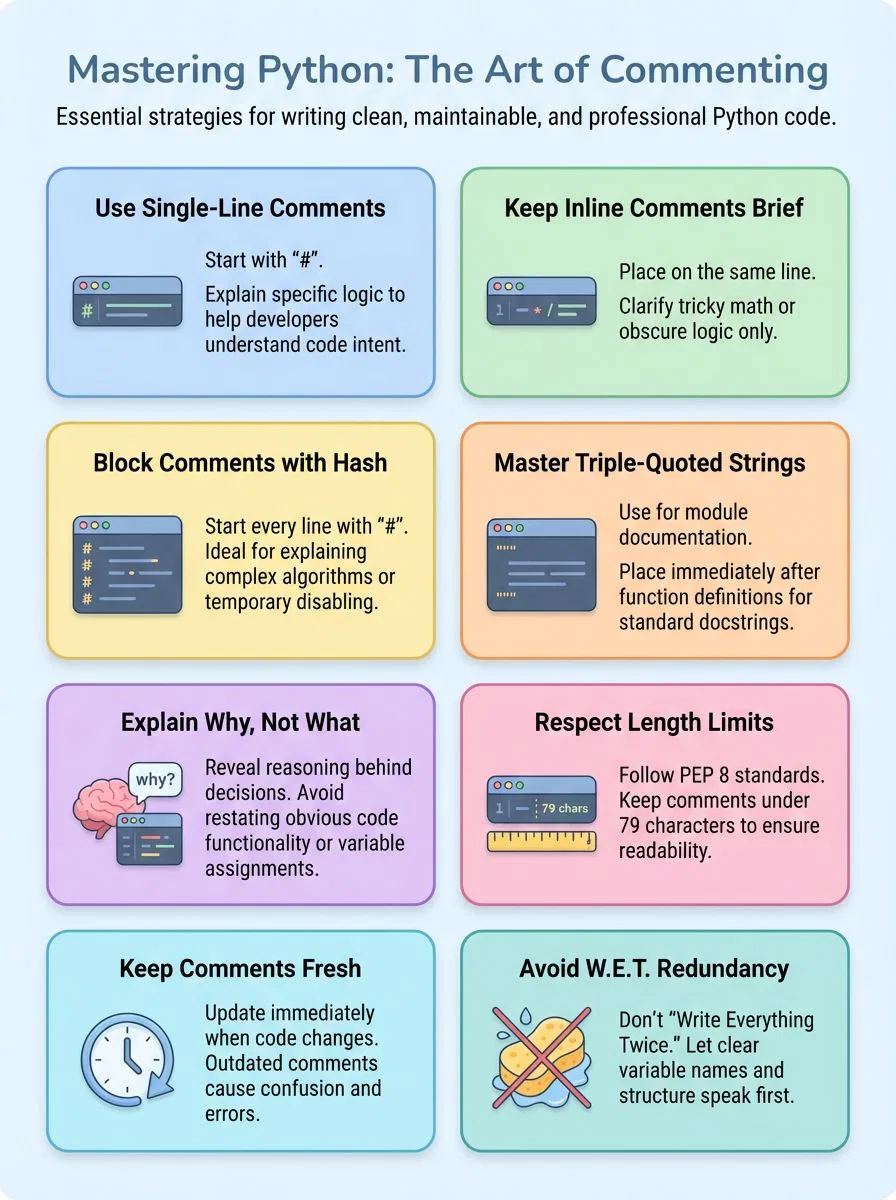
- Single-line comments in Python start with hash symbol (#) for quick notes, while multiline comments use multiple hash symbols or triple-quoted strings.
- PEP 8 recommends keeping comments under 79 characters per line and inline comments within 72 characters for better readability.
- Comments should explain “why” code exists rather than “what” it does, focusing on complex logic and business rules instead.
- W.E.T. (Write Everything Twice) commenting creates redundant information that clutters code and wastes development time during maintenance.
- Professional programmers update comments when code changes and remove outdated comments to prevent confusion during code reviews.
How do you write single-line comments in Python?

Single-line comments in Python start with a hash symbol (#), making it simple to add quick notes to your code. Python programmers use this syntax to explain what specific lines do, helping other developers understand the logic behind each line of code.
How can inline comments improve code clarity?
Inline comments serve as quick guides that explain tricky parts of python code right where developers need them most. These short notes appear on the same line as the code, making complex logic instantly clear to anyone reading the source code.
Alex Herrick from Web Design Booth often uses inline comments when building custom WordPress themes, especially for calculations that might confuse other team members. The python style guide suggests keeping these comments brief and focused on the specific line of code they describe.
Developers can spot potential issues faster when inline comments explain the reasoning behind unusual variable names or complex operations.
Smart use of inline comments helps new team members understand code blocks without spending hours deciphering the logic. PEP 8 recommends using these comments sparingly, focusing only on lines that truly need explanation.
Joshua Correos finds inline comments particularly helpful when working with data science libraries like NumPy or Pandas, where mathematical operations might not be obvious to all developers.
The python interpreter ignores these comments completely, so they add zero overhead to program performance. Code readability improves dramatically when inline comments clarify the purpose behind specific functions or explain why certain approaches were chosen over alternatives.
Moving beyond single lines, developers often need to comment out larger sections of their python file for testing or documentation purposes.
Methods for Writing Multiline Comments in Python
Python developers need flexible ways to add multi-line comments that explain complex blocks of code, and mastering these techniques transforms confusing scripts into clear, maintainable programs that any programmer can understand and modify with confidence.
How do you write multiple lines of comments with `#`?
Multi-line comments help developers explain complex blocks of code without affecting program execution. Each line of a multiline comment begins with the hash symbol to ensure the interpreter ignores every line.
- Start each comment line with a hash symbol – Place the # character at the beginning of each line you want to comment out, creating a clean block comment structure.
- Keep comments aligned for better readability – Line up all hash symbols vertically to create a neat visual block that makes your code easier to scan and understand.
- Use this method to disable code blocks during debug sessions – Comment out entire sections of code by adding # to each line, allowing quick testing without deleting working code.
- Write concise explanations that stay relevant to the code – Keep each commented line focused on explaining the logic or purpose of the code block below or above it.
- Apply this technique for temporary code removal – Add hash symbols to multiple lines when testing different approaches, making it simple to restore original code later.
- Follow the straightforward approach recommended by coding exercises – This method works consistently across all text editors and integrated development environments without special formatting requirements.
- Maintain consistency with existing comment blocks – Match the style of other multi-line comments in your module to keep the entire codebase looking professional and organized.
- Limit comment length to improve code maintainability – Write clear, brief explanations that future developers can quickly understand when reading your code months later.
When should you use triple-quoted strings for block comments?
Triple-quoted strings work best for detailed explanations that span multiple lines in Python code. These string literals become docstrings when placed right after function or module definitions, making them accessible through `__doc__` or `help()` commands.
Python developers find triple quotes perfect for providing high-level overviews of complex algorithms or explaining the purpose of entire code blocks.
Documentation is a love letter that you write to your future self. – Damian Conway
PEP 257 sets the standard for documentation strings, limiting docstrings to 72 characters per line for better readability. Triple-quoted strings should focus on documentation rather than commenting out large blocks of code during debugging sessions.
This approach keeps the codebase clean while providing valuable context for other developers who read the code later.
What are the best practices for commenting Python code?
Effective python commenting transforms complex code into readable, maintainable software that teams can understand and modify with confidence.
How do you write clean and concise comments?
Writing clean comments helps make code more readable and easy to understand. Good comments follow simple rules that make your code better for everyone.
- Keep comments under 79 characters per line – PEP 8 style guide for Python code sets this limit for general comments, while inline comments should stay within 72 characters to maintain clean formatting.
- Explain the “why” instead of the “what” – Comments should reveal your reasoning behind code decisions rather than restating what the code already shows clearly.
- Use specific and descriptive language – Write comments that give exact details about what your code accomplishes without vague or unclear words.
- Update comments when code changes – Old comments can mislead other developers, so keep them current with your latest code modifications.
- Place comments close to relevant code – Position your comments right above or beside the code they describe to maintain clear connections.
- Write complete thoughts in simple sentences – Each comment should express one clear idea that anyone can understand quickly.
- Remove comments that restate obvious code – Delete any comment that simply repeats what the code already makes clear through good naming conventions.
- Focus on complex logic and business rules – Add comments where your code handles tricky algorithms or specific business requirements that might confuse readers.
- Use comments as development outlines, then refine them – Start with rough comment drafts during coding, but polish them before finishing your work.
How can you avoid misleading or outdated comments?
Clean and concise comments form the foundation of good code documentation. Outdated comments can confuse developers and create serious problems in any codebase.
- Review comments during each code update to match current functionality. Version control systems track major changes better than static comments. Remove comments that no longer reflect what the code actually does.
- Delete comments before changing code that runs frequently. Code that changes often makes comments outdated quickly. Focus energy on writing clear variable names and python functions instead.
- Update docstrings when modifying function behavior or parameters. Python functions need accurate descriptions of their purpose. Comments and docstrings must match the actual code logic to avoid confusion.
- Remove blame comments that criticize previous developers or decisions. Professional code reviews handle quality issues better than negative comments. Keep all comments focused on explaining code purpose and logic.
- Check that comments match the code they describe exactly. Contradictory comments mislead other developers who read the code later. Test code changes against existing comments to ensure accuracy.
- Replace smelly comments with better code structure through refactoring. Comments that explain confusing code often signal deeper problems. Improve the actual code instead of adding more explanatory text.
- Use consistent naming conventions instead of explaining obvious code sections. Clear variable names and function names reduce the need for explanatory comments. Let the code speak for itself when possible.
- Set up regular comment audits as part of team code maintenance. Schedule monthly reviews of comment accuracy across the entire project. Make comment updates part of standard development workflow.
What common mistakes should you avoid when commenting?
Smart Python programmers know that bad commenting habits can make code harder to read than no comments at all. Many developers fall into traps that create confusion instead of clarity.
The W.E.T. principle teaches us why repeating obvious information wastes time and clutters our block of code. Over-commenting turns simple functions into walls of text that nobody wants to read.
These mistakes make reading code a chore rather than a smooth experience.
What does W.E.T. (Write Everything Twice) mean in commenting?
W.E.T. stands for “Write Everything Twice” and represents a common anti-pattern in code commenting that Python developers should avoid. This practice involves writing comments that simply restate what the code already shows clearly, creating redundant information that clutters the codebase.
For example, a W.E.T. comment might say “# Add 1 to x” right above the line “x = x + 1”, which provides no additional value to anyone reading code in Python.
Redundant comments waste valuable development time and create maintenance headaches when code changes but comments do not get updated accordingly. The opposite principle, D.R.Y. (“Don’t Repeat Yourself”), proves far more effective for writing comments in Python because it ensures each comment provides meaningful context rather than duplicating obvious code intent.
Excessive W.E.T. comments make code reviews more difficult and hinder understanding of complex logic, especially when developers work with long comments or need to comment out a block of code during debugging sessions.
Why is over-commenting or redundant commenting problematic?
Over-commenting leads to clutter, making code harder to read and maintain. Developers waste time reading comments that simply restate what the code already shows. Comments like “x = 5 # assign 5 to variable x” provide no real value.
These redundant comments distract from the actual logic and flow of the program. Code becomes messy when every line gets a comment. Readers struggle to find important information buried in unnecessary text.
Excessive comments often signal poorly written code that needs refactoring instead of explanation. Good code should be easily understandable without constant commentary. PEP 8 and PEP 257 guidelines discourage over-commenting for good reasons.
Comments that restate obvious operations waste developer time during code reviews. Teams spend more effort maintaining comments than improving the actual function. Clear variable names and well-structured functions eliminate the need for most explanatory text.
Maintaining a minimal, high-quality set of comments improves collaboration and makes old code easier to update.
Conclusion
Writing good comments transforms messy code into clear, readable programs. Python developers who master commenting techniques create code that others can understand and maintain easily.
These skills become essential when working on team projects or returning to old code months later.
Comments are an integral part of professional programming. They help explain complex logic, document functions, and guide future developers through the codebase. Clean commenting practices save time and prevent confusion during code reviews and debugging sessions.
Every Python programmer should practice writing clear and concise comments from day one. Start with simple explanations and gradually develop a consistent commenting style that matches your team’s standards.
For more insights on leveraging Python for efficient coding, check out our article on how to use the sleep function in Python.
FAQs
1. What are the main types of comments in Python programming language?
Python supports two primary types of comments: single-line comments using the hash symbol and multi-line comments using triple quotes. Single-line comments start with # and extend to the end of the line, while multi-line comments use triple quotes to span multiple lines. These comments are an integral part of writing good Python code and help make the code more readable.
2. How do you write a comment inside Python functions and control flow statements?
You write a comment by placing a # symbol before your text on any line within a function or control flow block. The comment should be clear and concise, typically limited to 72 characters per line according to Python standards. Comments inside functions help explain complex logic, variable assignments, and the purpose of specific code sections.
3. What role do comments play in Python standard library and computer file documentation?
Comments serve as documentation within the Python standard library, explaining function behavior, variable usage, and control flow logic. They help software developers understand code structure, especially when working with complex data types like associative arrays or linked lists. Good comments follow proper indentation style and character encoding standards like UTF-8.
4. How should comments be formatted when using development tools like Visual Studio Code?
Comments should follow consistent formatting rules, with the first line being clear and descriptive. Visual Studio Code and similar editors can highlight comments differently from reserved words and regular code. Proper bracket placement and namespace organization become clearer when comments explain the code structure.
5. What are best practices for commenting when working with different programming languages like Java and JavaScript?
While Java and JavaScript have similar comment syntax, Python’s approach differs with its hash symbol notation. Comments should explain variable assignments, function purposes, and complex algorithms like quicksort implementations. The naming convention for functions should be complemented by clear comments that explain their purpose and parameters.
6. How do comments help when working with data analysis libraries like Pandas software?
Comments become crucial when working with Pandas software for data manipulation and analysis tasks. They help explain data transformations, binary file operations, and complex data processing steps. Clear documentation through comments makes code maintainable and helps other developers understand receiver operating characteristic calculations and other analytical processes.
